
Basecamp notifications for Omarchy
A Quickshell bar plugin that shows notifications from all Basecamp accounts available through the Basecamp CLI.
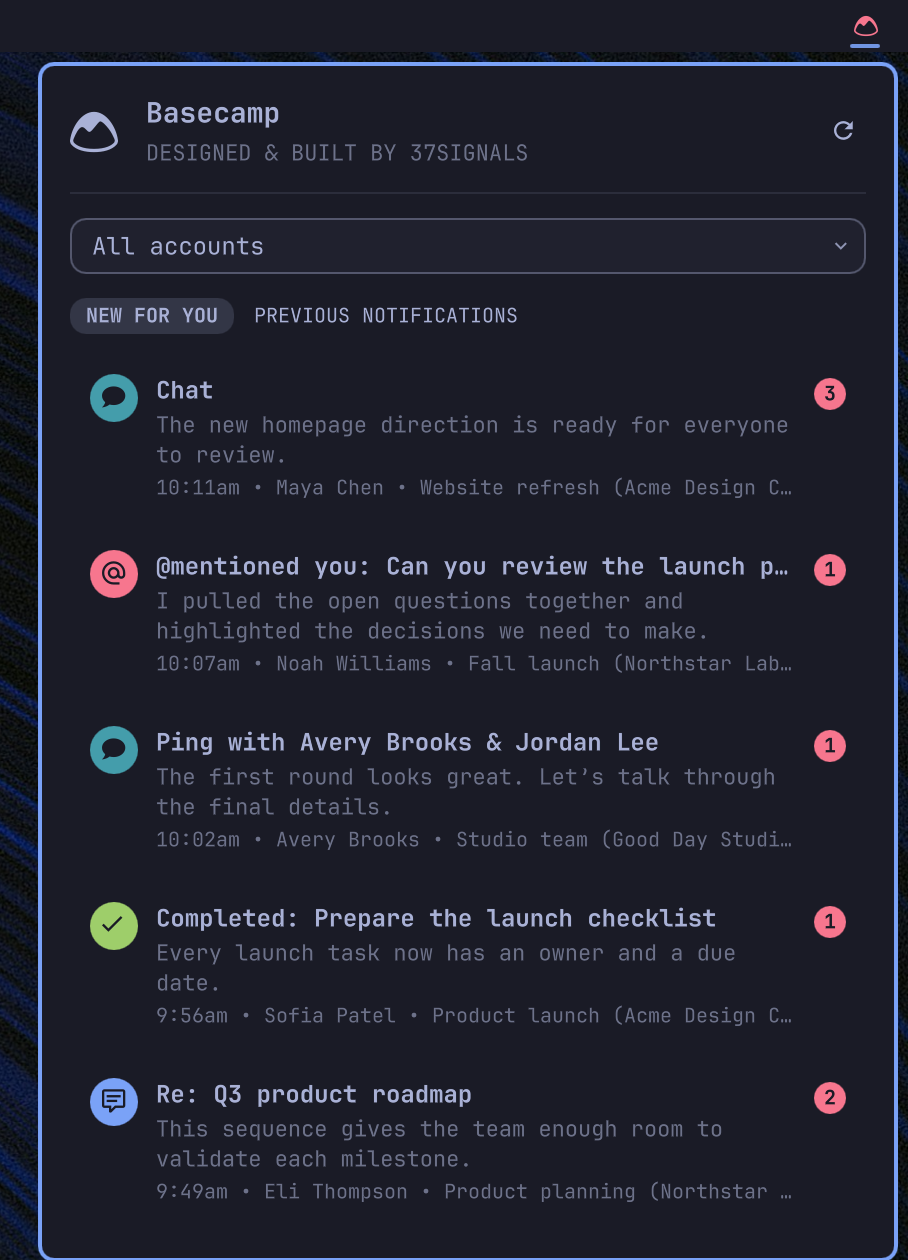
Features
- Discovers every authorized Basecamp account automatically.
- Shows unread notifications by default.
- Combines notifications from all accounts in newest-first order.
- Filters notifications by account or between unread and all items.
- Uses notification-type icons for comments, mentions, chats, events, completions, documents, bulletins, hills, and boosts.
- Opens notifications in Basecamp and marks unread items as read.
- Dismisses an unread notification from its count badge without opening it.
- Changes the bar logo color when the currently selected account has unread notifications.
- Shares unread state, account filter, and unread/previous tab across every monitor. Each bar still opens and closes on its own.
- Polls every 10 minutes from one shared service. Hover over the bar logo to refresh immediately.
Requirements
- Omarchy with Quickshell plugin support.
- Basecamp CLI 0.9 or newer.
- A full-access Basecamp CLI login. Version 0.9 and newer requests full access by default; read-only logins can view notifications but cannot mark them as read.
Install the Basecamp CLI on Omarchy:
omarchy pkg add basecamp-cli
Authenticate and confirm that the CLI can see your accounts:
basecamp auth login
basecamp accounts list
basecamp notifications list
The plugin uses the CLI's existing credential store. It does not read, copy, or store Basecamp access tokens.
Installation
Install and enable the plugin with:
omarchy plugin add https://github.com/basecamp/omarchy-basecamp-plugin.git --enable
Choose the right bar section if Omarchy asks for a placement. The plugin manifest also declares the right section as its default.
For a local checkout, pass its path instead:
omarchy plugin add ~/code/basecamp/omarchy-basecamp-plugin --enable
If the plugin ID is already installed, remove the existing copy first or use a separate test user. Omarchy will not overwrite an installed plugin.
Usage
- Left-click the Basecamp logo to open or close the panel.
- Hover over the logo to refresh.
- Select an account to filter the combined feed.
- Select
UnreadorPrevious notificationsbelow the Basecamp title. - Click a notification to open it. Unread notifications are also marked as read.
- Hover the unread count on a notification to reveal a dismiss control. Click it to mark the item as read without opening it.
- Use the up and down arrow keys to move through notifications.
- Use the left and right arrow keys to move through account filters.
- Press
Ufor unread notifications,Pfor previous notifications, orRto refresh.
Development
Run the model, demo-contract, and QML service tests with:
./tests/run
Demo data
Launch the current checkout with fictional accounts and notifications:
./demo/run
The demo uses an empty workspace and temporarily shows only the Basecamp widget on the right side of the bar. Press Ctrl+C to restore the normal shell, plugin installation, bar layout, and previous workspace.
Create a clean screenshot cropped to the top bar and open panel with:
./demo/run --screenshot
The screenshot is saved in ~/Pictures. Choose a destination explicitly when useful:
./demo/run --screenshot --output /tmp/basecamp-demo.png
Demo mode runs the plugin against demo/bin/basecamp, which implements the same CLI commands used in production. It never reads Basecamp credentials or contacts Basecamp. Mark-as-read actions are kept in temporary session state and disappear when the demo exits.
Updates
Git-managed installations can be updated with:
omarchy plugin update 37signals.basecamp
Removal
Remove the plugin with:
omarchy plugin remove 37signals.basecamp
Removing the plugin does not remove the Basecamp CLI or change its stored accounts and credentials.
Privacy and security
The plugin runs these local CLI commands:
basecamp version
basecamp auth status --json
basecamp accounts list --json
basecamp notifications list --account <account-id> --json
basecamp notifications read <notification-id> --account <account-id> --json
Notification data is held in the Quickshell process memory. The plugin does not write notification content, account details, credentials, or tokens to disk.
License
MIT