
Omahub
← All plugins
A

Plugin Drawer

by Aly Sarhan

Collapse chosen bar plugins into a tray-style drawer. Grid and list views with drag-and-drop reordering and a live preview of each plugin's bar icon; the grid stretches to fill the drawer width and the drawer adapts to the screen. Hide/unhide plugins via an eye toggle, with a show-hidden reveal in the drawer

Security review

No obvious issues detected

Deterministic scan — not a security guarantee

None
Risk level
None
Analyzed commit
9f1e5f0
Scanned
3 weeks ago

No potentially dangerous behavior detected in the analyzed commit.

Automated analysis only — not a security guarantee.

AI advisory review

Review recommended

Language-model assessment · ~deepseek/deepseek-v4-flash-latest — advisory only

Medium
AI risk level
Medium
Recommendation
review
Model
~deepseek/deepseek-v4-flash-latest
Analyzed commit
9f1e5f0
Reviewed
3 weeks ago

The deterministic scan found no issues, but the visible Panel.qml imports Quickshell.Io and its comments describe removing/deleting third-party plugins and restarting the shell, while the actual deletion/process code isn't included in the sample. The visible code looks like a normal drawer/manager UI, but the full source should be reviewed before publishing.

  • Panel.qml imports Quickshell.Io and the comments reference deleting plugin files and cleaning up after file deletions, but the actual Process/removal implementation is not visible in the provided sample.
  • The plugin can modify the live shell bar layout config and trigger a shell restart, which could disrupt the user's session if a bug or unexpected value is written.
  • The manage list is described as able to remove third-party plugins; the sample doesn't show how plugin IDs and paths are validated before deletion, so accidental deletion or path traversal should be ruled out.
  • The provided Panel.qml excerpt ends mid-file at pendingCleanIds, so a full source audit is needed to verify there are no hidden destructive commands.
How this check works

This review combines the deterministic scan (the rule-based results above) with an independent look at the plugin's code by a language model. The model reads a trimmed sample of the repository's files, the manifest, and the README, then gives a plain-language risk level and a recommendation: install (no notable danger), review (look closer first), or avoid (clearly dangerous).

It runs on the same analyzed commit as the deterministic scan and is strictly advisory — it is not a security guarantee and never blocks a plugin by itself. A human moderator still reviews plugins before they are listed.

AI advisory only — automated analysis, not a security guarantee.

Install
$ omarchy plugin add https://github.com/alyayman921/Omarchy-drawer --enable
Widgets #bar #quickshell

Plugin Drawer

Collapse plugins into a drawer to keep the Omarchy bar clean.
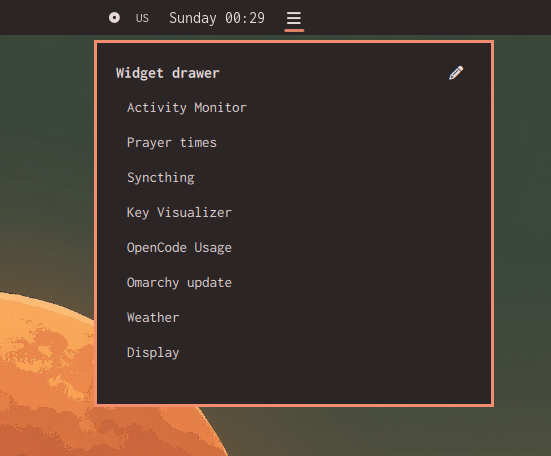
Showcase

Features

  • Hide any bar widget into a compact drawer button without disabling it.
  • Drag to reorder hidden widgets inside the drawer.
  • Edit which widgets are hidden from a checkbox list.

Requirements

  • Omarchy (Quattro shell) with a bar.

Install

omarchy plugin add https://github.com/alyayman921/Omarchy-drawer.git --enable

Usage

  • Make sure the Plugin is enabled first from the Omarchy menu.
  • Left-click the drawer button to open or close the menu.
  • In the drawer list, click an entry to open that widget's panel.
  • Click the pen icon to edit which widgets are hidden. Check or uncheck widgets, exit to save all at once, might lag alittle..

Remove

omarchy plugin remove 3lymn.plugin-drawer

License

MIT