
OmaOVPN
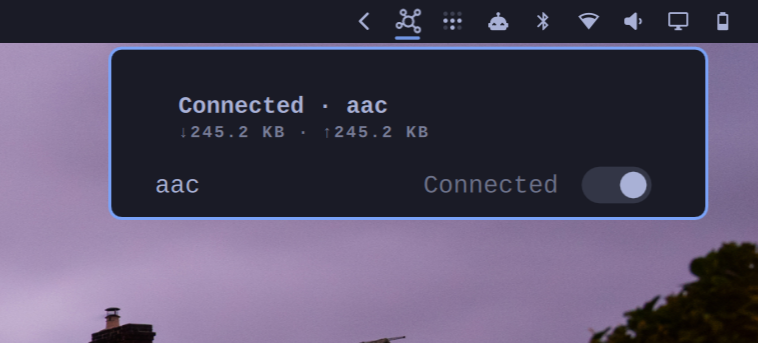
OmaOVPN switches OpenVPN profiles on and off from the Omarchy bar, backed by openvpn3.
Requirements
This plugin requires:
openvpn3- OpenVPN 3 clientpython-dbus- Python bindings for D-Buspython3- runs the plugin's helper
Everything runs as your own user. The plugin never asks for sudo, never
writes to a system path, and never stores or prompts for a credential.
Installation
omarchy plugin add https://github.com/harisadam/OmaOVPN.git --enable
omarchy restart shell
The restart is not optional. The bar builds its set of widgets when the shell starts, so a widget added afterwards is enabled but never constructed — you will see nothing in the bar until the shell restarts.
To choose where the icon sits (it defaults to the right section):
omarchy plugin enable aac.openvpn --section right
Then create the folder the plugin watches and put your profiles in it:
mkdir -p ~/.config/omarchy/openvpn
cp your-profile.ovpn ~/.config/omarchy/openvpn/
The profiles are imported into openvpn3 within a few seconds, and appear in the panel when you click the bar icon.
Usage
Drop .ovpn configuration files into ~/.config/omarchy/openvpn to manage them through the plugin.
Click the bar icon for the panel. Left click a switch to connect or
disconnect; right click the bar icon to toggle the obvious profile without
opening anything. In the panel, j/k move, space toggles, d disconnects
everything, r re-syncs the folder, and esc closes.
Removal
Disconnect first — removing the plugin does not close an active tunnel, because the session belongs to openvpn3, not to the widget:
openvpn3 session-manage --config <profile-name> --disconnect
Then, to leave nothing behind in openvpn3, empty the watched folder and let the plugin mirror the deletion before you remove it:
rm ~/.config/omarchy/openvpn/*.ovpn
# wait a few seconds, or press `r` in the panel, for the sync to run
omarchy plugin remove aac.openvpn
omarchy restart shell
If you remove the plugin while profiles are still in the folder, the configs it imported stay registered in openvpn3. Remove them by hand with:
openvpn3 config-remove --config <profile-name>
The plugin's own state — a lock file and its record of which profiles asked
for credentials — lives in ~/.local/state/omarchy-openvpn/ and can be
deleted freely.
Configuration
The plugin watches a folder for OpenVPN profile configurations:
- Config folder (default:
~/.config/omarchy/openvpn) - Directory where.ovpnfiles are stored - Refresh interval (default: 5 seconds, range 2–60) - How often to check for profile changes
Behavior
Profile Management
The watched folder is the source of truth for which profiles should exist. The plugin only ever modifies or removes the openvpn3 profiles it has imported (tagged aac.openvpn). When you remove a .ovpn file from the folder, the plugin removes the corresponding openvpn3 profile. Profiles that were imported to openvpn3 outside of this plugin (without the aac.openvpn tag) remain invisible and untouched.
Profile Support
- Certificate-only profiles - Fully supported
- Credential-requiring profiles - Flagged and reported rather than prompted for credentials; half-started sessions are torn down
Tunnels
- Only one session can be active at a time; connecting to a new profile will disconnect the currently active profile
- Disabling the plugin does not automatically disconnect an active tunnel