
Hot Corners for Omarchy
macOS-style hot corners for Omarchy. Rest the pointer in a corner of the screen for a moment and a command runs — lock the screen, open the menu, start the screensaver, or anything else you can type into a shell.
Includes a settings GUI, themed like the rest of the Omarchy shell, an accent glow that grows while a corner arms, and two ways to keep corners from firing by accident.
Requirements
Omarchy 4 (the Quickshell-based shell) and Hyprland. No other dependencies — the plugin is two QML files, a JS module, and two shell scripts, and every action it offers is a command Omarchy already ships.
Install
omarchy plugin add https://github.com/abdul/omarchy-hotcorners.git --enable --yes
omarchy restart shell
Plugins run as unsandboxed code inside omarchy-shell, so read the source
before you enable it — it is two QML files and a JS module.
Use
Open the settings GUI:
omarchy-shell hotcorners-settings toggle
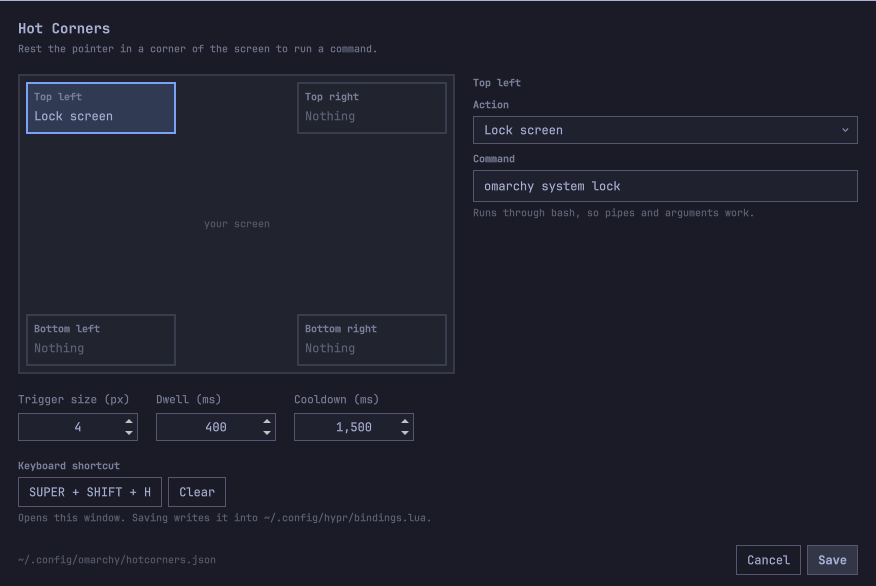
Pick a corner in the diagram, choose an action (or type your own command), and Save. Changes apply immediately — no restart.
Making it reachable
The GUI can set its own keyboard shortcut: click the shortcut button, press the
combination you want, and Save. The plugin writes it into a clearly marked
block in ~/.config/hypr/bindings.lua and reloads Hyprland:
-- >>> hotcorners (managed by the hotcorners plugin) >>>
o.bind("SUPER + SHIFT + H", "Hot corners", "omarchy-shell hotcorners-settings toggle")
-- <<< hotcorners <<<
Nothing outside those markers is touched, re-saving replaces the block rather than stacking up duplicates, and clearing the shortcut removes it. You can also set it without opening the GUI:
omarchy-shell hotcorners-settings shortcut "SUPER + SHIFT + H"
omarchy-shell hotcorners-settings shortcut ""     # remove it
A menu entry is still yours to add — installing a plugin never edits your
config, and the Omarchy menu only reads its own default file plus your
extension file. To get one under Setup, add this to
~/.config/omarchy/extensions/omarchy-menu.jsonc (it hot-reloads on save):
"setup.hotcorners": {"icon":"⬚","label":"Hot corners","when":"[[ -e ~/.config/omarchy/plugins/abdul.hotcorners ]]","action":"omarchy-shell hotcorners-settings toggle"}
The when clause hides the row if the plugin is ever removed.
Actions
The dropdown offers the macOS hot corner actions, mapped to their Omarchy equivalents:
| macOS | Here |
|---|---|
| Lock Screen | omarchy system lock |
| Start Screen Saver | omarchy launch screensaver |
| Put Display to Sleep | hyprctl dispatch 'hl.dsp.dpms("off")' |
| Notification Center | omarchy-shell notifications showHistory |
| Launchpad | omarchy menu toggle apps |
| Mission Control | — |
| Application Windows | Cycle windows, roughly |
| Desktop | — |
| Quick Note | — |
Plus what Omarchy and Hyprland offer that macOS does not have a corner for: next / previous / last-used workspace, toggle the scratchpad, cycle windows, the Omarchy and system menus, clipboard history, the emoji picker, a region screenshot, and night light. Anything else goes in the free-text field.
Mission Control has no equivalent. Hyprland ships no window overview;
hyprexpo and hyprtasking are out-of-tree plugins it does not load by
default. If you install one, add its dispatcher as a custom command — the
field takes any shell command. Cycle windows is the nearest built-in, and it
steps through windows one at a time rather than showing them all at once.
Note on Put display to sleep: this is real DPMS, so any mouse movement or keypress wakes it — including the movement that carries the pointer out of the corner. It is included for parity, but Lock screen already turns the display off and is usually what you want.
Hyprland dispatchers
Hyprland 0.56 configures in Lua, so hyprctl dispatch takes a Lua expression
rather than the older dispatcher argument form. A custom command that needs a
dispatcher looks like this:
hyprctl dispatch 'hl.dsp.focus({ workspace = "e+1" })'
hyprctl dispatch 'hl.dsp.workspace.toggle_special("scratchpad")'
hyprctl dispatch dpms off — the pre-Lua form — silently fails with a Lua
syntax error, so check anything you copy from an older guide.
Configuration
The GUI writes ~/.config/omarchy/hotcorners.json, which is equally fine to
hand-edit — the plugin watches it and reloads on save. It is created with every
corner disabled the first time the plugin runs.
{
  "version": 1,
  "triggerSize": 4,
  "dwellMs": 400,
  "cooldownMs": 1500,
  "shortcut": "SUPER + SHIFT + H",
  "requireSuper": false,
  "suppressFullscreen": true,
  "glow": true,
  "corners": {
    "top-left":     { "action": "omarchy system lock" },
    "top-right":    { "action": "" },
    "bottom-left":  { "action": "" },
    "bottom-right": { "action": "omarchy menu" }
  }
}
| Key | Meaning |
|---|---|
triggerSize |
Size of the corner trigger square, in pixels (1–40). |
dwellMs |
How long the pointer must rest in the corner before firing (0–3000). |
cooldownMs |
Ignore re-entry for this long after a corner fires (0–10000). |
shortcut |
Keybinding that opens the GUI, e.g. SUPER + SHIFT + H. Empty means none. |
requireSuper |
Corners only fire while Super is held. Off by default. |
suppressFullscreen |
Do not fire while a window is fullscreen. On by default. |
glow |
Show the accent bloom that grows while a corner arms. On by default. |
corners.<corner>.action |
Command to run, via bash -lc. Empty disables the corner. |
An empty action collapses that corner to nothing: it takes no pointer input at all, so it cannot fire and cannot get in the way.
A malformed config falls back to the defaults rather than taking the shell down with it.
Commands
omarchy-shell hotcorners status              # actions, timings, live trigger rects
omarchy-shell hotcorners trigger top-left    # run a corner's action now
omarchy-shell hotcorners configPath          # where the config lives
omarchy-shell hotcorners-settings toggle     # open/close the settings GUI
omarchy-shell hotcorners-settings shortcut "SUPER + SHIFT + H"
How it works
One transparent layer-shell surface per screen, with its input region masked
down to just the enabled corner squares. Everything outside those squares is
click-through, so the surface is invisible to the rest of your session. A
MouseArea starts the dwell timer on enter and cancels it on exit; the pointer
must leave the corner before it can fire again.
Not firing by accident
Two ways to stop a corner going off when you did not mean it, both in the GUI's Behaviour section:
Ignore fullscreen windows (on by default) — a corner will not fire while a window is fullscreen, so parking the pointer during a video is safe. State comes from Hyprland's event stream, not a polling loop.
Hold Super to arm (off by default) — corners fire only while Super is
held, which also means dragging a window into an edge cannot trip one. Turning
it on adds two binds to the managed block in bindings.lua:
o.bind("Super_L", "Arm hot corners", "omarchy-shell -q hotcorners arm 1", { non_consuming = true })
o.bind("Super_L", "Disarm hot corners", "omarchy-shell -q hotcorners arm 0", { release = true, non_consuming = true })
non_consuming is what keeps SUPER + <key> working — without it these binds
swallow the Super press and every Super shortcut on the system stops firing.
The cost is honest: each Super press and release spawns a short-lived process. That is why it is opt-in rather than the default. If you use Super constantly and would rather not pay for it, leave it off — the dwell delay alone already stops most accidental triggers, since throwing the pointer at a corner and clicking is faster than the dwell.
Notes and limitations
- The top corners sit over the bar. Whatever lands in the trigger square
stops reaching the bar, so a top-left corner costs the Omarchy menu button
its outermost few pixels. Keep
triggerSizesmall, prefer the bottom corners, or turn on Hold Super to arm. - Every screen gets its own corners, at that screen's own edges.
- Editing the QML needs
omarchy restart shell. The QML engine caches plugin components by path, so a plain reload keeps the old version. Config changes need no restart — only code changes do.
Removing it
omarchy plugin remove deletes the plugin folder but runs no hooks, so undo
the things this plugin wrote outside its own directory first:
~/.config/omarchy/plugins/abdul.hotcorners/bin/uninstall.sh
omarchy plugin remove abdul.hotcorners
uninstall.sh removes the managed keybinding block from your Hyprland config,
reloads Hyprland, and deletes ~/.config/omarchy/hotcorners.json. Pass
--keep-config to keep your settings. A menu entry, if you added one, is
yours to delete.
What it writes
Only these, and nothing else:
| Path | When |
|---|---|
~/.config/omarchy/hotcorners.json |
Created with every corner disabled on first run; rewritten when you Save. |
~/.config/hypr/bindings.lua |
Only when you set or clear the shortcut, and only inside its own marked block. |
The Hyprland config is never touched unless you deliberately change the
shortcut — an ordinary Save that leaves it alone does not rewrite it. The edit
is confined to the block between the plugin's own markers; everything else in
the file is left byte-for-byte intact, which you can check with git diff if
you keep your dotfiles in git.
License
MIT. See LICENSE.