
Theme Scheduler for Omarchy
Automatically switch between a light and dark Omarchy theme at sunrise and sunset, or at times you set. The plugin runs inside Omarchy Shell, catches up after sleep or restart, and does not require root access or systemd units.
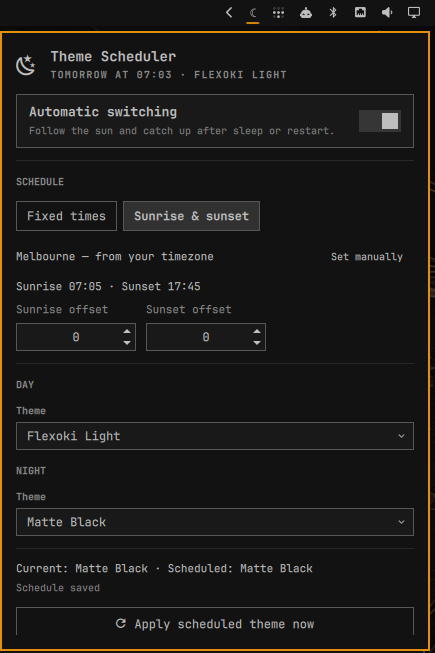
Features
- Independent day and night themes
- Sunrise/sunset scheduling, computed locally, from a location it works out for itself
- Random light and dark choices using each theme's Omarchy mode metadata
- 15-minute schedule controls
- Local-time operation with overnight schedules supported
- Resume/restart catch-up
- Manual theme overrides remain until the next scheduled boundary
- Bar panel, middle-click “apply now,” and shell IPC controls
- Configuration stored at
~/.config/omarchy/theme-scheduler/config.json
Install
omarchy plugin add https://github.com/acrogenesis/omarchy-theme-scheduler.git --enable
The plugin is safe on first install: its internal automation toggle defaults to off. Add its widget to the bar, choose the two themes and times, then enable automatic switching.
Requirements
- Omarchy 4 with the Quattro shell plugin API
- No external packages, root access, or background system services
Remove
omarchy plugin remove acrogenesis.theme-scheduler
Removing the plugin leaves its settings at
~/.config/omarchy/theme-scheduler/config.json so a later reinstall can reuse
them. Delete that file separately only if you also want to discard the saved
schedule and theme choices.
For local development:
ln -sfn "$PWD" ~/.config/omarchy/plugins/acrogenesis.theme-scheduler
omarchy plugin enable acrogenesis.theme-scheduler --section right
Commands
omarchy-shell acrogenesis.theme-scheduler status
omarchy-shell acrogenesis.theme-scheduler enable
omarchy-shell acrogenesis.theme-scheduler disable
omarchy-shell acrogenesis.theme-scheduler applyNow
How scheduling behaves
At each day/night boundary, the service applies the configured theme with
omarchy theme set. It records that boundary after a successful switch. This
means choosing another theme manually will not be immediately undone; the
scheduler takes control again at the next boundary.
The day and night pickers also offer Random light theme and Random dark
theme. Omarchy declares the classification as mode = "light" or mode = "dark" in each theme's effective colors.toml. Themes without that metadata
remain available for explicit selection but are excluded from random choices.
Each picker lists its matching mode first, the opposite mode second, and any
unclassified themes last; themes within every group are alphabetical.
The service evaluates the wall clock every minute. If the computer sleeps through a boundary or Omarchy Shell starts later, it applies the theme for the current period when it resumes.
Solar scheduling
Choose Sunrise & sunset in the panel. There is usually nothing else to set: the panel names the location it is using, and offers coordinate fields only if you want to override it.
Sunrise and sunset are computed on the spot with the NOAA solar position algorithm, so there is no network request, no cached almanac to go stale, and no IP geolocation. It works at boot before Wi-Fi associates, on a plane, and with the network disconnected entirely.
The panel shows the computed times for today so you can check them against an almanac at a glance. Optional offsets shift the switch relative to the sun by up to two hours in either direction, for anyone who wants dark half an hour before sunset.
Where the location comes from
Coordinates are taken from the first of three sources that has them:
- Coordinates entered in this panel. Only these are saved to the plugin's own config.
- Omarchy's shared location, at
~/.local/state/omarchy/settings/weather.json— the same file the weather panel uses. Set it once and both follow it:omarchy-weather-location --set "Melbourne" -37.8136,144.9631 - Your system timezone.
tzdatarecords the coordinates of each zone's reference city, soAustralia/Melbourneresolves to Melbourne without anything being configured at all. This is why the plugin generally works correctly the moment it is installed.
Nothing inherited is ever copied into the plugin's config, so changing your weather location or your timezone moves the sun immediately. Clearing the coordinate fields returns to whatever the system provides.
Coordinates only need to be roughly right: a whole degree of latitude moves sunrise by two or three minutes, so a nearby city is fine — which is exactly why a timezone is a good enough answer.
If no source has a location, the fixed times take over, as they do in the two cases where sun-derived boundaries cannot describe a schedule — polar days when the sun never rises or never sets, and days inside the polar circles when sunrise and sunset fall either side of local midnight.
Development
node tests/test_schedule.js
bash tests/test_theme_catalog.sh
bash tests/test_timezone_location.sh
omarchy plugin validate .
qmllint -I /usr/share/omarchy/shell ./*.qml
License
MIT