
Agent Threads for Omarchy
A keyboard-first Omarchy Shell sidebar for Codex, Claude Code, and OpenCode. See which agents are busy, ready, or blocked, then jump back to the right terminal without hunting through workspaces.
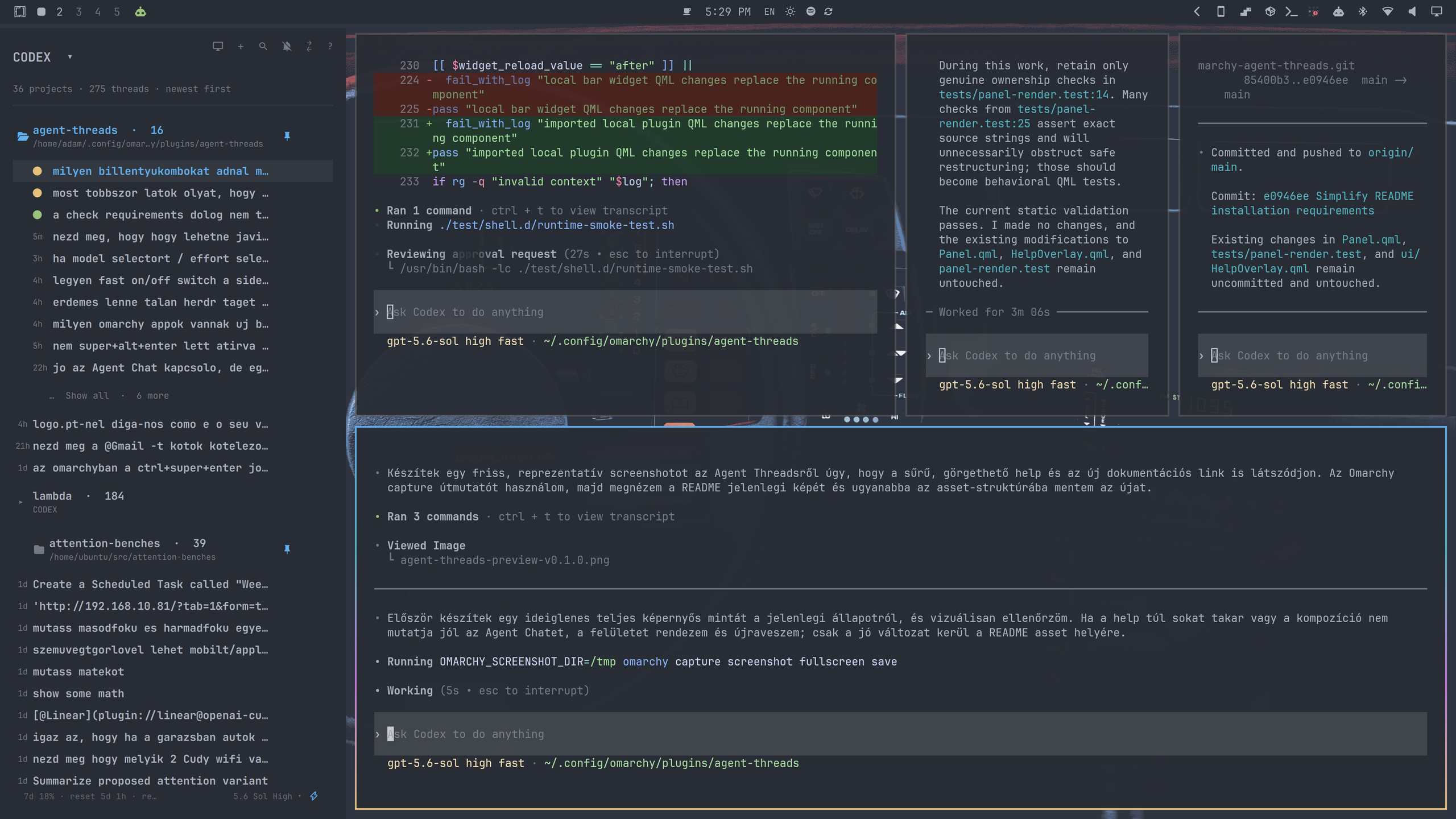
Agent Threads groups saved sessions by project, follows the active thread, supports local and remote agents, and keeps completed work one shortcut away.
Install
Agent Threads works out of the box on a current standard Omarchy installation.
Runtime helpers use Bash, Node.js, jq, curl, OpenSSH, hyprctl, and the
provider CLI selected in the sidebar. These are present on a standard Omarchy
installation. SSH provider hosts also need Node.js and curl. The optional Agent
Chat window builds a small local compatibility shim on first use and therefore
needs a C++17 compiler, pkg-config, and the Qt 6 WebEngine development
package. Its web UI uses vendored Marked and MathJax assets under chat/web;
their versions and checksums are recorded in chat/web/vendor/README.md, and
the page does not download scripts at runtime.
1. Install and enable the plugin
omarchy plugin add https://github.com/adamritter/omarchy-agent-threads.git --enable
The plugin appears in the left section of the Omarchy bar. Click its icon to open the sidebar.
2. Add the recommended global shortcuts
Open ~/.config/hypr/bindings.lua and add:
-- Open or close Agent Threads without taking keyboard focus.
-- SUPER + S normally opens the scratchpad; SUPER + grave still does that.
hl.unbind("SUPER + S")
o.bind("SUPER + S", "Toggle Agent Threads", "omarchy-shell -q adam.codex-threads toggle")

-- Open Agent Threads, follow the active session, and focus the sidebar.
o.bind("SUPER + A", "Focus Agent Threads", "omarchy-shell -q adam.codex-threads focusSidebar")

-- Open the newest completed thread that you have not viewed yet.
o.bind("SUPER + CTRL + J", "Open ready agent thread", "omarchy-shell -q adam.codex-threads openReady")

-- Use Fast while the Codex sidebar or Agent Chat is focused. Preserve tiled
-- fullscreen everywhere else.
hl.unbind("SUPER + CTRL + F")
o.bind("SUPER + CTRL + F", "Toggle Agent Fast / tiled full screen",
  "omarchy-shell -q adam.codex-threads globalAction fast")

-- Cycle reasoning effort while Agent Threads or Agent Chat is focused.
-- Preserve the emoji picker during rename and everywhere else.
hl.unbind("SUPER + CTRL + E")
o.bind("SUPER + CTRL + E", "Cycle Agent Effort / emojis",
  "omarchy-shell -q adam.codex-threads globalAction effort")
Save the file, then validate the Hyprland configuration:
hyprctl reload
hyprctl configerrors
hyprctl configerrors should print no errors.
The shortcuts have deliberately different jobs:
| Shortcut | Action |
|---|---|
Super+S |
Show or hide the sidebar without interrupting your current window |
Super+A |
Open the sidebar and give it keyboard focus |
Super+Ctrl+J |
Open the newest completed, unread agent thread |
Super+Ctrl+F |
Toggle Codex Fast when an agent surface is focused; otherwise toggle tiled fullscreen |
Super+Ctrl+E |
Cycle reasoning effort when an agent surface is focused; otherwise open emojis |
Optional direct thread switching:
o.bind("SUPER + CTRL + DOWN", "Next agent thread", "omarchy-shell -q adam.codex-threads nextThread")
o.bind("SUPER + CTRL + UP", "Previous agent thread", "omarchy-shell -q adam.codex-threads previousThread")
First five minutes
- Press
Super+Ato open and focus Agent Threads. - Move with
j/kor the arrow keys. - Press
Enterto open a thread. If its terminal is already running, Agent Threads focuses that window instead of starting a duplicate. - Select a project and press
norNto start a new thread there. - Press
/to search and?whenever you need the built-in keyboard help.
When a background thread completes, its row becomes ready and the bar icon
turns green. Click the green icon or press Super+Ctrl+J to open the newest
ready thread. Repeat the shortcut to work through the remaining completions.
Desktop and sound notifications are off by default. Click the bell in the sidebar header to enable notifications for ready and blocked threads.
Everyday use
Browse and open sessions
Threads are grouped by project and ordered newest first. Project and remote rows can be collapsed. The plugin remembers collapsed groups and pinned items across Shell restarts.
The row indicators show the state at a glance:
- amber: the agent is busy;
- green: the thread completed and has not been viewed;
- urgent: the thread needs attention;
- strong accent: the currently active thread;
- faint highlight: keyboard selection or pointer hover.
Press p to pin the selected thread, project, or remote. Press r to rename a
thread and y to archive it. The same actions are available from row buttons
and right-click menus.
Create work
norNcreates a thread in the selected project or remote directory.torShift+Enteropens a terminal in the selected directory without opening its thread.
Choose a provider and model
Press P to switch between Codex, Claude Code, and OpenCode. Optional
providers remain inactive until selected.
The footer exposes the model, reasoning effort, and agent choices supported by
the selected provider. Use Super+Ctrl+E to cycle reasoning effort. For Codex,
click the lightning icon or press Super+Ctrl+F to toggle Fast responses.
Local Codex threads open in their native terminal by default. Press a to
switch local Codex threads between terminal mode and the optional Agent Chat
window. This choice is remembered and does not affect remote providers.
Control sidebar scope
Press s to choose whether the sidebar is open globally or only on the current
workspace. The sidebar temporarily hides while the active window is in true
fullscreen mode.
Keyboard reference
Press ? inside the focused sidebar to show the built-in reference.
Essential
| Key | Action |
|---|---|
j / k, arrows |
Move selection |
Enter / o |
Open a thread or toggle a group |
h / l, left/right |
Collapse or expand a group |
/ |
Search threads and projects |
n / N |
Create a thread in the selected directory |
t / Shift+Enter |
Open a terminal in the selected directory |
? |
Open or close help |
Esc / q |
Close the current overlay or release focus |
Organize and configure
| Key | Action |
|---|---|
p |
Pin or unpin the selected item |
r |
Rename the selected thread |
y |
Archive the selected thread |
P |
Select provider |
R |
Add an SSH or App Server remote |
a |
Toggle terminal or Agent Chat for local Codex threads |
s |
Toggle workspace or global sidebar scope |
Tab / Shift+Tab |
Switch between sidebar panels |
Faster navigation
| Key | Action |
|---|---|
[count]j / [count]k |
Move by a count |
Ctrl+U / Ctrl+D |
Move half a page |
Ctrl+B / Ctrl+F, Page Up / Page Down |
Move a full page |
[count]g / G, Home / End |
Jump to a numbered row or the last row |
[count]f<char> / [count]F<char> |
Find the next or previous thread by initial |
Remote agents
Press R or click the remote button in the sidebar header. Select the provider
and connection type, then enter the remote details.
SSH remotes
Agent Threads reads aliases from ~/.ssh/config. SSH uses BatchMode=yes, so
key-based login must already work. Your SSH configuration continues to control
keys, ports, proxy jumps, and other connection options.
Codex, Claude Code, and OpenCode must already be installed and authenticated on the remote machine. Agent Threads never installs their packages. Remote OpenCode additionally requires Node.js and curl.
When a remote Claude terminal is opened, Agent Threads atomically installs its
size-limited status hook at
~/.local/lib/omarchy-codex-threads/claude-thread-hook on that host. The hook
runs only through the per-launch Claude settings passed by Agent Threads; it
does not modify the remote user's persistent Claude settings.
Codex App Server remotes
Direct Codex App Server connections support ws:// and wss://. Use wss://
on untrusted networks. Agent Threads refuses to send a bearer token over a
non-local plain ws:// connection.
Store the bearer token in a separate file and enter its path in the remote setup form. The token value is not stored in the plugin configuration.
Use the remote row menu to test, edit, or disable a connection. Disabling a remote removes only the local Agent Threads configuration; it does not delete remote sessions or files.
Troubleshooting
The plugin icon does not appear
Confirm that the plugin is enabled in the left bar section:
omarchy plugin enable adam.codex-threads --section left
omarchy-shell shell rescanPlugins
A Codex terminal does not open
Agent Threads records private, size-limited launch diagnostics at:
~/.local/state/omarchy/agent-threads-launch.log
The file is mode 0600 and does not contain authentication token values.
A remote connection fails
Use Test connection from the remote row menu. For SSH remotes, first verify that a non-interactive connection works outside the plugin:
ssh -o BatchMode=yes your-host true
State and privacy
Omarchy Shell plugins run with the permissions of the current user. Agent Threads reads local agent session metadata and process information so it can list sessions, determine status, and focus existing terminal windows.
Persistent user state is stored under ~/.local/state/omarchy/:
codex-threads.json
codex-thread-remotes.json
agent-threads-launch.log
opencode-server-auth.json
Remote configuration is size-limited, must be a regular file, and cannot be a
symbolic link. Agent Threads does not copy SSH keys or provider access tokens.
Window coordination is transient QML state and is recovered from owned process
metadata when needed; no window-address or provider-port mapping files are
written. Short-lived launch status is created only below a validated,
user-owned $XDG_RUNTIME_DIR with mode 0700.
Review the source before enabling any unsandboxed Shell plugin, especially the
helpers under bin/.
Remove
omarchy plugin remove adam.codex-threads
Removal leaves local state and remote connection configuration in place so a later reinstall can restore your organization. It does not remove remote agent sessions or the remote Claude status hook. To remove that hook from a remote host explicitly, run:
ssh your-host 'rm -f -- "$HOME/.local/lib/omarchy-codex-threads/claude-thread-hook"; rmdir -- "$HOME/.local/lib/omarchy-codex-threads" 2>/dev/null || true'
If Agent Threads is useful to you, consider starring the repository so other Omarchy users can find it.
License
MIT — see LICENSE.