
Galaxy Buds — Omarchy plugin
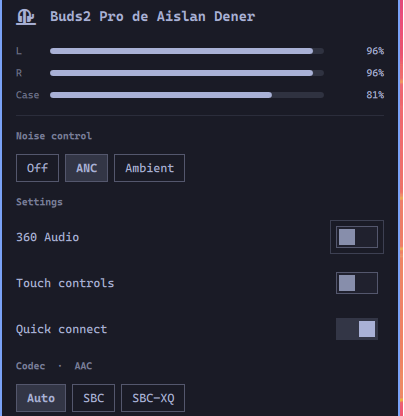
Noise control for Samsung Galaxy Buds in the Omarchy bar. Click the ear icon to switch noise modes, see the battery of each earbud as a bar, and toggle 360 Audio, touch controls and quick connect.
The icon follows the earbuds, not the other way around: change the mode by touching an earbud or from your phone and the bar updates immediately.
Controls the model does not have are hidden rather than shown dead — a Buds+ has no ANC and no 360 Audio, so it gets an ambient-sound switch and nothing about spatial audio.
It also picks the Bluetooth codec (the A2DP profiles PipeWire offers for that card), shows a bolt on whatever is charging, and — when two pairs are connected at once — controls the pair sound is actually going to, saying so when the pair on screen is not the audio output.

Requirements
- Omarchy 4 (the Quickshell-based
omarchy-shell) - A pair of Galaxy Buds. Not paired yet? Open the panel while disconnected, open the case, hold the touch sensors on both earbuds for about 7 seconds until the light starts flickering, then hit Search — the panel finds and pairs them for you.
- The system Python at
/usr/bin/python3withdbus-pythonandPyGObject(python-dbusandpython-gobjecton Arch — both are already present on a stock Omarchy install) - PipeWire with
pactl, for the codec row only; without it every other feature still works
No other packages, no daemon to install, and nothing that asks for root: it runs entirely as your own user.
Install
Review the repository, then add the plugin:
omarchy plugin add https://github.com/aislandener/galaxy-buds-control.git
Accept the prompt to enable the plugin during installation.
For an unattended install from a repository you already trust:
omarchy plugin add https://github.com/aislandener/galaxy-buds-control.git --enable --yes
The widget lands in the right bar section. Put it next to the audio panel with:
omarchy bar move aislandener.galaxy-buds --before omarchy.audio
Nothing else to configure — the model is detected from the Bluetooth device id or, on older models, from its name.
Update
Review and apply the next fast-forward update:
omarchy plugin update aislandener.galaxy-buds
Or update all Git-managed plugins:
omarchy plugin update --all
Uninstall
omarchy plugin remove aislandener.galaxy-buds
Removing the plugin stops its helper and leaves nothing behind: it writes no files of its own, and the earbuds keep whatever mode they were last set to.
Keybinds
The plugin answers on its own IPC target, so a Hyprland bind can drive it without opening the popover:
bind = SUPER SHIFT, A, exec, omarchy-shell aislandener.galaxy-buds cycle
bind = SUPER SHIFT, N, exec, omarchy-shell aislandener.galaxy-buds set anc
cycle, set <off|anc|ambient>, open, close, toggle and status are
available. Never call bin/galaxy-buds directly for this — see below.
What it does on your system
Everything this plugin does, in full:
- Bluetooth: registers an
org.bluez.Profile1client on the system D-Bus and opens one RFCOMM socket to the earbuds, to read their state and send the commands the panel offers. It talks to no other device. - Commands it runs:
/usr/bin/python3(its own helper, from this repository) andpactl(to list cards and sinks, and to set a card profile when you pick a codec). - Privileges: none beyond your own user. It never elevates.
- Files: none. It writes nothing and reads nothing outside its own repository.
- Network: none.
- Background: one helper process, started and stopped with the shell.
- IPC: registers the
aislandener.galaxy-budsshell IPC target withopen,close,toggle,cycle,set <mode>,codec <profile>andstatus. Keybindings are yours to define; the plugin adds none. - User configuration: none required. Optional label overrides live in your
own
shell.jsonentry, and the plugin never writes to it.
Security
This plugin runs unsandboxed inside omarchy-shell when enabled. Review its
source and the behavior documented above before installing it.
How it works
bin/galaxy-buds speaks Samsung's SPP protocol over an RFCOMM socket that
BlueZ hands over through the Profile1 API — the same path GalaxyBudsClient
takes on Linux. It prints the earbud state as JSON lines and takes commands as
JSON lines on stdin.
The plugin runs it from Service.qml, which the shell mounts once per session,
and every bar reads that one object. Bar widgets are mounted once per monitor,
so owning the process in the widget would start one helper per screen.
Only one program can hold that connection. Opening the GalaxyBudsClient GUI while the widget is running will take the link away from one of the two, and running a second copy of the helper by hand does the same. Drive the plugin through its IPC target instead.
Uses the system Python (/usr/bin/python3) for dbus-python and PyGObject.
No extra packages, no daemon to install, no root.
Translating the labels
Every visible string is English by default and can be replaced from this
widget's entry in ~/.config/omarchy/shell.json:
{
  "id": "aislandener.galaxy-buds",
  "labels": {
    "noiseControl": "Controle de ruído",
    "settings": "Ajustes",
    "off": "Desligado",
    "ambient": "Som ambiente",
    "spatial": "Áudio 360",
    "touch": "Controles de toque",
    "seamless": "Conexão rápida",
    "case": "Estojo",
    "searchHint": "1. Abra o estojo\n2. Segure os sensores de toque dos dois fones por uns 7 segundos, até a luz começar a piscar\n3. Toque em Buscar",
    "search": "Buscar"
  }
}
Every key is optional; anything you leave out keeps its English text.
| Key | Default |
|---|---|
noiseControl |
Noise control |
settings |
Settings |
off / anc / ambient / adaptive |
Off / ANC / Ambient / Adaptive |
codec |
Codec |
spatial |
360 Audio |
touch |
Touch controls |
seamless |
Quick connect |
left / right / case |
L / R / Case |
notOutput |
Not the audio output |
serviceOff |
The plugin service is not running. |
searchHint |
1. Open the case. 2. Hold the touch sensors on both earbuds for about 7 seconds, until the light starts flickering. 3. Tap Search. |
search |
Search |
searching |
Searching for Galaxy Buds… |
found |
Found |
pair |
Pair |
connectingDevice |
Connecting… |
Models
| Model | Noise control | 360 Audio | Touch | Quick connect | Charging |
|---|---|---|---|---|---|
| Buds (original) | ambient on/off | — | yes | — | — |
| Buds+ | ambient on/off | — | yes | firmware 11+ | — |
| Buds Live | ANC on/off | firmware 9+ | yes | yes | — |
| Buds Pro | off / ANC / ambient | firmware 2+ | yes | yes | — |
| Buds2, Buds2 Pro, Buds FE, Buds Core | off / ANC / ambient | most | yes | yes | yes |
| Buds3, Buds3 Pro, Buds3 FE | off / ANC / ambient | most | yes | yes | yes |
Battery is reported by every model; the case only reports its own charge while the earbuds are sitting in it, so that bar comes and goes. Which earbud is charging is only reported from Buds2 on — on older models that byte means something else, so no bolt is shown rather than a guessed one.
Codec
The codec row comes from PipeWire, not from the earbuds, so it works the same
on every model. If you already run the bt.codecs plugin, this replaces it.
Auto is PipeWire's generic A2DP profile: it negotiates the best codec both
ends support, which is usually what you want. Because the profile name says
nothing about what it picked, the section header shows the codec actually in
use — Codec · AAC — read from the sink rather than the profile. The other
buttons pin a specific codec instead.
A codec only appears when both the earbuds and PipeWire offer it. AAC needs
libfdk-aac installed; a pair that never negotiates AAC will not list it.
While something holds the microphone — a call in Discord, say — PipeWire switches the card to a headset profile, where the music codecs are not choices at all. The row follows that: it offers the call codecs (mSBC, CVSD) and the header marks the mode with a mic glyph, so the music codecs going away reads as "you are on a call" rather than "they disappeared". PipeWire switches back on its own when the microphone is released.
Tested on Galaxy Buds2 Pro and Galaxy Buds+. The rest come from the protocol layout and have not been exercised on real hardware.
What differs per model lives in the PROFILES table in bin/galaxy-buds:
which service UUID to connect on (each generation uses a different one), which
command changes the noise mode, where each field sits in the status message,
and which firmware revision started reporting it. Adding a model is a row.
A model the table does not know still gets noise control and battery — those bytes have not moved since Buds Live — and hides 360 Audio rather than reading a byte that means something else on that firmware.
Validate from source
omarchy plugin validate .
Tests
/usr/bin/python3 tests/test_protocol.py
Framing, CRC, per-model status parsing, command encoding, codec discovery and device selection — all without earbuds.