
Omahub
← All plugins
A

Thermals

by ak127a

CPU/GPU temperatures and fan speeds in the Omarchy bar.

Security review

No obvious issues detected

Deterministic scan — not a security guarantee

None
Risk level
None
Analyzed commit
eea2fae
Scanned
1 month ago

No potentially dangerous behavior detected in the analyzed commit.

Automated analysis only — not a security guarantee.

AI advisory review

No obvious issues detected

Language-model assessment · ~deepseek/deepseek-v4-flash-latest — advisory only

None
AI risk level
None
Recommendation
install
Model
~deepseek/deepseek-v4-flash-latest
Analyzed commit
eea2fae
Reviewed
1 month ago

This is a straightforward, read-only hardware monitoring widget. The shell script only reads temperature/fan values from /sys/class/hwmon and prints them to stdout; the QML files are pure UI. There is no network access, no writes outside of normal operation, no obfuscation, and no install-time scripts. The deterministic scan found no issues, and independent review confirms the code matches its documented purpose.

How this check works

This review combines the deterministic scan (the rule-based results above) with an independent look at the plugin's code by a language model. The model reads a trimmed sample of the repository's files, the manifest, and the README, then gives a plain-language risk level and a recommendation: install (no notable danger), review (look closer first), or avoid (clearly dangerous).

It runs on the same analyzed commit as the deterministic scan and is strictly advisory — it is not a security guarantee and never blocks a plugin by itself. A human moderator still reviews plugins before they are listed.

AI advisory only — automated analysis, not a security guarantee.

Install
$ omarchy plugin add https://github.com/ak127a/thermals --enable
Hardware #bar #system

Thermals

A minimal Omarchy bar widget showing CPU/GPU temperatures, with a click panel for CPU/GPU temps and fan speeds.

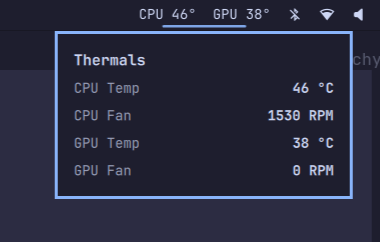
Thermals bar widget

Thermals bar widget expanded

  • Bar shows live CPU 48° GPU 39° (slow 10s poll)
  • Click to open a panel with CPU temp, CPU fan, GPU temp, GPU fan (2s poll while open)
  • One persistent collector process streams readings — no per-tick process spawning
  • Reads /sys/class/hwmon directly (k10temp/zenpower/coretemp for CPU; amdgpu/nouveau/nvidia for GPU; ITE/Nuvoton super-IO chips for board fans)
  • Works best with the it87 driver on Gigabyte boards (it87-dkms-git from AUR, with ignore_resource_conflict=1)

Install

omarchy plugin add https://github.com/ak127a/thermals.git --enable

That clones the plugin into ~/.config/omarchy/plugins/ak.thermals/, validates the manifest, and places the widget on the right side of the bar. Move it with:

omarchy bar move ak.thermals --section right

Update later with:

omarchy plugin update ak.thermals

Remove

omarchy plugin remove ak.thermals

Requirements

  • No runtime dependencies beyond bash — the collector is a plain shell script reading sysfs
  • Fan readings require a hwmon driver for your motherboard's Super I/O chip (e.g. it87 or nct6775); otherwise fans show "n/a"