
ai-usagebar
Native Omarchy Quattro panel, Waybar widget, and tabbed TUI for AI plan usage across Claude, Codex/ChatGPT, GitHub Copilot, Z.AI (GLM), OpenRouter, DeepSeek, DeepInfra, Kimi, Nous Research, OpenCode Go, Command Code, and other supported AI coding services.
ai-usagebar began as a Rust port of
claudebar and remains drop-in
compatible. It keeps claudebar's Pango tooltip, Omarchy theme detection, and
flock-protected OAuth refresh while adding more providers and a testable Rust
codebase.
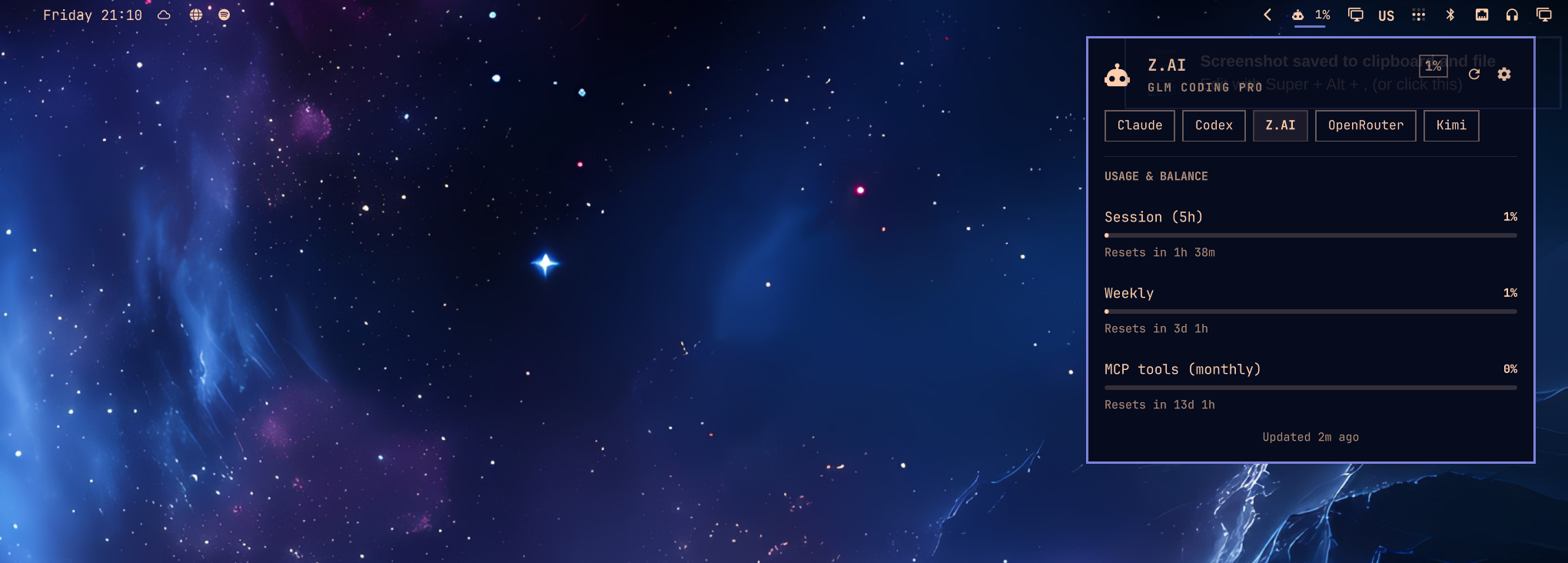
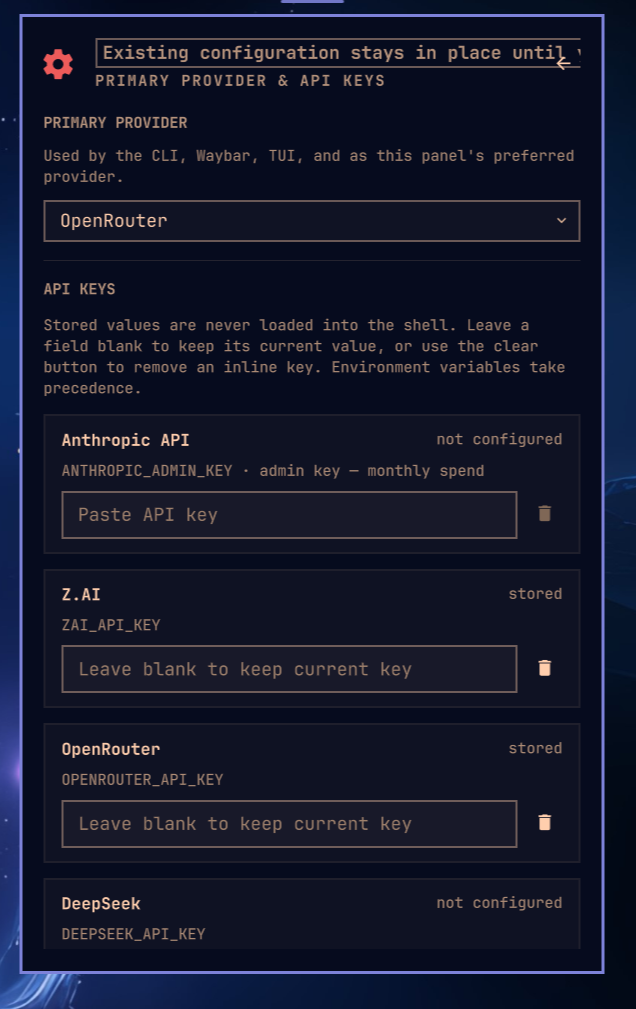
Features
- Per-provider Waybar modules use the same JSON shape and flags as claudebar.
- The native Omarchy Quattro plugin follows the shell theme and supports keyboard navigation, provider switching, live reset timers, and stale/error states.
ai-usagebar-tuiopens with a compact provider overview and refreshes every 60 seconds. Its navigation can use a sidebar, navbar, or no vendor box.- An optional Claude Code context view reads recent local session usage without scanning entire histories.
- Native integrations are available for Omarchy, GNOME Shell, KDE Plasma 6,
and a macOS/Windows system-tray popover (
ai-usagebar-tray). An experimental GTK tray frontend for Linux Mint is inlinux-mint/. - One bar item can cycle through enabled providers.
[ui] primarycontrols the initial provider in both the widget and TUI. - Atomic caches and file locking prevent duplicate requests from multi-monitor Waybar setups.
- Quota-threshold desktop notifications are on by default: a window crossing
97% (configurable in
[notifications]or macOS Preferences) raises one system alert per crossing on Linux and macOS. At 100% the limit is critical, and banked Codex/SuperGrok reset credits warn 48h before expiring. Setenabled = falseunder[notifications]to turn them off — see the configuration reference. - Network failures keep the previous data visible; HTTP errors appear in the tooltip.
- A vendor that answers HTTP 429 is left alone for five minutes: the last good snapshot keeps showing marked as stale, or the entry reads "rate limited; next attempt in 4m" and no request is made until then (every vendor on the shared cache; Nous Research has its own path).
--pretty,--watch N, andmake smokehelp with local testing and API response changes.
Reference guides
- Configuration
- Development guide
- TUI mouse support
- Windows build guide
- Ollama Cloud integration
- Claude accounts
- Format placeholders
- Provider endpoints and live tests
- KDE Plasma 6 plasmoid
Install
Nix
Run either application directly from GitHub:
nix run github:akitaonrails/ai-usagebar
nix run github:akitaonrails/ai-usagebar#tui
Install both ai-usagebar and ai-usagebar-tui into your user profile:
nix profile install github:akitaonrails/ai-usagebar
For a flake-based NixOS or Home Manager configuration, add the input in your
root flake.nix:
inputs.ai-usagebar.url = "github:akitaonrails/ai-usagebar";
Pass inputs to your NixOS modules with specialArgs:
nixpkgs.lib.nixosSystem {
  system = "x86_64-linux";
  specialArgs = { inherit inputs; };
  modules = [ ./configuration.nix ];
}
For standalone Home Manager, use extraSpecialArgs:
let
  system = "x86_64-linux";
in
home-manager.lib.homeManagerConfiguration {
  pkgs = nixpkgs.legacyPackages.${system};
  extraSpecialArgs = { inherit inputs; };
  modules = [ ./home.nix ];
}
If your configuration already passes inputs through these arguments, you do
not need to add it again. Then consume the package in a NixOS module:
{ inputs, pkgs, ... }:
{
  environment.systemPackages = [
    inputs.ai-usagebar.packages.${pkgs.stdenv.hostPlatform.system}.default
  ];
}
The equivalent Home Manager module is:
{ inputs, pkgs, ... }:
{
  home.packages = [
    inputs.ai-usagebar.packages.${pkgs.stdenv.hostPlatform.system}.default
  ];
}
Alternatively, apply the overlay when you want the package available as
pkgs.ai-usagebar:
{ inputs, pkgs, ... }:
{
  nixpkgs.overlays = [ inputs.ai-usagebar.overlays.default ];
  environment.systemPackages = [ pkgs.ai-usagebar ];
}
Omarchy Quattro
The native plugin is a display frontend and does not bundle the
ai-usagebar executable. Both are needed, and they install through different
managers — the binary is a system package, the plugin is per-user shell config
under ~/.config/omarchy/plugins/ — so this is one paste rather than one
command:
omarchy pkg aur add ai-usagebar-bin &&
  omarchy plugin add https://github.com/akitaonrails/ai-usagebar.git --enable
If you found the plugin through plugins.omarchy.org,
its Install button copies the omarchy plugin add line on its own. That
installs the widget but not the binary it reads, and the bar will say
ai-usagebar is not installed until you run the omarchy pkg aur add half too.
Quattro enables its own omarchy.agents status widget by default. Disable it
if you want AI Usage to be the only agent status item in the bar:
omarchy plugin disable omarchy.agents
Once enabled, left-click the AI Usage widget to open the native Quattro
usage panel. From that panel, click the gear or press s to open the native
QML settings page. Right-click intentionally opens ai-usagebar-tui in a
terminal; it is not the settings shortcut. Middle-click or use the mouse
wheel to switch providers. In QML settings, turn off Show usage value in the
top bar for an icon-only widget; the panel and tooltip keep the full details.
Turn on Show provider name in the top bar to prefix the entry with the same
three-letter code Waybar's {vendor_short} prints, so a bar cycling several
providers says which one it is showing. Use Top bar usage window to pin the
bar to one quota window — auto (highest), 5-hour, weekly, or monthly — instead
of always showing the highest percent; the tooltip and panel hero echo the
pinned value while panel rows and alert state still follow the highest quota.
The source-built ai-usagebar AUR package can replace ai-usagebar-bin in
the first command.
Arch (AUR)
Two packages. Pick one:
yay -S ai-usagebar-bin    # prebuilt binary from GitHub Releases (fast, ~5s install)
yay -S ai-usagebar        # compiles from source (~30-60s, hermetic)
The -bin variant downloads the same x86_64 ELF that CI built and tested. The source variant compiles locally with your toolchain. Both install identical binaries to /usr/bin/. If you already have one installed, switch with yay -S the other package; pacman handles the swap through conflicts/provides.
Other Linux / macOS (crates.io)
cargo install ai-usagebar                # compile from source (needs rustup)
cargo binstall ai-usagebar               # download prebuilt binary (needs cargo-binstall, no rustup)
cargo binstall fetches the same x86_64 / aarch64 Linux tarball the AUR -bin package uses. Both install ai-usagebar + ai-usagebar-tui to ~/.cargo/bin/.
From source
cargo build --release
sudo make install                  # → /usr/local/bin
# or
make install PREFIX=$HOME/.local   # → ~/.local/bin
Windows
The Waybar widget is Wayland-only and does not apply to Windows. Use the
system-tray popover (ai-usagebar-tray) or ai-usagebar-tui. The tray
reads the same usage --json report as the KDE plasmoid, in-process — no
console window. ai-usagebar --json / --pretty still work for scripting.
Install with Scoop from the official bucket:
scoop bucket add akitaonrails https://github.com/akitaonrails/scoop-bucket
scoop install ai-usagebar
Scoop-installed trays update themselves through Scoop: Install Update (and
Automatic) runs scoop update ai-usagebar, then the tray quits while Scoop
replaces it — usually 10–60 seconds — and relaunches from Scoop's current
path. The Scoop transcript is written to
%LOCALAPPDATA%\ai-usagebar\updates\scoop.log; if Scoop does not deliver the
requested version, the tray reports that log path and Automatic does not retry
it in the background. A global Scoop install without the scoop.ps1 shim
keeps the release-page fallback. The tray's built-in updater applies to
standalone ZIP installs.
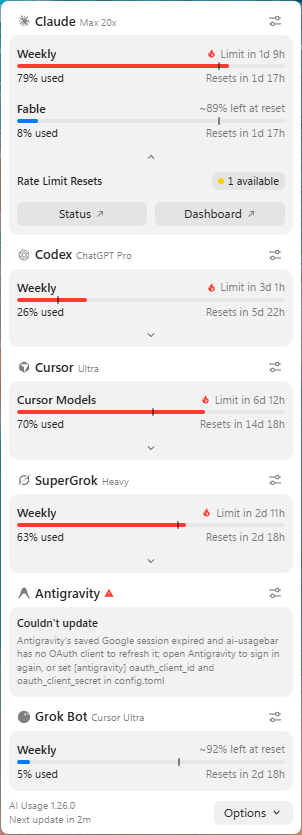
Build with a standard Rust toolchain plus Node.js 20+ (the tray WebView is
a Vite app; build.rs runs npm run build on Windows). WebView2 Evergreen
ships with Windows 11 and recent Windows 10:
cargo build --release
# binaries: target\release\ai-usagebar.exe, ai-usagebar-tui.exe, ai-usagebar-tray.exe
.\target\release\ai-usagebar-tray.exe
Pin the icon in the Windows 11 notification overflow if it hides behind the
chevron. Left-click opens the popover; right-click opens the same menu as
the popover's Options — Customize (Classic only), Settings, Refresh, Detect
Providers, Open TUI, Start at Login, Check for Updates, About, and Quit — in
the popover's language. On its first run the
tray detects which vendors already have a credential on this PC (local files
and keys only, never the network) and turns exactly those on in
config.toml — it never turns a vendor off. Settings adds a global shortcut
that toggles the popover from anywhere, the poll interval, and an update mode
(Automatic / Notify me / Off) that installs new releases from GitHub after
verifying their .sha256; all three live in the [tray] section of
config.toml (shortcut, refresh_minutes = 1, 5 or 10; default 5;
updates). See windows/README.md.

Credentials are read from the Windows user profile rather than $HOME:
%USERPROFILE%\.claude\.credentials.json (Anthropic) and
%USERPROFILE%\.codex\auth.json (OpenAI Codex). Run the official claude /
codex CLI once on Windows to populate them, exactly as on Linux/macOS.
API-key vendors work unchanged via environment variables or config.toml.
Authentication
Claude and Codex reuse OAuth credentials from their official CLIs. Other
providers use API keys, an existing app login, or a local service. API keys can
come from environment variables or config.toml.
| Vendor | Method | Action required |
|---|---|---|
| Claude | OAuth from ~/.claude/.credentials.json or the macOS login Keychain |
Run claude once. Tokens refresh automatically. |
| Anthropic API | Organization Admin key | Opt in with ANTHROPIC_ADMIN_KEY or [anthropic_api] api_key. Inference and Claude Code keys do not work. |
| Codex | OAuth, read from ~/.codex/auth.json |
Run codex login once. Token auto-refreshes. |
| GitHub Copilot | GitHub CLI OAuth | Run gh auth login --web, then choose GitHub Copilot as the primary provider in Settings. ai-usagebar gets the token only with gh auth token; GITHUB_COPILOT_TOKEN is an optional explicit override. |
| Z.AI | API key (ZAI_API_KEY env or [zai] api_key in config) |
Set either. |
| OpenRouter | API key (OPENROUTER_API_KEY env or [openrouter] api_key in config) |
Set either. Multiple keys: one [[openrouter.accounts]] entry each. |
| DeepSeek | API key (DEEPSEEK_API_KEY or config) |
Set either and opt in. |
| DeepInfra | API key (DEEPINFRA_API_KEY or config) |
Set either and opt in. Reports prepaid balance and current-month spend. |
| Kimi | Existing Kimi Code CLI login or API key (KIMI_API_KEY or config) |
Opt in, then either log in with kimi (nothing to paste) or set an API key, which wins when present. A Kimi For Coding subscription can issue one at kimi.com/code/console. |
| Kilo | API key (KILO_API_KEY env or [kilo] api_key in config) |
Set either. Opt-in. For a team balance, also set [kilo] organization_id; omit it for the personal balance. |
| Novita | API key (NOVITA_API_KEY env or [novita] api_key in config) |
Set either. Opt-in. |
| OrcaRouter | API key (ORCAROUTER_API_KEY env or [orcarouter] api_key in config) |
Set either. Opt-in. Reports the credit card (spend / total limit / remaining, key expiry) from the one-api compatible dashboard billing endpoints. |
| Moonshot | API key (MOONSHOT_API_KEY or config) |
Opt in. Set region cn for CNY; global uses USD. |
| Grok (xAI) | Management key | Opt in with XAI_MANAGEMENT_KEY or config. An inference key does not work. |
| SuperGrok | Existing grok login (its auth.json key, or its ACP extension) |
Opt in, install Grok Build, and run grok login. This reports subscription usage — overall included credits plus per-product slices (Build, Chat, Imagine) — not the Management API balance. |
| Grok Bot | Existing Grok Bot desktop sign-in (Linux and macOS) | Opt in, install the Grok Bot desktop app, and sign in to it once. This reports the app's weekly included-usage pool — not the Management API balance, and not the Grok Build subscription. Refreshed tokens stay in ai-usagebar's cache; the app's own file is never written. |
| MiniMax | Token Plan subscription key | Opt in with MINIMAX_API_KEY or config. Choose the matching global or China region; pay-as-you-go keys do not work. |
| Google Antigravity | Local Antigravity server, saved Google session, or agy status line |
Opt in. The desktop products provide quota through their local server. The agy CLI can provide its live session quotas through the macOS status-line integration (see Multiple Antigravity CLI accounts); the existing saved-session Cloud Code API fallback remains available and is labelled Google API in the TUI. |
| Cursor | Existing Cursor IDE or cursor-agent login |
Opt in and sign in once. cursor-agent is the headless fallback. |
| Kiro CLI | Existing kiro-cli login | Opt in and run kiro-cli login once. ai-usagebar refreshes the session when needed. |
| Nous Research | OAuth device flow | Enable [nous], click Log in with Nous Research in the Omarchy settings panel, or run ai-usagebar auth nous login. Credentials are kept in ai-usagebar's separate platform config directory (~/.config/ai-usagebar/credentials.json on Linux). |
| OpenCode Go | API key (OPENCODE_GO_API_KEY env or [opencode-go] api_key in config) |
Enable [opencode-go], then enter the key in the Omarchy settings panel or set the environment variable. |
| Command Code | Existing commandcode or pi login |
Enable [commandcode] and sign in to either one once. No key to paste; COMMANDCODE_API_KEY overrides if you prefer one. |
| Model Studio | Existing bl auth login --console (Alibaba Cloud) |
Opt in ([modelstudio]), install the official bl CLI, and run bl auth login --console once. Reports the Token Plan's 5-hour and weekly percentage windows with resets, through the same console gateway the CLI uses; the credential file ~/.bailian/config.json is only ever read. |
Nous credits and OpenCode Go
Nous usage percentage is calculated from the subscription-credit pool only:
(monthly subscription credits - subscription credits remaining) / monthly subscription credits.
Top-up/purchased credits are not mixed into that percentage. When the Portal
reports them, the tooltip and TUI show subscription credits, top-up credits, and
total usable credits as separate values.
Nous login is interactive because the device code is authorized in the browser.
Leave the terminal open until it reports that login completed, then refresh the
Omarchy panel. The login never reads Hermes Agent credentials. On Unix, newly
created credential directories use mode 0700, and credential and lock files
use mode 0600; an existing current-user-owned config directory also works when
it is not group- or world-writable. Windows uses the user's platform config
directory and inherited per-user access controls.
OpenCode Go uses the official usage endpoint and the percent field. Its key can
be entered through the native Settings panel; stored values are sent to the Rust
settings command over stdin and are never placed in QML command arguments. Cache
entries are tied to the endpoint and a one-way key fingerprint, so changing
accounts cannot reuse another account's fresh or stale usage.
Command Code
Command Code meters spend rather than tokens, so its two rolling windows are
priced in dollars: $1.23 of $14.00 for the 5-hour window and $5.24 of $35.00
for the weekly one. The monthly credit allowance renders as a third window with
the derived spend against the plan's pool and a reset countdown from the
subscription's billing period end.
There is no key to enter, and no key field in the settings panel.
Command Code appears in the provider selector but not in the key list, the same
way Claude, Codex, Cursor and Kiro do. It is disabled by default; a local login
can auto-enable it, or you can set enabled = true under [commandcode].
If it appeared without a login after an earlier version, set enabled = false
under [commandcode] to hide it.
Credentials are reused, never issued. The OAuth token comes from
~/.commandcode/auth.json from the official CLI first, then
~/.pi/agent/auth.json; COMMANDCODE_API_KEY outranks both. The token is
only ever read.
Refreshing it belongs to the CLI that owns the file, and writing back from here
would race the harnesses that share it; an expired token is reported as expired
instead. Set [commandcode] auth_paths to search somewhere else entirely.
The plan's monthly allowance is not reported by the API, so a small table maps the plan id to it (GOAT → $70, and so on). An unrecognised plan keeps its id and simply omits the "spent of allowance" line rather than inventing a denominator. Cache entries are tied to the endpoint and a one-way token fingerprint, so changing accounts cannot reuse another account's usage.
Grok: team-scoped vs organization-scoped keys
The balance lives at /v1/billing/teams/{team}/prepaid/balance, so a team has to
be identified. With a team-scoped management key the team is read
automatically from the key. An organization-scoped key cannot provide it
because that key's scopeId is an organization id rather than a team. Set the
team explicitly in that case:
[grok]
team_id = "your-team-id"
Without it, an organization-scoped key reports an error saying exactly this rather than silently querying the wrong URL.
Giving a prepaid balance a tank
DeepSeek, DeepInfra, Kilo, Novita, Moonshot and prepaid Grok report money left and no denominator, so their row is a plain balance rather than a meter. Tell them how big the tank is and it becomes one:
[deepseek]
display_limit = 200        # in the currency that vendor already reports
headline = "percent"       # "amount" (default here) puts the money on the bar
The percentage is consumed — (display_limit - balance) / display_limit,
clamped to 0–100 — and whichever number is not the headline stays in the detail
line. There is no default limit: without one nothing changes. A vendor that
states its own limit keeps it, which is why [openrouter] has no
display_limit — it reports credits purchased against credits used. It does
take headline. Full rules in
docs/configuration.md.
Enabling a vendor
enabled = true is what makes a vendor fetch. Anthropic API, GitHub Copilot,
DeepSeek, DeepInfra, Kimi, Kilo, Novita, Moonshot, Grok, SuperGrok, Grok Bot, Antigravity,
Cursor, MiniMax, and Kiro CLI all default to disabled so that existing
installs are unaffected until you opt in. Use either method:
- Use the gear or
sin the Omarchy panel, or runai-usagebar-tuiand presss. Saving a non-empty API key sets that vendor'senabled = truefor you. Clearing it removes the inline key fromconfig.toml. - Add
enabled = trueto the vendor's config section alongside the key.
The primary-vendor selector only offers enabled vendors, except GitHub Copilot:
after signing in with GitHub CLI, selecting it as primary explicitly enables
[copilot] at the same time.
Vendors that authenticate through a local login rather than a key — Cursor,
Kiro CLI, SuperGrok, Grok Bot, Antigravity, and Kimi when you have a Kimi For
Coding subscription — have no key to save, so enable them with enabled = true in
config.toml.
GitHub Copilot has no token field in the Omarchy or terminal Settings forms.
Run gh auth login --web, then select GitHub Copilot under Primary
Provider and save. That enables [copilot] and sets it as primary, making it
fetchable. At fetch time ai-usagebar runs only the fixed, structured
gh auth token command; it never parses GitHub CLI configuration, credential
stores, editor state, or browser state, and never writes the token to config or
cache. GITHUB_COPILOT_TOKEN is an optional explicit environment override and
takes precedence over GitHub CLI OAuth.
Custom providers (static token)
A service ai-usagebar does not know can still get a TUI tab and a
usage --json entry — and so a card in every frontend that reads
usage --json — when it exposes a JSON endpoint and accepts a static token.
Declare it as a [[custom]] table in config.toml; the JSON is mapped with
RFC 6901 JSON Pointers:
[[custom]]
id = "mytool"                    # slug; the entry id becomes custom:mytool
name = "My Tool"                 # header / tab label
short_name = "myt"               # three lowercase letters, unique
brand = "deepseek"               # optional built-in slug for supported UIs
enabled = true
url = "https://api.example.com/v1/usage"   # https unless allow_http = true
api_key_env = "MYTOOL_API_KEY"   # env var first, inline api_key second
# api_key = "..."
# auth_header = "Authorization"  # default; auth_scheme = "Bearer" (empty sends the raw key)
# headers = { "X-Org" = "acme" } # extra non-secret headers
# plan = "Pro"                   # literal, or plan_path = "/subscription/tier"
# cache_ttl_secs = 60

[[custom.metrics]]
label = "Requests"
used = "/usage/requests/used"    # numbers or numeric strings
limit = "/usage/requests/limit"  # or percent = "/usage/pct" instead of used + limit
resets_at = "/usage/requests/reset_at"   # RFC 3339, epoch seconds or epoch ms
window_secs = 86400              # window length; reported as `window_secs` for pacing

[[custom.texts]]
label = "Balance"
value = "/balance/display"
Each metric renders as a meter with the usual severity colours; texts render
as one-line rows. brand lets supporting frontends, currently the Omarchy
widget, draw a built-in vendor's mark for the custom entry; omit it to keep the
short_name tag. The cache under <cache>/ai-usagebar/custom/<id> holds the
projected snapshot (only the values the pointers selected, never the response
body) with the same stale-while-revalidate rules as the built-in vendors, and
an error names the failing pointer, never the response body or the key. The
api_key_env variable is scrubbed from every child process ai-usagebar
spawns, like the built-in ones.
Limits by design: static tokens only (no OAuth or refresh flows); GET
requests; no scripting. Custom providers appear in the TUI, in usage --json,
and in every frontend that reads usage --json, but not in the Waybar
widget's --vendor list, the TUI Settings overlay, [ui] primary, or the
vendors catalog.
Credential resolution order (for API-key vendors)
For each API-key vendor, ai-usagebar checks in this order:
- A non-empty environment variable named by
api_key_env. - An inline
api_keyin the same config section. - An error that names both missing options.
Security
- Inline keys belong in
~/.config/ai-usagebar/config.tomlat mode600. Redact them before committing that file to dotfiles. Environment variables remain the default and avoid storing keys in the config. - Claude and Codex credentials stay in files managed by their official CLIs.
- SuperGrok credentials stay inside Grok Build. ai-usagebar reads the login's
keyfromauth.jsonand uses it in the outgoingAuthorizationheaders of the billing request and the remaining-resets RPC; it never copies, caches, refreshes, or writes that key back. Auth/config files are also hashed as opaque bytes to separate caches between logins. - Cursor's
state.vscdbandcursor-agentfallbackauth.jsonare read-only. - Antigravity's keyring entry and CLI OAuth file are read-only. A refreshed
access token goes to
antigravity/oauth.jsonin the cache dir (mode600on Unix), keyed by a fingerprint of the refresh token so a different login never reuses it. Renewing the session needs Antigravity's own OAuth client id and secret in[antigravity] oauth_client_id/oauth_client_secret; they are public installed-app credentials, but nothing secret-shaped ships in this repository, so without them the fallback lasts only as long as the saved access token. - kiro-cli's
data.sqlite3is read-only. Refreshed credentials go to an account-scopedkiro/oauth.jsonfile, mode600on Unix.
macOS: Claude credentials in the Keychain
Recent Claude Code builds store OAuth credentials in the macOS login Keychain
instead of ~/.claude/.credentials.json. No setup is needed: ai-usagebar uses
macOS's security tool to read and refresh the Claude Code-credentials item.
- The default account still uses an existing credentials file when one is present.
- Each scoped
CLAUDE_CONFIG_DIRlogin gets its ownClaude Code-credentials-<hash>Keychain item. - Named accounts use the scoped Keychain item on macOS and fall back to their credentials file on Linux.
Known issues
macOS: repeated Keychain prompts for Claude Code (#148)
Affects every release up to and including 1.21.1, on macOS only. Up to
1.15.0 every token write-back was native; 1.16.0 through 1.21.1 still fell
back to the native write when the credential did not fit the security -i
line cap, which is the normal case once Claude Code stores mcpOAuth plugin
state in the same item.
When ai-usagebar refreshes the Claude OAuth token it writes the result back to
the login Keychain through the native Security.framework API. That marks the
Claude Code-credentials item as belonging to ai-usagebar's own code signature
(cdhash:…). Claude Code reads the same item with /usr/bin/security, whose
partition is apple-tool:, so from the next launch onward every read raises a
Keychain permission dialog — once per claude process, which means bursts of
them across subagents, claude -p jobs and IDE integrations.
securityd logs it as ACL partition mismatch. "Always Allow" is only
temporary: with the Keychain password it does put apple-tool: back on the
partition list, but ai-usagebar's next native write-back removes it again.
To clear it, sign in to Claude Code again:
claude
/login
Claude Code recreates the item through security, restoring the apple-tool:
partition. Note that ai-usagebar's next token write-back reintroduces the
problem, so this is relief rather than a cure.
To stop it recurring until the fix ships, set enabled = false under
[anthropic] in config.toml. That removes Claude from the panel and from the
automatic refresh cycle, so nothing writes to the Keychain. An explicit
ai-usagebar --vendor anthropic still fetches — --vendor overrides the
enabled flag by design — so avoid that too while the workaround is in place.
The fix for #148 makes every write go through security(1) — normal-sized
blobs over security -i on stdin, larger ones (real once Claude Code stores
mcpOAuth plugin state in the same item) as a security add-generic-password
argument, the same fallback Claude Code uses — so writer and reader always
share the apple-tool: partition. Linux is unaffected: there the credential
is a file, not a Keychain item.
Configuration
The optional config file is ~/.config/ai-usagebar/config.toml. Claude,
Codex, Z.AI, and OpenRouter are enabled by default; other providers are
opt-in.
Both binaries also accept --config <PATH> to read and write an alternate
file instead of the default (%APPDATA%\ai-usagebar\config.toml on Windows).
The file must already exist, and the override applies to every subcommand —
handy for testing a config side by side with the real one:
ai-usagebar usage --json --config ./config.test.toml
ai-usagebar-tui --config ./config.test.toml
A minimal example:
[ui]
primary = "openai"

[kimi]
enabled = true
# api_key = "..."  # or set KIMI_API_KEY
Desktop notifications for quota thresholds are on by default (97%); to turn them off or retune the threshold:
[notifications]
enabled = false
# threshold = 90   # 1..=100
See the configuration reference for every provider, display option, account path, region, and API-key setting.
Quick start
# Local testing — auto-detects TTY and renders human-readable output.
ai-usagebar                        # uses [ui] primary (defaults to anthropic)
ai-usagebar --vendor anthropic_api
ai-usagebar --vendor openai
ai-usagebar --vendor copilot
ai-usagebar --vendor zai
ai-usagebar --vendor openrouter
ai-usagebar --vendor deepseek
ai-usagebar --vendor deepinfra
ai-usagebar --vendor kimi
ai-usagebar --vendor kiro

# Force Waybar JSON (e.g. piping into jq).
ai-usagebar --json

# Everything at once: quota + time-to-reset for every configured vendor,
# with one entry per named Claude account. Exits 0 after a complete document
# (per-entry errors are data); non-zero only when the document cannot be produced.
ai-usagebar usage
ai-usagebar usage --json | jq '.entries[] | {id, metrics, sections}'

# Turn on every vendor that already has a credential on this machine
# (local files, keychains, saved keys, env vars — never the network).
# Only vendors never checked before are probed; --all re-checks everything.
# Detection only ever sets enabled = true; it never turns a vendor off, and
# never overrules an `enabled = false` you wrote yourself — not even --all.
ai-usagebar detect
ai-usagebar detect --all --json

# Every provider that exists — the switched-off and the never-configured
# included — with how each authenticates and whether it is usable here.
ai-usagebar vendors
ai-usagebar vendors --json | jq '.vendors[] | select(.enabled and (.configured|not))'

# Live preview while iterating on --format / --tooltip-format.
ai-usagebar --vendor openrouter --watch 5

# Interactive TUI with tabs.
ai-usagebar-tui
The JSON report has two views of each provider:
metricscontains percentage gauges only.sectionspreserves the complete ordered display, including balances, grouped rows, and spacers. Rows without a percentage do not invent one.
The top-level schema_version is currently 1. Consumers should ignore
unknown fields and treat absent fields as not applicable. The version changes
only when a tolerant reader could not safely absorb a change.
usage (plain or --json) exits 0 after printing a complete document, even
when every entry carries its own error. Non-zero means the command could not
produce the document (missing or unreadable --config, unparseable TOML, no
vendors enabled, or a runtime/bootstrap failure).
usage reports only the providers that are enabled, which makes the
switched-off and the never-credentialed exactly the rows it cannot describe.
vendors --json is the catalog that covers them: one row per provider with its
kind (oauth / apikey / local), whether config has it enabled, whether
this machine has the credential it needs (configured), the environment
variable it reads (honoring an api_key_env override), and the login command
that fixes it. It contacts nothing. A frontend drawing a per-provider health
list reads both and needs no provider table of its own — needs_credential is
false only for Antigravity, which has no credential to be missing.
The report also includes the configured primary, resolved to an entry id
from entries — with named accounts, the first entry of the configured
vendor (so anthropic reports anthropic@claude-me when that is the entry
present); a primary naming a vendor with no entries keeps the vendor slug.
Each entry has
display_name, short_name, status, stale, and fetched_at; metric rows
may add severity, an absolute reset_at, and window_secs, the exact length
of the reset window in seconds. window_secs is present only when the vendor
states the window (rolling 5h/7d windows; Cursor's billing cycle from
billingCycleStart/billingCycleEnd, assumed to be 30 days when the start is
missing) and is omitted, not null, otherwise — a calendar month or an unstated
window gives a frontend nothing to pace against. Cursor's On-Demand text row
may also carry used_cents, limit_cents, and percent: the spend and the
prepaid cap in USD cents, and how much of that cap is already used (rounded
half up, and above 100 when spend passes the cap). Those fields are omitted,
not null, when the row is ordinary text or when Cursor reported spend
without a positive cap. A frontend meters the row from the numbers; value
stays the formatted $spent / $cap string other surfaces print. Every metric
row also carries
headline — "percent" or "value" — naming which of its two numbers belongs
on the bar; a frontend draws that one and leaves the other in the detail line,
rather than inferring a balance row from its label. These fields are additive, so
existing consumers remain compatible. short_name is the same three-letter
code {vendor_short} prints, so a frontend that wants a compact provider tag
takes it from the report instead of keeping its own table.
Standalone TUI
The TUI does not depend on Waybar. Run it directly in a local terminal, over SSH, or in a tmux pane:
ai-usagebar-tui # opens in your current terminal
It works in Kitty, Alacritty, Foot, Ghostty, and other terminal emulators. The controls and Settings overlay are the same everywhere; no compositor or window manager integration is required.
TUI controls
| Action | Keys | Mouse |
|---|---|---|
| Switch vendor tab | ↑ / ↓, Tab / Shift+Tab, ← / → |
Click a sidebar entry |
| Refresh current / all | r / R |
Click the footer action |
| Open Settings | s |
Click the footer action |
| Quit | q / Esc |
Click the footer action |
| Context view | c |
— |
In Settings, ↑/↓/Tab move the focus ring, ←/→/space change the
focused control, Ctrl-S (or Enter on Save) saves, and Esc closes. Click
a field to focus it, click an on/off cell to toggle it, and click the
Primary vendor's name to open a picker popup (↑/↓, Enter/space,
Esc; a click outside closes it).
Which vendors the Primary vendor picker offers
The picker lists every vendor that can actually fetch data, not every vendor that exists:
- Vendors switched on in Providers.
- GitHub Copilot always (its credential lives in the GitHub CLI; there is no local key to enable).
- Key vendors off but still reachable — a saved API key or an exported
env var (
env set (overrides)in the API keys list).
A vendor that is off with no credential is left out on purpose: choosing it as
primary would produce a dashboard it cannot fetch from, and saving such a
primary is blocked (save_does_not_write_a_disabled_primary). Turn a vendor
on first; it then shows up in the picker.
Native desktop integrations
Omarchy Quattro
Omarchy 4's Quattro shell can host ai-usagebar as a native Quickshell plugin. Follow the two-step Omarchy installation above; adding the plugin alone does not install its binary dependency.
Update or remove the plugin without editing shell.json by hand:
omarchy plugin update akitaonrails.ai-usagebar
omarchy plugin remove akitaonrails.ai-usagebar
The widget reads the providers and accounts already enabled in
~/.config/ai-usagebar/config.toml; it does not keep another copy of API keys.
- Left-click opens the native panel.
- The gear or
sopens QML settings. - QML settings can hide the bar's percentage or balance for an icon-only widget; this applies immediately and preserves the full panel and tooltip.
- QML settings can also show the provider's
{vendor_short}code before that value (cld 29%). It is off by default and applies immediately. - QML settings can pin the bar to one quota window — auto (highest), 5-hour, weekly, or monthly — instead of always showing the highest percent. The tooltip and panel hero echo the pinned value; panel rows and alert state still follow the highest quota.
- Right-click launches the TUI.
- Middle-click or the mouse wheel switches providers.
- The selected provider or named account is remembered across shell reloads and sleep/unlock cycles. If it is later disabled, the configured primary is used instead.
The Omarchy plugin guide covers keyboard controls, credential handling, updates, and development checks.
The plugin depends only on the ai-usagebar executable. It runs the fixed
ai-usagebar usage --json command for reports and starts ai-usagebar-tui
only after a right-click. It installs no service, asks for no elevated
privileges, and does not overwrite user configuration.
macOS menu bar and Windows tray
ai-usagebar-tray shows the same report in a popover that opens from the
macOS menu bar or the Windows notification area. The Popover Style setting
(Settings → Appearance) picks its look: Classic (the default, shown in the
Windows install section) or Native, which follows Apple's
macOS 26 UI kit on macOS and Fluent (WinUI 3, with Acrylic and the system
accent) on Windows. Setup and controls: macOS,
Windows.
Native on Windows 11:
| Light | Dark |
|---|---|
| <img src="screenshots/windows-tray-native-light.png" width="300" alt="Native popover on Windows 11, light: provider tabs with each provider's percentage, the Claude card with Weekly and Fable meters, and the Options button in the footer"> | <img src="screenshots/windows-tray-native-dark.png" width="300" alt="Native popover on Windows 11, dark, over Acrylic"> |
| <img src="screenshots/windows-tray-native-settings-light.png" width="300" alt="Native Settings on Windows 11, light, on the General tab, with Providers and Preferences beside it"> | <img src="screenshots/windows-tray-native-settings-dark.png" width="300" alt="Native Settings on Windows 11, dark"> |
| Native in Português | Right-click on the notification-area icon |
|---|---|
| <img src="screenshots/windows-tray-native-pt-br.png" width="300" alt="Native popover on Windows 11 in Brazilian Portuguese"> | <img src="screenshots/windows-tray-right-click-menu.png" width="254" alt="Native menu over the notification-area icon after a right-click: Customize, Settings, Refresh, Detect Providers, Open TUI, Start at Login, Check for Updates, About and Quit"> |
Native on macOS 26:
| Light | Dark |
|---|---|
| <img src="screenshots/macos-tray-native-light.png" width="300" alt="Native popover on macOS 26, light: segmented provider tabs, the Claude card with its Weekly meter, refresh and settings buttons at the top"> | <img src="screenshots/macos-tray-native-dark.png" width="300" alt="Native popover on macOS 26, dark"> |
| <img src="screenshots/macos-tray-native-settings-light.png" width="300" alt="Native Settings on macOS 26, light, on the Preferences tab"> | <img src="screenshots/macos-tray-native-settings-dark.png" width="300" alt="Native Settings on macOS 26, dark: Appearance with Language, Theme, Popover Style and Time Format, and Usage Display below"> |
| Options menu (Native) | Right-click on the menu bar icon | Classic |
|---|---|---|
| <img src="screenshots/macos-tray-native-options.png" width="300" alt="Options menu open on macOS: Settings, Refresh, Detect Providers, Open TUI, Start at Login, Check for Updates, About and Quit"> | <img src="screenshots/macos-tray-right-click-menu.png" width="180" alt="Native menu under the menu bar icon after a right-click: Customize, Settings, Refresh, Detect Providers, Open TUI, Start at Login (checked), Check for Updates, About and Quit"> | <img src="screenshots/macos-tray-classic-light.png" width="260" alt="Classic popover on macOS, light, with one card per provider"> |
When a newer release is out, the dashboard shows it above the provider tabs (Native) or the cards (Classic), with Install Update where the tray can update itself:
| Update available (macOS, Native) | Update available (Windows, Native) |
|---|---|
| <img src="screenshots/macos-tray-native-update-light.png" width="300" alt="Native popover on macOS with an Update available card above the provider tabs: AI Usage v1.27.0 is ready to install, with an Install Update button and a blue dot beside the version in the footer"> | <img src="screenshots/windows-tray-native-update-light.png" width="300" alt="Native popover on Windows 11 with the same Update available card and Install Update button above the provider tabs"> |
| <img src="screenshots/macos-tray-native-update-dark.png" width="300" alt="The same Update available card on macOS, dark"> | <img src="screenshots/windows-tray-native-update-dark.png" width="300" alt="The same Update available card on Windows 11, dark"> |
On macOS the menu bar item shows the starred metrics — Chart (default): <img src="screenshots/macos-menu-bar-chart.png" width="40" alt="Menu bar item in Chart mode"> · Logos: <img src="screenshots/macos-menu-bar-logos.png" width="240" alt="Menu bar item in Logos mode: each starred provider's logo with its percentage">
Desktop integrations
| Integration | Supported providers | Notes |
|---|---|---|
| macOS menu bar | Whatever usage --json reports |
ai-usagebar-tray: WKWebView popover + each ready provider's name and usage with a chart glyph. |
| GNOME Shell | Menu: whatever usage --json reports. Top bar: Claude, Codex, Z.AI, OpenRouter, DeepSeek, Antigravity |
Usage overview with native provider submenus and configurable appearance; the top bar follows its vendor preference. |
| KDE Plasma 6 | Whatever usage --json reports |
Provider tabs in the popup; vendor is per applet instance. |
| Linux Mint / Cinnamon | Whatever usage --json reports |
Experimental GTK dashboard with provider icons; left-click the status icon. |
| Windows tray | Whatever usage --json reports |
NotifyIcon + WebView2 popover; left-click the tray icon. |
The GNOME click menu includes Cursor when enabled in config.toml; the
top bar still supports the providers listed in its preferences.
Community integrations
External projects built on ai-usagebar usage --json. They live in their own
repositories and are maintained by their authors, not here.
-
cosmic-applet-ai-usage — panel applet for the COSMIC desktop.
-
AI Usage for Noctalia — bar widget and panel for the Noctalia v5 shell, installable from its plugin browser as
felipeartur/ai-usagebar. -
usage for Codex CLI — Codex skill for checking remaining quotas, balances, and reset times with
$usage, using the usage and vendor JSON reports.
Waybar config
Single module, scroll-to-cycle (recommended)
Use one bar item and scroll through your vendors. The TUI on-click still shows them all:
"modules-right": ["custom/aibar", ...],

"custom/aibar": {
    "exec": "ai-usagebar --format '{vendor_short} {session_pct}% · {session_reset}'",
    "return-type": "json",
    "interval": 300,
    "signal": 13,
    "tooltip": true,
    "on-click": "ai-usagebar-tui",
    "on-scroll-up":   "ai-usagebar --cycle-next",
    "on-scroll-down": "ai-usagebar --cycle-prev"
}
{vendor_short} identifies the active provider with a three-letter code. For a
format shared by every cycled provider, use {session_pct},
{session_reset}, {weekly_pct}, and {weekly_reset}. Cursor maps its two
usage pools to the session and weekly slots; Kiro maps its single pool to both.
The placeholder reference lists every generic
and provider-specific field.
signal: 13 lets the scroll commands refresh the bar through SIGRTMIN+13
instead of waiting for the next interval.
The KDE plasmoid has the same gesture in its own settings and never reads or writes the state file this section relies on.
If a tray expander follows custom/aibar, the usage text may sit too close to
its icon. Add right padding in Waybar CSS:
#custom-aibar {
    padding-right: 18px;
}
Per-vendor modules
If you'd rather see them all at once:
"modules-right": ["custom/claude", "custom/openai", "custom/openrouter", "custom/zai", "custom/deepseek", "custom/kimi"],
"custom/claude": {
"exec": "ai-usagebar --vendor anthropic --icon ''",
"return-type": "json",
"interval": 300,
"tooltip": true,
"on-click": "ai-usagebar-tui"
},
"custom/openai": {
"exec": "ai-usagebar --vendor openai --icon ''",
"return-type": "json",
"interval": 300,
"tooltip": true
},
"custom/openrouter": {
"exec": "ai-usagebar --vendor openrouter --icon '' --format '{or_balance} · {or_used_today}'",
"return-type": "json",
"interval": 600,
"tooltip": true
},
"custom/zai": {
"exec": "ai-usagebar --vendor zai --icon ''",
"return-type": "json",
"interval": 300,
"tooltip": true
},
"custom/deepseek": {
"exec": "ai-usagebar --vendor deepseek --icon ''",
"return-type": "json",
"interval": 600,
"tooltip": true
},
"custom/kimi": {
"exec": "ai-usagebar --vendor kimi --icon ''",
"return-type": "json",
"interval": 600,
"tooltip": true
}
Why 300s? The Anthropic and OpenAI Codex endpoints are undocumented and rate-limit aggressively below ~300s. The cache TTL is 60s so multi-monitor instances coexist, but Waybar's polling interval should stay at 300s.
Multiple Codex accounts
Two ChatGPT subscriptions, each its own login:
CODEX_HOME=~/.codex-work codex login
[[openai.accounts]]
label = "work"
codex_auth_path = "~/.codex-work/auth.json"
ai-usagebar --vendor openai --account work
Each account keeps its own cache and refreshes independently. Without
--account, the default codex_auth_path login is used exactly as before.
Multiple Claude accounts
Named accounts appear as separate TUI tabs and report entries. The recommended setup is:
ai-usagebar account add work
ai-usagebar --vendor anthropic --account work
On macOS, the same account command can also capture and switch the active Claude Desktop or CLI login. The dedicated Claude account guide covers:
- explicit and auto-discovered accounts;
- safe credential and cache isolation;
- Waybar modules for personal and work subscriptions;
- macOS Desktop and CLI switching, backups, and history conflicts.
Multiple Antigravity CLI accounts (macOS)
If you keep separate agy terminal sessions signed into different Google
accounts, install the official status-line integration once:
ai-usagebar antigravity setup-statusline
Restart existing agy terminals or run /statusline in them to reload the
configuration. The popover and ai-usagebar usage --json then show one entry
per distinct account with a live agy process; multiple terminals for the same
account are deduplicated, and the number of entries follows the active
accounts. Names use a masked address such as j***@gmail.com.
Public account IDs are opaque and stable on this Mac; sessions remain listed
while agy is running, with snapshots marked stale after 15 minutes without a
new status-line payload.
This integration reads only the CLI's status-line payload. It does not read,
copy, or store OAuth tokens, prompts, project paths, or transcripts. When no
valid agy status-line snapshot is available, the existing single-account
Antigravity collector remains the fallback. To remove only AI UsageBar's own
status line while preserving other Antigravity settings, run:
ai-usagebar antigravity remove-statusline
This multi-account integration is currently macOS-only.
Multiple OpenRouter accounts
Add one [[openrouter.accounts]] entry per key, then select it with
--vendor openrouter --account <label>. Named accounts appear separately in
the TUI, native integrations, and usage reports. Each has its own cache, so
one key's fresh data cannot be shown for another. One entry per workspace is
the pattern for several workspaces; keys inside one workspace share its
billing account, so the split is per login session, not per key within a
bill. See the
OpenRouter account guide for the config and
Waybar examples.
Multiple keys for other API-key providers
Z.AI, DeepSeek, DeepInfra, Kilo, Novita, Moonshot, Grok, MiniMax, and OrcaRouter take the
same array: one [[<vendor>.accounts]] entry per extra key, selected with
--vendor <vendor> --account <label>. Region, team, organization, and display
settings stay per provider. See the
API-key account guide.
Hyprland: float the TUI window
By default Hyprland tiles the TUI. To make ai-usagebar-tui open as a centered floating window, the same way Omarchy floats its own settings TUIs (Wi-Fi/impala, audio/wiremix, Bluetooth/bluetui), add this to ~/.config/hypr/hyprland.conf or any sourced .conf, such as looknfeel.conf:
# ai-usagebar TUI — float + center + fixed size. omarchy-launch-tui sets the
# app-id from the binary basename, so the class is org.omarchy.ai-usagebar-tui.
# 875x600 matches the size Omarchy gives its own `floating-window`-tagged TUIs.
windowrule = float on, match:class ^(org\.omarchy\.ai-usagebar-tui)$
windowrule = center on, match:class ^(org\.omarchy\.ai-usagebar-tui)$
windowrule = size 875 600, match:class ^(org\.omarchy\.ai-usagebar-tui)$
Then hyprctl reload (no logout needed).
Omarchy tags a hardcoded list of TUI app-ids with
floating-windowin~/.local/share/omarchy/default/hypr/apps/system.conf, which then appliesfloat + center + size 875 600. The rules above set those values directly, so the size is deterministic regardless of which config is sourced first. If you launch the TUI differently (e.g.kitty -e ai-usagebar-tui), replace the class regex with whateverhyprctl clientsreports for your terminal.
Hyprland 0.46+ uses the unified
windowrulekeyword withmatch:…filters. The olderwindowrulev2 = …, class:…syntax still works on legacy releases but is deprecated. Use the form above on current Omarchy and Hyprland.
Provider coverage
The CLI and TUI support every provider in the authentication table above. Native desktop coverage varies by integration. The provider endpoint reference lists each endpoint, reported metric, desktop selector, stability note, and live-test command.
Run make smoke to check live response shapes.
For Ollama Cloud setup (Bearer key from ollama.com/settings/keys), see the Ollama integration guide.
Format placeholders
Use placeholders in --format and --tooltip-format:
ai-usagebar --vendor anthropic --format '{session_pct}% · {session_reset}'
ai-usagebar --vendor openrouter --format '${or_balance} remaining'
Shared claudebar placeholders and every provider-specific field are listed in the format placeholder reference.
Contributing
See CONTRIBUTING.md for the pre-PR gate, the checklist, and the bar a new provider has to clear.
Local development
ai-usagebar --watch 5                              # iterate on --format live
ai-usagebar --vendor openrouter --format '{or_balance} · today {or_used_today}'

make test                                          # unit + integration
source ~/.config/zsh/secrets                       # required for existing vendor smoke tests
make smoke                                         # runs all ignored tests; only Kimi skips without its key
make clippy                                        # cargo clippy -D warnings
TUI controls
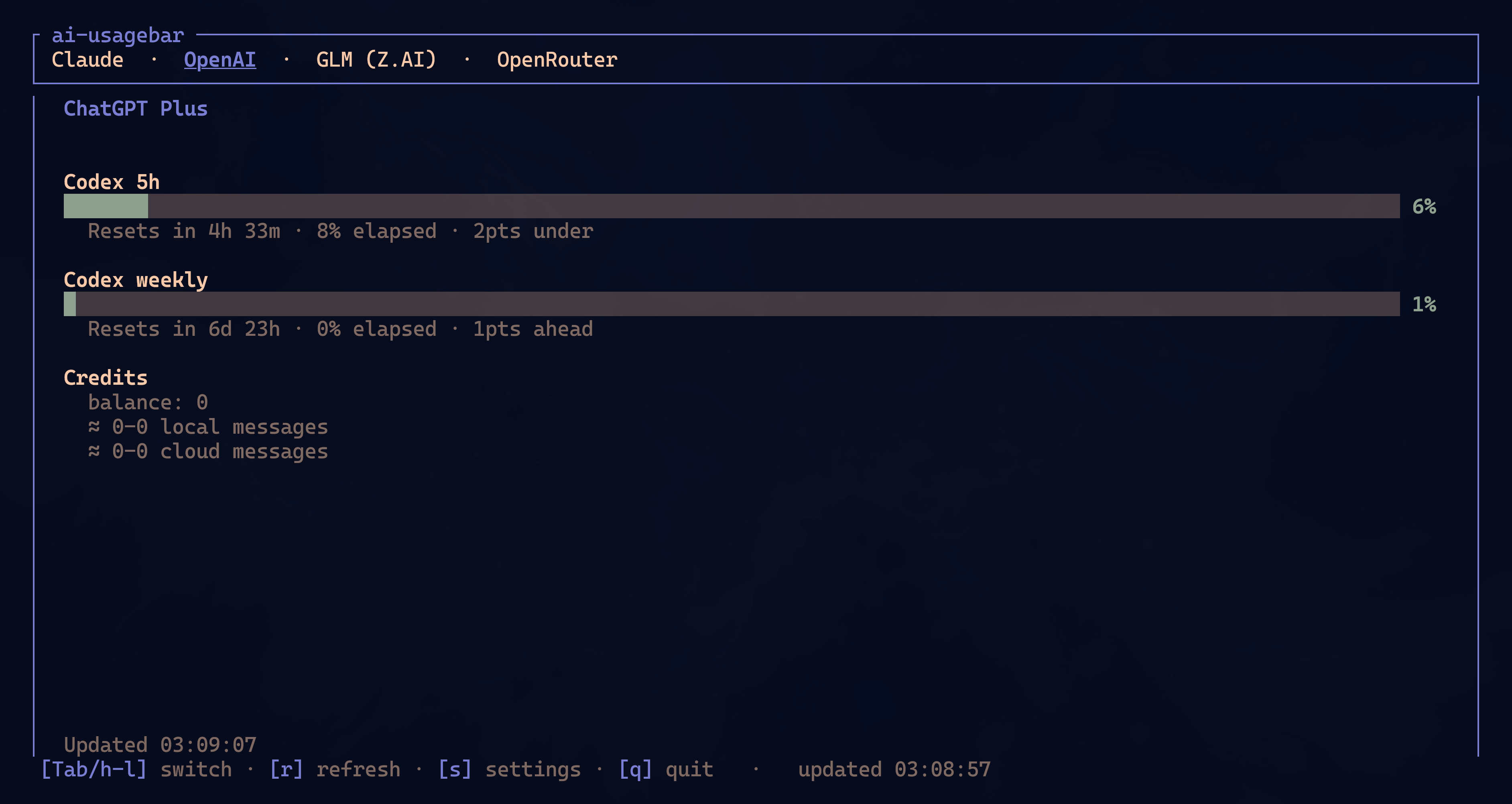
↑/↓— move through the vendor menu (wraps;Tab/l/→andShift+Tab/h/←still work as secondary shortcuts)- Mouse — click a vendor menu entry to select it; click the footer's
r/R/s/q/Escactions to refresh, refresh all, open Settings, or quit; in Settings, click a field to focus it or click Save to save r— refresh active tabR— refresh all tabss— open Settings overlay (primary vendor + API keys)c— open local Claude context sessions (only when[context] enabled = true);vcycles its layoutq/Esc/Ctrl-C— quit
The TUI refreshes every 60 seconds. During a refresh it keeps the current values
visible with a ↻ marker. If the request fails, the last snapshot remains on
screen and is marked stale.
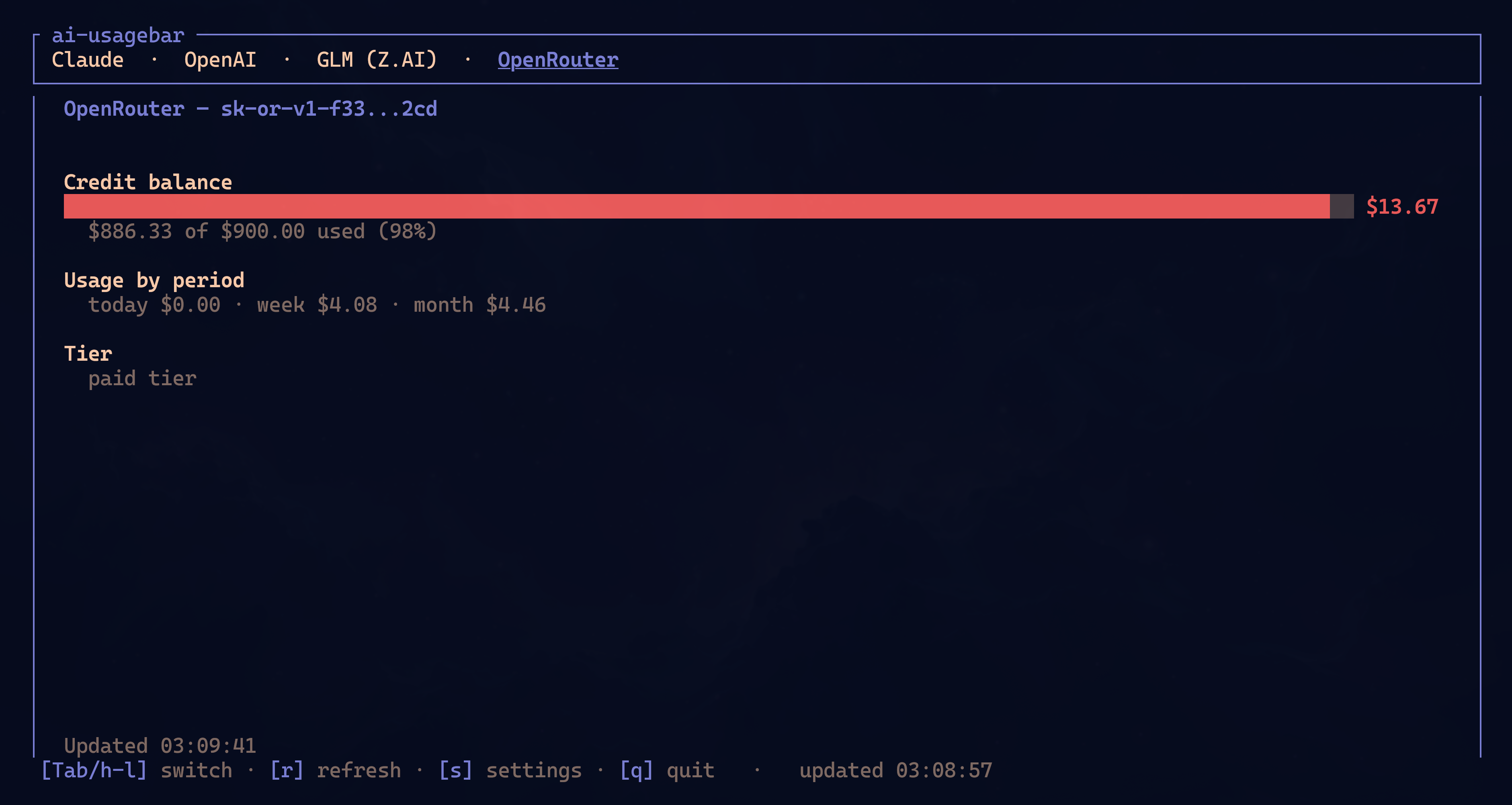
OpenRouter uses the same layout for balance, usage by period, and account tier:
Local context overlay
The optional context overlay answers a different local question from the
vendor tabs: how much input context was present in recent Claude Code sessions.
Enable it by hand, restart the TUI, and press c:
[context]
enabled = true
layout = "full"                          # full | split | bottom  (`v` cycles)
# projects_path = "~/.claude/projects"  # this is the default
# context_window_tokens = 200000         # optional fallback

# Exact model ids override the fallback when 200K and 1M sessions coexist.
[context.model_context_window_tokens]
"claude-opus-4-6" = 1000000
The default full layout replaces the dashboard body. Press v to cycle
through full, split, and bottom layouts.
↑/↓orj/kselects a session.Enteropens its detail gauge.Escreturns andrrescans.
The percentage follows
Claude Code's status-line definition:
input_tokens + cache_creation_input_tokens + cache_read_input_tokens. Without
a trustworthy model window size, the overlay shows tokens instead of guessing
a percentage. After compaction, it waits for the next assistant response before
calculating a new value.
The reader handles Claude Code's undocumented local JSONL defensively:
- it reads bounded tails from the 100 most recently modified top-level sessions;
- it ignores corrupt records and
subagentssidechains; - it does not follow discovered symlinks;
- it performs filesystem work off the UI thread.
When the feature is disabled, nothing under ~/.claude/projects is read.
Context options remain in TOML rather than the Settings modal.
Settings overlay
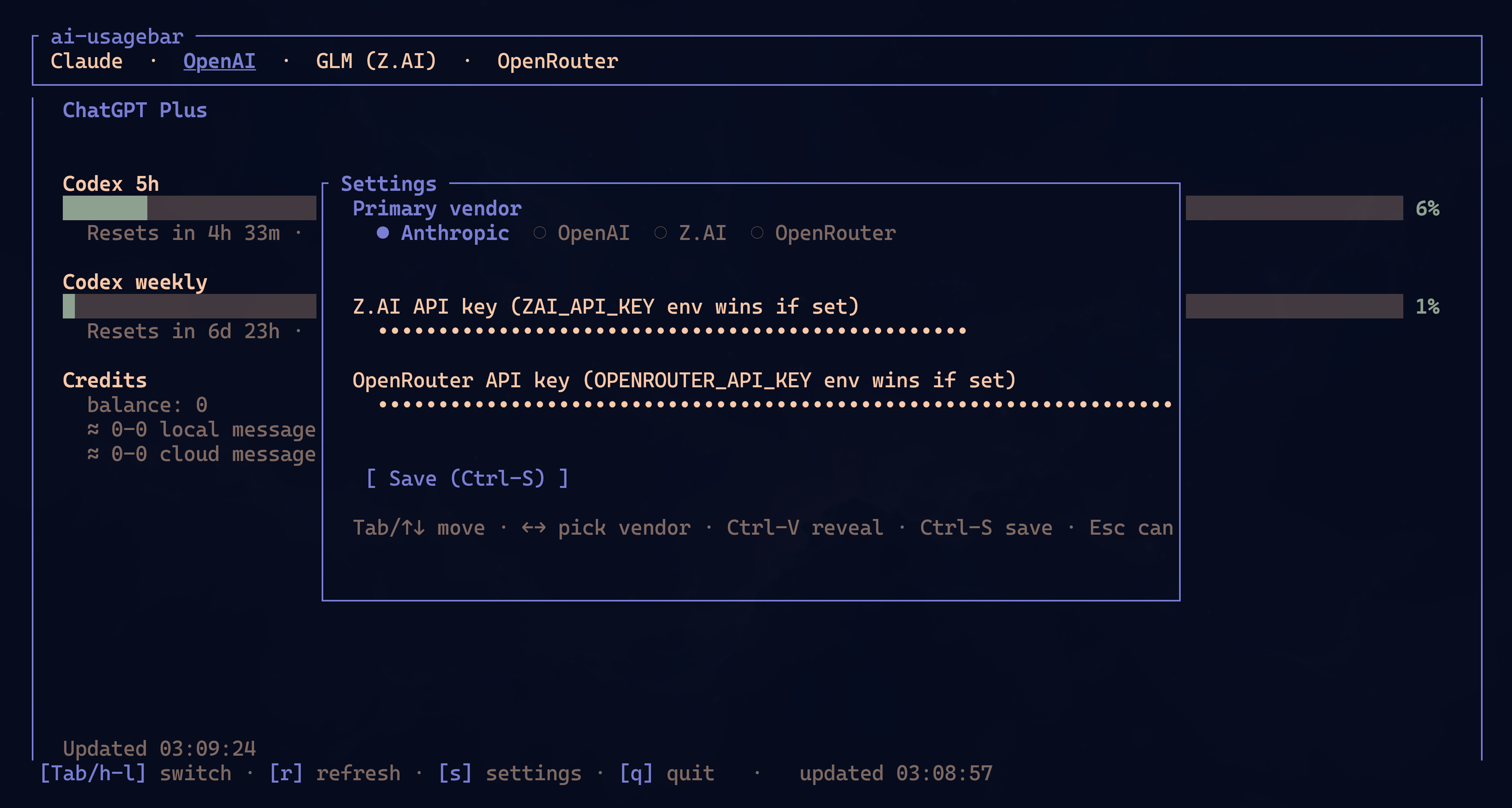
Press s while the TUI is open. The overlay lets you:
- Pick the primary vendor that the widget defaults to and that the TUI selects on startup. Use
←/→to cycle. - Enter a key for any supported API-key provider. Keys are masked as you type;
press
Ctrl-Vto reveal or hide them. The provider's configured environment variable still wins at runtime; the inline key is the fallback. Saving a non-empty key also sets that provider'senabled = true.
Key bindings inside the overlay:
Tab/↑↓— move between fields←/→— cycle primary-vendor selection (only on the vendor field)Ctrl-V— toggle key visibility on the focused key fieldCtrl-S— save and closeEsc— discard and close
Save updates ~/.config/ai-usagebar/config.toml through toml_edit, preserving
comments and unrelated settings. The file is set to mode 600.
Omarchy's native QML form uses the same Rust persistence path and semantics. It never loads stored key values into the long-lived shell process: blank means unchanged, clear is explicit, and new values are sent to the binary over stdin.
After saving:
- TUI tabs fetch again immediately.
- Waybar modules configured with
signal: 13refresh throughSIGRTMIN+13. - Other Waybar modules refresh on their next interval. Run
pkill -SIGUSR2 waybarto force a full reload.
Theming
- One Dark palette by default.
- Auto-merges with the active Omarchy theme at
~/.local/state/omarchy/current/theme/colors.toml(the older~/.config/omarchy/current/theme/colors.tomllocation is still read when that file is absent). - Per-color overrides:
--color-low,--color-mid,--color-high,--color-critical(claudebar-compatible).
Changelog
See CHANGELOG.md for the release history. Each release also has its own page at https://github.com/akitaonrails/ai-usagebar/releases with the auto-generated install snippet and checksum.
Acknowledgements
The Codex and Claude OAuth endpoint references came from
claudebar and
codexbar, both by mryll. The bordered
Pango tooltip, severity colors, and pacing math also come from those projects.
The Kimi /coding/v1/usages endpoint reference came from community quota tools: CodexBar (steipete), OpenUsage, and OmniRoute.
License
MIT.