
Ambient Agent 🫧
Your Omarchy desktop feels what your AI agents are doing — no pop-ups.
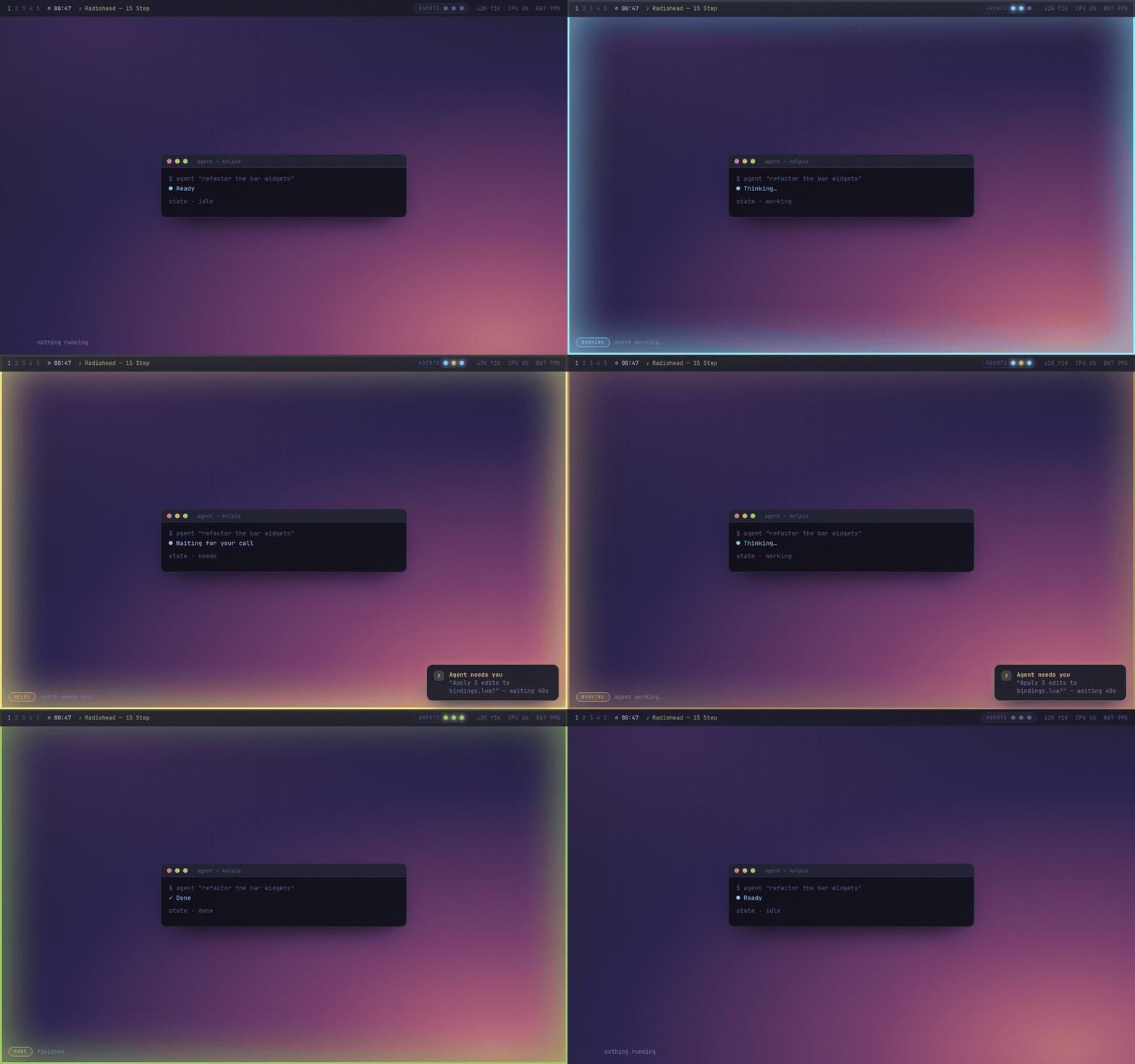
The screen edge breathes cyan while an agent works, warms to amber the moment one needs your call, and gives a quiet green pulse when it's done. Peripheral awareness, not interruption.
omarchy.agentsshows agent usage and limits. Ambient Agent shows the thing that actually costs you time when you run several agents at once: which one is silently waiting for you.
▶ Live demo & docs · by @fjalvarezdd
Install
# 1) the overlay (Quickshell plugin)
omarchy plugin add https://github.com/fjalvarezdd/omarchy-ambient-agent --enable

# 2) the agent-ambient helper CLI + a default config
git clone https://github.com/fjalvarezdd/omarchy-ambient-agent
cd omarchy-ambient-agent && ./install.sh
The overlay itself only ever reads its state — it never writes to your filesystem. Prefer no CLI? Anything can drive it by writing one word (working/needs/done/error/idle) to ~/.local/state/omarchy/agent-ambient.
Drive it
Set the state from anywhere:
agent-ambient working   # slow cyan breathing
agent-ambient needs     # amber pulse — an agent is blocked on you
agent-ambient done      # green flash, then calm
agent-ambient error     # red pulse
agent-ambient idle      # off
Wrap any long task so the edge tracks it automatically:
agent-ambient working; npm run build; agent-ambient done
If your agent or editor can run a command on events, point it at agent-ambient <state> — e.g. starting a task → working, waiting for your approval → needs, finished → done. A ready-to-adapt hook example lives in hooks/.
Theming
By default the glow uses your selected Omarchy theme accent (Color.accent), so it matches whatever theme you're on. The done state is a solid blue. Override any of it in the config (colors, doneColor).
Configure it
Edit ~/.config/omarchy/ambient-agent.json — it hot-reloads, no restart:
{
  "enabled": true,
  "borderWidth": 3,
  "glowWidth": 26,
  "glowOpacity": 0.40,
  "radius": 16,
  "colors": { "working": "#7dcfff", "needs": "#e0af68", "done": "#9ece6a", "error": "#f7768e" },
  "periods": { "working": 3800, "needs": 1500, "error": 1100 },
  "doneTimeoutMs": 2500
}
Match your theme with colors; calm it down with a smaller glowWidth / glowOpacity; slow the breathing with bigger periods; set "enabled": false to switch it off without uninstalling.
| State | Color | Motion |
|---|---|---|
| working | cyan #7dcfff |
breathe 3.8s |
| needs you | amber #e0af68 |
pulse 1.5s |
| done | green #9ece6a |
flash once |
| error | red #f7768e |
pulse 1.1s |
| idle | — | off |
How it works
A tiny Quickshell layer-shell overlay (transparent, click-through, WlrLayer.Overlay) draws the edge glow, driven by a one-word state file at ~/.local/state/omarchy/agent-ambient. No daemon, no dependencies beyond Omarchy's shell.
Uninstall
omarchy plugin remove ambient-agent
rm -f ~/.local/bin/agent-ambient ~/.config/omarchy/ambient-agent.json
Roadmap
- Per-agent orbs in the bar (N agents); the edge shows the most urgent state.
- Soft blurred glow and per-edge direction hints.
MIT · built for Omarchy.