
Bar Studio
Omarchy bar widget for arranging the bar itself — move widgets between left, center and right, reorder them, collapse them into the tray drawer, and switch between saved layout profiles, without hand-editing shell.json.
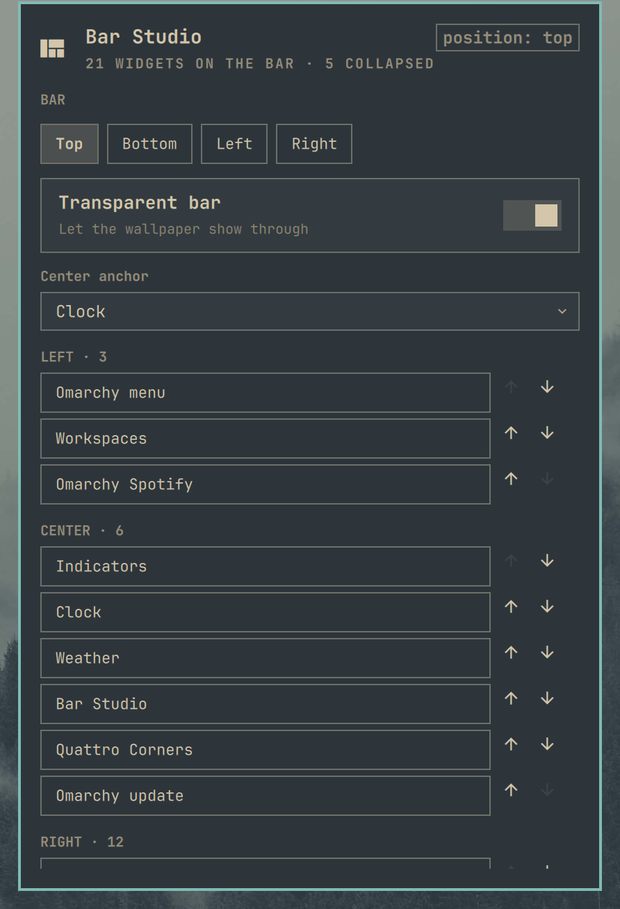
What it does
- Lists every widget in the
left,centerandrightsections in their real order - Select a widget, then move it to another section or one slot earlier/later
- Removes a widget from the bar, or adds any installed bar widget from a searchable list
- Collapses a widget into the tray drawer so it stays reachable but off the bar, and releases it again
- Sets the bar position (top/bottom/left/right), transparency, and the center anchor
- Saves the whole bar as a named profile and applies it later — useful for "Work", "Presenting", "Minimal"
Edits go through the same helpers the bar's own drag gestures use, so a change made here and a change made by dragging a widget produce the same shell.json write.
Requirements
- Omarchy 4 / Quickshell plugin support
- For the collapse feature: a tray widget that reads a
hostedarray from its own layout entry. The stockomarchy.traydoes not — it honours onlypinnedandhidden. With the stock tray, collapsing hides the widget from the bar and keeps it enabled, but it will not appear inside the drawer; use Bar Studio's own "Collapsed in tray" list to put it back.
Configuration
Layout profiles are stored on the widget's own entry:
{
  "id": "andreconde.bar-studio",
  "profilesJson": "[]"
}
Profiles capture every section, the bar position, transparency and the center anchor. There is nothing to configure by hand — the panel writes this for you.
Notes
- "Collapse into tray drawer" removes the widget from the visible layout, keeps it enabled through a top-level
plugins[]entry, and adds it to the tray entry'shostedarray. Whether it then appears in the drawer depends on the tray implementation reading that array — the stock tray does not (see Requirements). Either way the widget stays enabled and Bar Studio can restore it. - Removing a widget disables it. Adding it back from the searchable list re-enables it in the section you pick.
Install
omarchy plugin add https://github.com/andreconde21/omarchy-bar-studio.git --enable --yes
Remove
omarchy plugin remove andreconde.bar-studio --yes
Removing the plugin leaves your bar exactly as it is — it only takes away the editor. Layout profiles live on the widget's own entry in shell.json and go with it.
License
MIT — see LICENSE.