
Omahub
← All plugins
A

Omarchy Restore

by André Conde

Browse system snapshots and trigger restore actions from an Omarchy panel.

Security review

Review recommended · 3 findings

Deterministic scan — not a security guarantee

Medium
Risk level
Medium
Analyzed commit
f78dd98
Scanned
1 month ago
  • medium sudo Panel.qml:205

    Command runs with sudo, elevating the process beyond the plugin environment.

    sudo and "
  • medium sudo Panel.qml:221

    Command runs with sudo, elevating the process beyond the plugin environment.

    sudo sh -lc " + shellQuote("cd " + path + " && exec ${SHELL:-bash}"))
  • medium sudo Panel.qml:400

    Command runs with sudo, elevating the process beyond the plugin environment.

    sudo in a terminal)"

Automated analysis only — not a security guarantee.

AI advisory review

No obvious issues detected

Language-model assessment · ~deepseek/deepseek-v4-flash-latest — advisory only

Low
AI risk level
Low
Recommendation
install
Model
~deepseek/deepseek-v4-flash-latest
Analyzed commit
f78dd98
Reviewed
1 month ago

Low risk: this is a transparent Snapper snapshot browser/restore widget. The sudo/pkexec calls flagged by the deterministic scan are the documented create/restore/browse actions, all user-initiated, and the destructive restore path requires an explicit confirmation. No obfuscation, hidden persistence, credential theft, or install-time scripts were found.

  • The widget can trigger root-level operations (snapshot create/restore and a root shell inside a snapshot); this is by design and user-initiated, but is inherently powerful.
  • Restore can roll back the system; mitigated by an in-panel confirmation naming the snapshot and by limine-snapper-restore's own picker.
  • Browse opens an interactive root shell inside a snapshot; users should understand this is a root shell.
  • The deterministic scan's medium rating is driven by sudo/pkexec usage, which review confirms is intentional and transparent rather than hidden elevation.
How this check works

This review combines the deterministic scan (the rule-based results above) with an independent look at the plugin's code by a language model. The model reads a trimmed sample of the repository's files, the manifest, and the README, then gives a plain-language risk level and a recommendation: install (no notable danger), review (look closer first), or avoid (clearly dangerous).

It runs on the same analyzed commit as the deterministic scan and is strictly advisory — it is not a security guarantee and never blocks a plugin by itself. A human moderator still reviews plugins before they are listed.

AI advisory only — automated analysis, not a security guarantee.

Install
$ omarchy plugin add https://github.com/andreconde21/omarchy-restore --enable
System #quickshell #system

Omarchy Restore

Omarchy bar widget for browsing Snapper system snapshots and starting a restore, without dropping into a terminal to find out what exists.
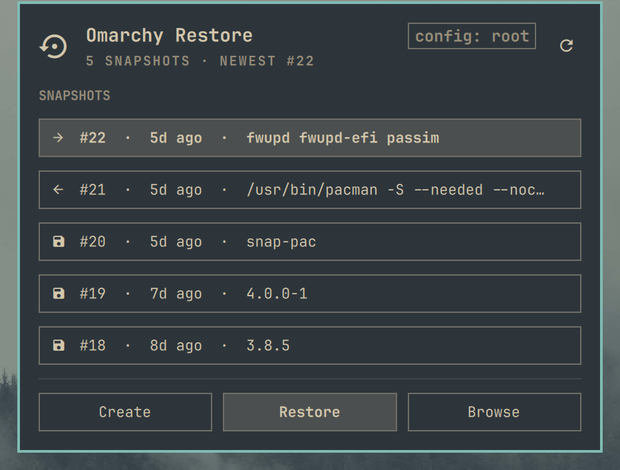
Preview

What it does

  • Lists the snapshots in your Snapper config, newest first
  • Shows each snapshot's number, age, description, and whether it is a pre, post or standalone snapshot
  • Pairs post snapshots with the pre they belong to, in the tooltip
  • Creates a new snapshot (omarchy snapshot create)
  • Starts the restore flow (omarchy snapshot restore, which runs limine-snapper-restore) behind a confirmation naming the snapshot you picked
  • Opens a root shell inside a snapshot so you can recover a single file instead of rolling the whole system back

Requirements

  • Omarchy 4 / Quickshell plugin support
  • snapper, configured with at least one config
  • bash — the listing command uses process substitution to bound both output streams, which dash/sh cannot parse
  • limine-snapper-restore for the restore flow
  • sudo and a terminal (xdg-terminal-exec, launched via uwsm-app) for Create, Restore and Browse
  • polkit (pkexec) only if listing snapshots turns out to need elevation on your system — see Notes

Configuration

{
  "id": "andreconde.omarchy-restore",
  "configName": "root"
}

Set configName if your snapshots live in a config other than root. Run snapper list-configs to see what you have.

Notes

  • Listing runs unprivileged. On a normal Arch/Omarchy setup snapper list works as your user, so opening the panel does not ask for a password. Only if that call fails does the panel retry under pkexec.
  • Snapshot 0 is the live system rather than a snapshot, so it is not listed.
  • Restore asks twice: once in the panel, naming the snapshot and when it was taken, and again in the terminal flow itself. Creating and restoring genuinely need root, so both prompt there.
  • Browsing a snapshot's files needs root too, because /.snapshots is 0750.

Install

omarchy plugin add https://github.com/andreconde21/omarchy-restore.git --enable --yes

Remove

omarchy plugin remove andreconde.omarchy-restore --yes

Your snapshots are managed by Snapper and are untouched by removing this plugin.

License

MIT — see LICENSE.