
Omahub
← All plugins
A

Project Focus

by André Conde

Launch a named project setup and apply a focus mode from the Omarchy bar.

Security review

No obvious issues detected

Deterministic scan — not a security guarantee

None
Risk level
None
Analyzed commit
633add8
Scanned
1 month ago

No potentially dangerous behavior detected in the analyzed commit.

Automated analysis only — not a security guarantee.

AI advisory review

No obvious issues detected

Language-model assessment · ~deepseek/deepseek-v4-flash-latest — advisory only

Low
AI risk level
Low
Recommendation
install
Model
~deepseek/deepseek-v4-flash-latest
Analyzed commit
633add8
Reviewed
1 month ago

The plugin is a project launcher that executes user-configured commands and applies focus modes. The code is well-structured with input bounds and sanitization, and it only runs commands on explicit user action. No malicious or dangerous behavior was found.

  • Executes arbitrary commands from the projectsJson config, but this is the intended feature and the user controls the config.
  • Uses shell commands for workspace switching, but the workspace value is sanitized to alphanumeric and a few safe characters.
How this check works

This review combines the deterministic scan (the rule-based results above) with an independent look at the plugin's code by a language model. The model reads a trimmed sample of the repository's files, the manifest, and the README, then gives a plain-language risk level and a recommendation: install (no notable danger), review (look closer first), or avoid (clearly dangerous).

It runs on the same analyzed commit as the deterministic scan and is strictly advisory — it is not a security guarantee and never blocks a plugin by itself. A human moderator still reviews plugins before they are listed.

AI advisory only — automated analysis, not a security guarantee.

Install
$ omarchy plugin add https://github.com/andreconde21/omarchy-project-focus --enable
Productivity #Hyprland #quickshell #workspaces

Project Focus

Omarchy bar widget that starts a project — jump to its workspace, launch its apps — and puts the desktop into a matching focus mode.
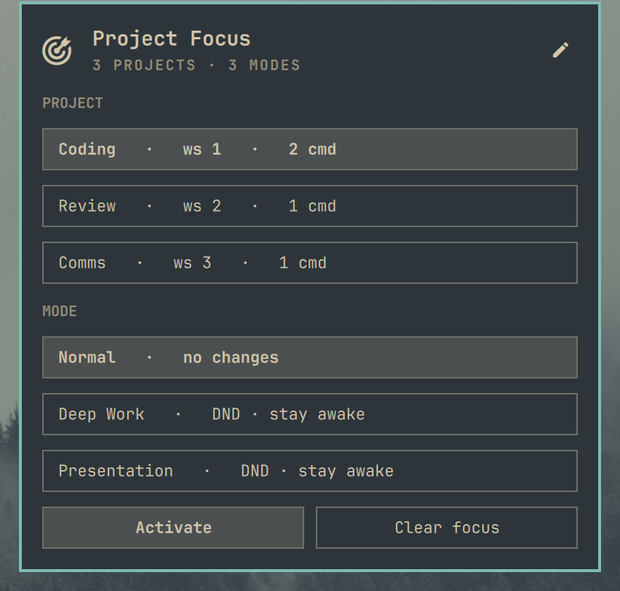
Preview

What it does

  • Keeps a list of projects, each with a workspace and any number of launch commands
  • Keeps a list of focus modes, each of which can silence notifications and block idle
  • Activating a project switches to its workspace, runs its commands, and applies the selected mode
  • "Clear focus" turns Do Not Disturb and stay-awake back off
  • Everything is edited in the panel as a form — projects, workspaces, commands and modes — with no JSON to hand-write

Requirements

  • Omarchy 4 / Quickshell plugin support
  • Hyprland, for workspace switching (both the 0.56+ Lua dispatcher and the older flat syntax are supported)
  • omarchy-shell for Do Not Disturb and the omarchy CLI for stay-awake — both ship with Omarchy

Configuration

The panel writes this for you; the stored shape is:

{
  "id": "andreconde.project-focus",
  "defaultProject": "coding",
  "defaultMode": "deep-work",
  "projectsJson": "[{\"id\":\"coding\",\"name\":\"Coding\",\"workspace\":1,\"commands\":[\"omarchy launch browser\"]}]",
  "modesJson": "[{\"id\":\"deep-work\",\"name\":\"Deep Work\",\"dnd\":true,\"stayAwake\":true}]"
}
  • workspace — set to 0 to stay on the current workspace.
  • commands — each entry runs through sh -lc.

Notes

  • Activating is always an explicit action. The plugin does not relaunch your default project's apps on every shell restart; it only adopts the default mode.
  • Renaming a project or mode regenerates its id and keeps it unique.

Install

omarchy plugin add https://github.com/andreconde21/omarchy-project-focus.git --enable --yes

Remove

omarchy plugin remove andreconde.project-focus --yes

If a focus mode is active, press Clear focus in the panel before removing — or afterwards run omarchy-shell notifications setDnd off and omarchy toggle idle allow-idle to undo it.

License

MIT — see LICENSE.