
Quattro Corners
macOS-style hot corners for Omarchy. Push the pointer into a screen corner, hold briefly, and the action assigned to that corner fires.
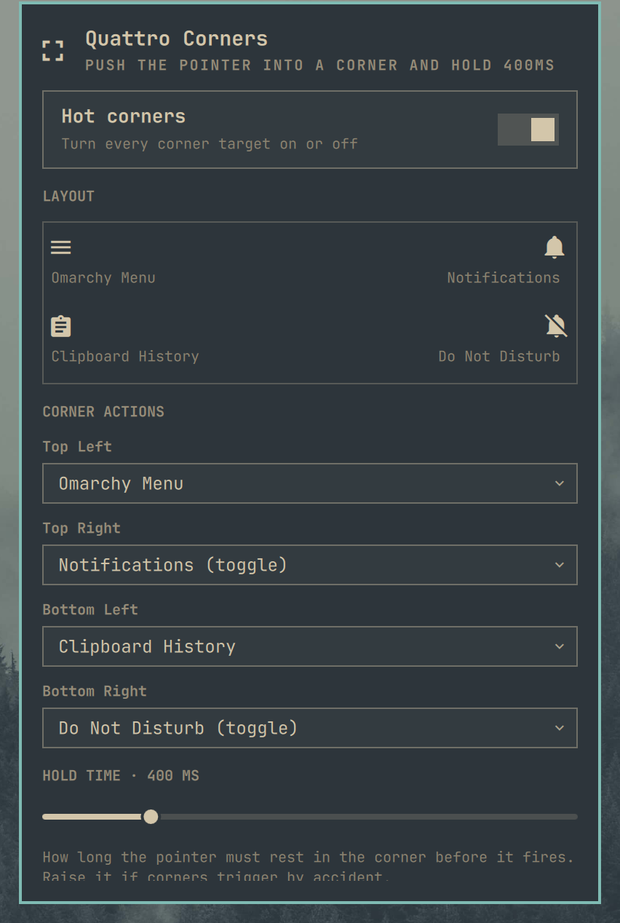
What it does
- Assigns an independent action to each of the four screen corners, on every monitor
- Ships with useful defaults instead of placeholders:
- top-left — Omarchy Menu
- top-right — Notifications (toggle)
- bottom-left — Clipboard History
- bottom-right — Do Not Disturb (toggle)
- Shows a miniature of the screen in the panel so all four assignments read at a glance
- Adjustable hold time and corner size, so corners stop firing by accident
- A master on/off switch for all corners
Actions
| Action | What happens |
|---|---|
| Omarchy Menu | Opens the Omarchy menu |
| Notifications (toggle) | Replays notification history; hitting the corner again dismisses it |
| Do Not Disturb (toggle) | Turns notification silencing on and off |
| Clipboard History | Opens the clipboard picker |
| Emoji Picker | Opens the emoji picker |
| Lock Screen | Locks the session |
| Turn Display Off | Blanks the displays (hyprctl dispatch dpms off) |
| Custom Command… | Runs any shell command you type into the panel |
| Nothing | Leaves that corner inert |
Pick Custom Command… for a corner and a text field appears underneath it. Type the command, press Enter or hit Save, and that corner runs it.
Requirements
- Omarchy 4 / Quickshell plugin support
- Hyprland (only for the "Turn Display Off" action)
omarchy-shell, which ships with Omarchy
Corner actions summon other first-party plugins — Omarchy Menu, Clipboard History, Emoji Picker, notifications. If one of those is disabled, the corner assigned to it does nothing.
Configuration
Everything is set from the panel. The stored shape is:
{
  "id": "andreconde.quattro-corners",
  "enabled": true,
  "dwellMs": 400,
  "targetSize": 24,
  "topLeftAction": "menu",
  "topRightAction": "notifications",
  "bottomLeftAction": "clipboard",
  "bottomRightAction": "dnd",
  "topLeftCommand": ""
}
dwellMs— how long the pointer must rest in the corner before it fires. Raise it if corners trigger by accident.targetSize— the size in pixels of the corner hit area.
Notes
- A corner fires once per entry. Resting in the corner does not repeat it; leaving and returning re-arms it.
- The plugin ships both a service (the corner targets) and a bar widget (the configuration panel). The service reads its settings straight from
shell.json, so changes made in the panel apply without restarting the shell.
Install
omarchy plugin add https://github.com/andreconde21/omarchy-quattro-corners.git --enable --yes
Remove
omarchy plugin remove andreconde.quattro-corners --yes
The corner targets disappear with the plugin. Nothing else on the system is touched.
License
MIT — see LICENSE.