
Omarchy Battery Protection
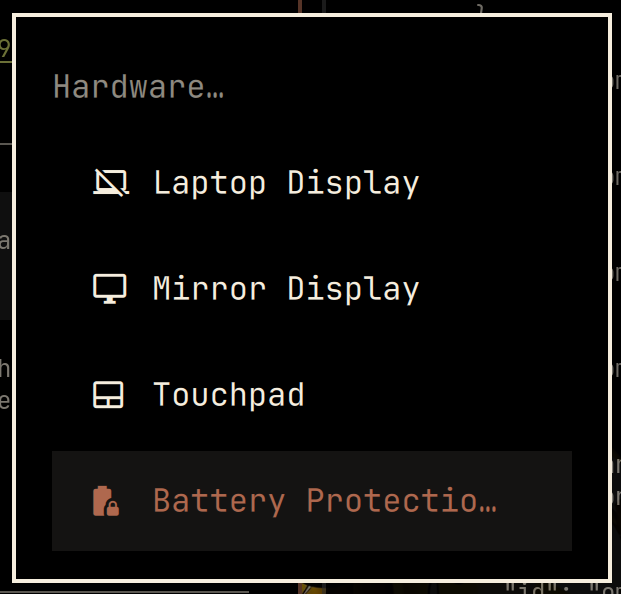
An Omarchy Quattro plugin for switching between UPower's protected charging limit and normal full-capacity charging from Trigger → Hardware, with an optional bar icon that is hidden by default.
Features
- Uses UPower's standard D-Bus API.
- Battery Protection entry under Trigger → Hardware.
- Optional bar icon, hidden by default with remembered visibility.
- Shows
battery-lockwhile protection is enabled. - Shows
battery-lock-openwhile protection is disabled. - Provides a tooltip with the current state and configured limit.
- Updates the visible icon immediately after UPower confirms a change.
- Shows the applied mode and current limit in a Trigger-menu notification.
- Hides itself when UPower reports that charge limiting is unsupported.
Requirements
- Omarchy Quattro.
- UPower with
EnableChargeThresholdsupport. - A battery and Linux driver for which UPower reports
ChargeThresholdSupported: true. - A charge threshold configured by the system hardware database or firmware.
Check support and the configured threshold:
upower --battery | grep -E 'charge-threshold|charge-end-threshold'
UPower exposes the configured threshold as an on/off feature. This plugin does not choose the percentage: enabling protection selects the limit configured by the system, while disabling it restores full charging. The icon tooltip shows the configured limit reported by UPower.
Install
Install and enable the plugin from GitHub:
omarchy plugin add https://github.com/andrewf403/omarchy-battery-protection.git --enable
Add the Battery Protection entry to Trigger → Hardware:
~/.config/omarchy/plugins/andrewf.battery-protection/install.sh
The widget is placed immediately before Omarchy's battery widget. Its icon is hidden by default.
Usage
Select Trigger → Hardware → Battery Protection, or click the bar icon, to toggle the configured charge limit. Trigger-menu changes show a notification with the applied mode and charge limit.
When visible, the bar icon indicates the current state without changing color:
battery-lock— protection is enabled; clicking disables it.battery-lock-open— protection is disabled; clicking enables it.
Toggle the optional icon from the command line:
omarchy-shell andrewf.battery-protection toggleIcon
You can also control or query it explicitly:
omarchy-shell andrewf.battery-protection showIcon
omarchy-shell andrewf.battery-protection hideIcon
omarchy-shell andrewf.battery-protection getIconVisible
Icon visibility is saved as showIcon on the widget entry in
~/.config/omarchy/shell.json and is preserved across shell restarts.
The bundled helper can also query or change the standard UPower state directly:
~/.config/omarchy/plugins/andrewf.battery-protection/battery-protection status
~/.config/omarchy/plugins/andrewf.battery-protection/battery-protection enable
~/.config/omarchy/plugins/andrewf.battery-protection/battery-protection disable
~/.config/omarchy/plugins/andrewf.battery-protection/battery-protection toggle
Remove
If protection is enabled and you want to restore normal full-capacity charging, toggle it off before removal. Remove the Trigger entry, then remove the plugin:
~/.config/omarchy/plugins/andrewf.battery-protection/uninstall.sh
omarchy plugin remove andrewf.battery-protection
The first command removes only the menu integration. The second removes the widget and its bundled helper.
License
MIT