
Tic-Tac-Toe
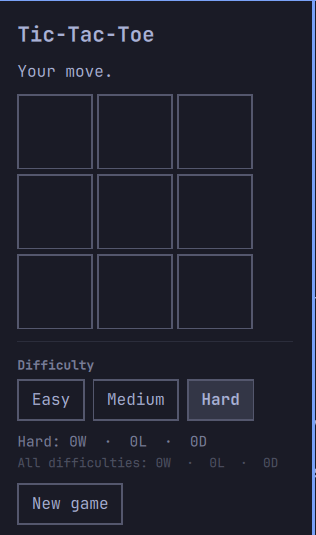
Play tic-tac-toe against the computer, or against a matched stranger online,
from the Omarchy bar. Click the # icon to open the board.
Made by anel (@anelcelik).
Rules
- You're always X, the computer is always O.
- Who opens the game alternates: you, computer, you, computer, ... New game keeps the alternation going even if you close the popup mid-series.
- Wins/losses/draws are tracked per difficulty (an Easy win and a Hard win aren't the same thing), plus a subtle all-time total underneath.
Play online
The "Mode" tab at the top of the popup switches between Offline (vs. the bot) and Online (vs. a matched stranger). Online:
- Connects to a small matchmaking relay and joins the queue automatically.
- Pairs you with whoever's next in line — first in gets X.
- The relay is the referee: win/loss/draw is decided there, not locally, so your client and your opponent's can never end up disagreeing about how a match ended.
- No rematches with the same opponent, no reconnect if you or they drop — closing the popup mid-match doesn't end it (the connection stays open in the background, same as the bot game keeps its board), but losing the connection does. If your opponent leaves, "Find new opponent" requeues you.
- Switching back to Offline (or the bar widget going away) disconnects — your opponent just sees the same "opponent left" they'd see from any other drop.
Mode isn't remembered across a shell restart on purpose: it always starts back on Offline rather than silently rejoining a queue in the background.
Online play talks to companion.py, a small dependency-free script this
plugin spawns as a child process — it bridges stdin/stdout JSON lines to a
WebSocket connection, since QML has no raw-socket API of its own. It's a
dumb relay of bytes on purpose: it doesn't parse or validate game messages,
so the online protocol only needs to be understood in two places (the relay
and Panel.qml), not three. Only requirement: python3 on PATH (standard
on any Omarchy install already) — no pip packages, no Node.
If you're running your own relay for development, point Panel.qml's
relayUrl property at it — it defaults to the live one this plugin talks to.
Bot difficulty
Set from the popup, persisted to shell.json:
- Easy — blocks your immediate wins, otherwise plays at random. Never hunts for its own win, so it's genuinely beatable.
- Medium — plays perfectly most of the time, but 35% of moves are random. Beatable if you catch the slip.
- Hard — full minimax with alpha-beta pruning, every move. Provably unbeatable: worst case is a draw.
Game logic lives in Bot.js, independent of QML, if you want to tweak the
bot (e.g. change Medium's randomness from 35%, or add a "blocks 2-in-a-rows"
mid-tier).
Files
manifest.json— plugin identity and bar-widget registrationPanel.qml— bar icon + popup UI + game state, offline and onlineBot.js— offline bot logic: winner detection, minimax, difficulty tierscompanion.py— stdio↔WebSocket bridge to the online relay
Development
This plugin lives directly under ~/.config/omarchy/plugins/anel.tictactoe/
as its own git checkout. Saving any file here hot-reloads it into the running
shell; if a change doesn't seem to apply (especially anything affecting bar
slot sizing), force a clean reload with:
omarchy-restart-shell
Validate before committing:
omarchy plugin validate ~/.config/omarchy/plugins/anel.tictactoe
qmllint -I /usr/share/omarchy/shell ~/.config/omarchy/plugins/anel.tictactoe/Panel.qml
Remove
omarchy plugin remove anel.tictactoe