
QuickBib Omarchy Plugin
An Omarchy shell plugin for QuickBib:
fetch a BibTeX entry and an APS-style \bibitem for a DOI, arXiv ID, or paper URL,
straight from the bar. Powered by the doi2bib3
Python package.
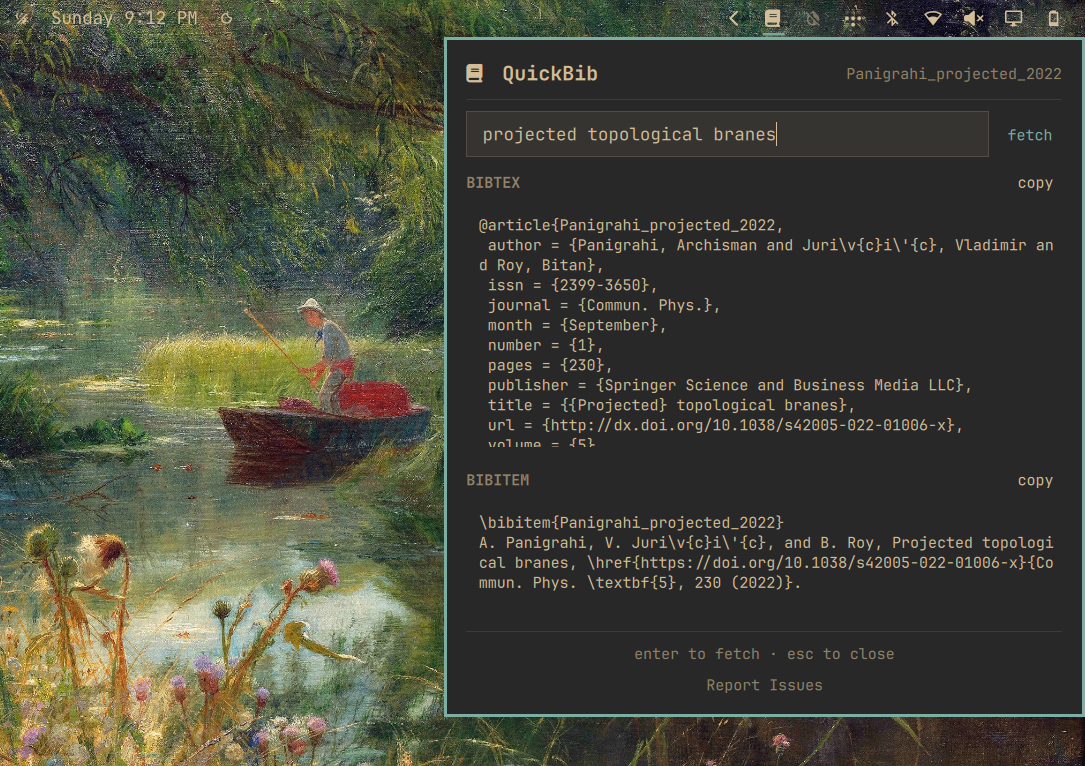
Note: While this plugin uses arXiv and crossref APIs and does not use any AI/ML algorithms in the runtime, it was initially vibe coded with OpenCode.
Install
omarchy plugin add https://github.com/archisman-panigrahi/QuickBib-omarchy-plugin.git --enable
Remove
omarchy plugin remove archisman-panigrahi.quickbib
Usage
- Click the book glyph in the bar's right section, or run:
omarchy-shell shell toggle archisman-panigrahi.quickbib - Paste a DOI (
10.1103/PhysRevA.100.042101), an arXiv ID (2401.12345), or a publisher/article URL. - Press Enter or click fetch.
- Copy the whole entry with its section's copy button, or select any part of the text and press Ctrl+C.
- "Report Issues" at the bottom of the panel opens this repository's issue tracker.
External dependencies
| Dependency | Purpose | Notes |
|---|---|---|
Python package doi2bib3 |
Fetches BibTeX from DOI / arXiv / URL | On Arch/Omarchy: AUR package python-doi2bib3. The plugin detects when it is missing and offers a one-click guided install. |
wl-copy |
Copy buttons | Ships with Omarchy's clipboard tooling. |
About the installer button: Omarchy never executes plugin code at install
time, so nothing is installed silently. When the dependency is missing, the
panel explains exactly what will happen and only runs Omarchy's own packaged
helper (omarchy-pkg-aur-add python-doi2bib3) in a floating terminal after you
click Install — you will see yay's output and can enter your sudo password
there. On non-Arch systems, install doi2bib3 into your user environment by hand
(e.g. a venv or pipx-style setup) instead.
Layout
scripts/quickbib_fetch.py   thin bridge: identifier -> one JSON result
Model.js                    pure: constants + helper-output parsing
Service.qml                 non-visual: Process objects, clipboard, dep probe
Panel.qml                   render only: input field, results, copy buttons
One network pass per lookup: the BibTeX is fetched once and the \bibitem
is derived locally via format_bibtex_to_aps_bibitem.
The fetch helper bounds each network
response to 250 KiB and its JSON output to 250 KiB before stdout is collected by
QML.
Why a Python helper script? QML cannot import Python packages, and every
bit of the actual work (DOI/arXiv/publisher resolution, BibTeX retrieval,
\bibitem formatting) lives in doi2bib3. The script is deliberately thin
glue — argparse, error handling, JSON output, nothing else — so all citation
logic stays in doi2bib3 where it is maintained and tested. The alternative
(reimplementing doi2bib3 in JavaScript) would be true duplication.
Settings
In the shell settings panel for the widget:
- Network timeout (seconds) — default 15.
Tests
python3 -m unittest discover -s tests
The suite stubs doi2bib3, so it never touches the network.
Local testing
Automated checks (from a checkout of this repo):
python3 -m unittest discover -s tests        # unit tests (network stubbed)
qmllint Panel.qml Service.qml                # QML parse check (exit 255 = syntax error)
omarchy plugin validate .                    # manifest schema validation
Fetch helper against real identifiers:
scripts/quickbib_fetch.py 10.1103/PhysRevA.100.042101   # DOI
scripts/quickbib_fetch.py 2401.12345                    # arXiv ID
scripts/quickbib_fetch.py https://arxiv.org/abs/1706.03762  # URL
scripts/quickbib_fetch.py 10.9999/not-a-real-doi        # error path (JSON, exit 1)
Live UI testing. If you installed with omarchy plugin add, your
~/.config/omarchy/plugins/archisman-panigrahi.quickbib is a clone of this repo and hot-
reloads on every save; structural changes (new elements/properties) need
omarchy restart shell. Then:
omarchy-shell archisman-panigrahi.quickbib toggle # open/close the panel from CLI
In the panel: fetch a DOI/arXiv ID/URL, select part of the output with the mouse, Ctrl+C to copy it, try both section copy buttons, click Report Issues.
Testing the missing-dependency flow without uninstalling anything. The plugin exposes debug IPC that fakes the probe result:
omarchy-shell archisman-panigrahi.quickbib.dev simulateMissingDep   # notice + Install button appear, glyph dims
omarchy-shell archisman-panigrahi.quickbib.dev simulateDepOk        # back to normal
While simulating "missing", clicking Install still runs the real
installer — safe because omarchy-pkg-aur-add is idempotent for an already-
installed package (--needed) — and the periodic recheck probes the real
state, so the panel self-heals to "ok" once the import succeeds. That makes
the entire install path testable end-to-end without ever removing the package.
License
GPL-3.0-only — same as doi2bib3. See LICENSE.