
IVPN — Omarchy bar widget
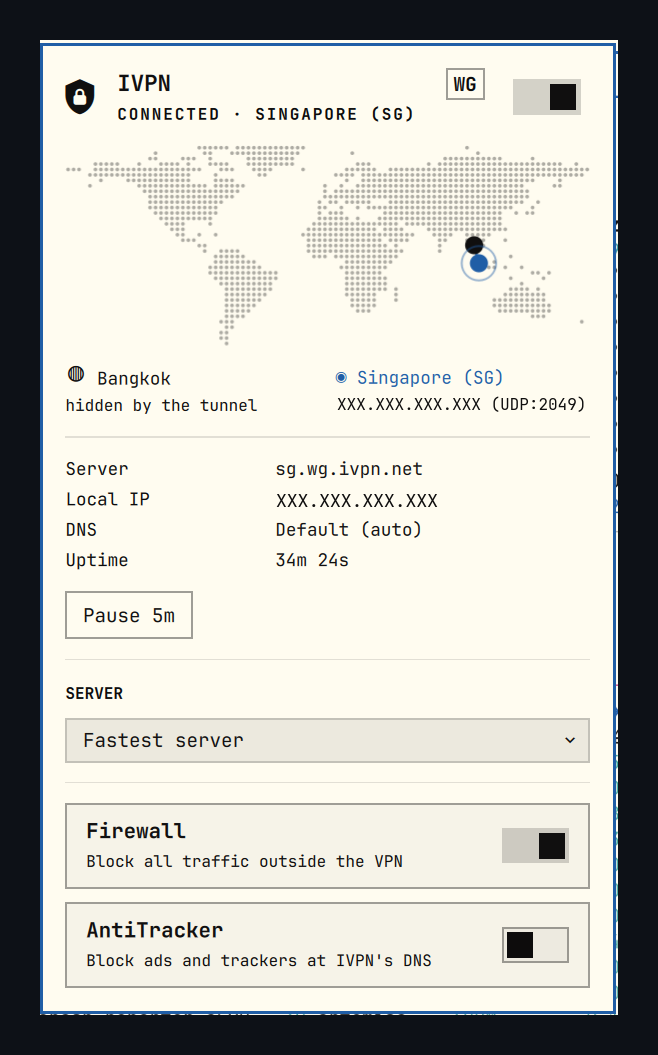
A bar-widget plugin for Omarchy that drives IVPN from the top bar: connect, disconnect, pause, pick a server, and see where your traffic comes out on a world map.
Requirements
-
Omarchy with the Quickshell plugin system (
omarchy plugin/omarchy bar). -
The IVPN client installed, providing
ivpnonPATH, withivpn-servicerunning:systemctl status ivpn-service -
A logged-in account. The widget cannot create one; log in once with:
ivpn login ACCOUNT_IDUntil then the widget shows "Not logged in" and the switch is inert.
The plugin shells out to ivpn only (status, servers, connect,
disconnect, connection -pause/-resume, firewall, antitracker). It needs
no elevated access, bundles no binaries, and never handles your Account ID.
It reads two files it does not own, both read-only:
~/.config/IVPN/ivpn-settings.json— the IVPN desktop app's settings, for exact server coordinates. The daemon'sservers.jsonhas them too but is0600 root./usr/share/zoneinfo/zone.tab— public-domain timezone coordinates.
The only file it writes is ~/.config/omarchy/ivpn-widget.json, holding the
selected server and, if you enable the lookup below, your cached public address.
Use
- Left click — open the panel.
- Middle click — connect/disconnect without opening.
- Right click — refresh.
In the panel: c connect/disconnect, p pause/resume, f firewall,
a AntiTracker, r refresh, Esc close.
Map
Home and the tunnel exit are plotted on an equirectangular world with an arc between them; multi-hop draws both legs. The land raster is generated from Natural Earth 1:110m land polygons, which are public domain, and is embedded — the map needs no network and no map library.
Exit coordinates come from IVPN's own data, falling back to a zone.tab city
lookup. Your position is the reference city of your system timezone unless
you turn on the public-IP lookup, and the panel says which of the two it is
rather than implying a precision it does not have.
Pause
ivpn connection -pause suspends the tunnel for a set number of minutes and
restores it by itself, which a plain disconnect will not do. One button is
rendered per entry in pauseDurations, and while paused they are replaced by a
single Resume.
Firewall
The Firewall toggle is IVPN's kill switch (ivpn firewall -on|-off), which
blocks all traffic outside the tunnel. Enabling it while disconnected cuts your
connectivity until you connect, so that direction asks for confirmation first;
turning it off never does.
Settings
Per widget, in ~/.config/omarchy/shell.json:
| Key | Default | Meaning |
|---|---|---|
refreshIntervalSec |
5 |
How often ivpn status is polled (2–60). |
protocol |
WireGuard |
Which protocol to list servers for and connect with. WireGuard or OpenVPN. |
pauseDurations |
5,15,30 |
Durations offered as pause buttons. Up to four, each 1–1440 minutes. |
publicIpLookup |
false |
See below. |
IVPN publishes a separate hostname per protocol (sg.wg.ivpn.net versus
sg.gw.ivpn.net), so the list is filtered to one rather than showing each city
twice. If the setting ever matches nothing, the widget lists every server
instead of showing an empty picker.
publicIpLookup
Off by default, and the widget's only network request. When on, it asks
https://api.ivpn.net/v4/geo-lookup what address the internet sees, and shows
your real city and ISP on the map instead of the timezone estimate.
The reply carries an isIvpnServer flag, so the widget can tell your own
address from the tunnel exit rather than inferring it from connection state. A
lookup made while connected necessarily reports the exit, so your own address is
only recorded during a disconnected moment and then cached; while connected the
panel says "hidden by the tunnel" rather than showing a stale value as current.
This is the setting to turn on if you travel. The timezone estimate is only as
right as your system clock, and a laptop carried to another country without
changing its clock will keep claiming the old city. A fresh lookup happens on
every connect and disconnect, so the position corrects itself the first time the
tunnel goes down in the new place. The cached reading is shown with its age
(203.0.113.45 · 2d ago) so a stale one is visible as stale.
Note that the Tunnel IP in the details is the address IVPN assigns you inside the tunnel. It is the same wherever you are and says nothing about your location; the same goes for your LAN address.
IPC
omarchy-shell artemisa81.ivpn status       # Connected / Paused / Disconnected / ...
omarchy-shell artemisa81.ivpn toggle       # open or close the panel
omarchy-shell artemisa81.ivpn connect
omarchy-shell artemisa81.ivpn disconnect
omarchy-shell artemisa81.ivpn pause
omarchy-shell artemisa81.ivpn resume
omarchy-shell artemisa81.ivpn refresh
Remove
omarchy plugin disable artemisa81.ivpn
rm -rf ~/.config/omarchy/plugins/artemisa81.ivpn ~/.config/omarchy/ivpn-widget.json
Credits
World land raster derived from Natural Earth (public domain). Timezone coordinates from the IANA time zone database (public domain).