
OMEENOTES
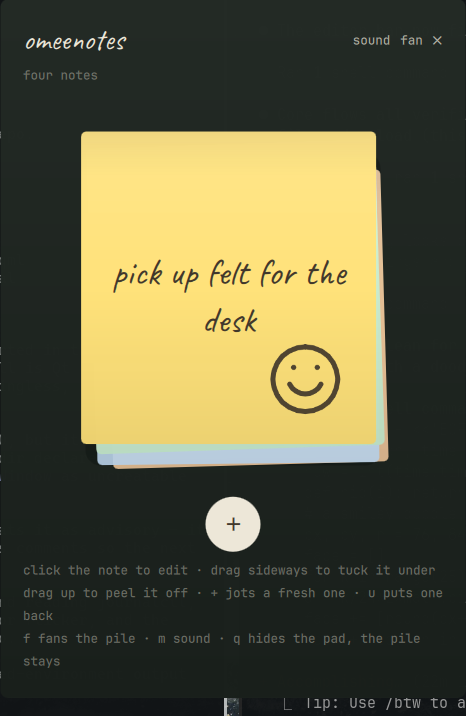
OMEENOTES is a plugin for the Omarchy shell. It is a pocket pad of sticky notes: one pile of paper on a felt desk. Jot a note, stack it, peel it off when it is done. There are no statuses, no folders and no accounts — a note exists until you peel it off, and the top of the pile is whatever you put there.
OMEENOTES is a port of the meenotes web app. It keeps the paper: the five colors, the handwriting, the doodle pen, the glue strip, and the way old notes yellow and dog-ear on the pile.
OMEENOTES does not use the network. Notes stay in one local file.
Terminology
| Term | Definition |
|---|---|
| The pile | The stack of notes. The top of the pile is the note you see. |
| The pad | The floating panel that shows the pile. |
| The bar widget | The small pile icon in the Omarchy bar, with the note count. |
| Tuck | Move the top note under the pile, so the next note surfaces. |
| Peel | Remove a note for good — with six seconds of regret to undo it. |
| The fan | A grid of every note. Click one to fly it to the top. |
Requirements
| Item | Function |
|---|---|
Omarchy 4 (Quattro), with omarchy-shell |
Hosts the plugin. |
pw-play (PipeWire) |
Plays the paper sounds. Optional — without it the desk is silent. |
Omarchy supplies PipeWire. The plugin has no other dependencies; the handwriting font (Caveat, OFL) ships in the plugin directory.
Installation
-
Add the plugin and enable it:
omarchy plugin add https://github.com/asfarsadewa/omarchy-omeenotes.git --enableTo read the code before the plugin runs, omit
--enable. The plugin then stays disabled. Enable it later with:omarchy plugin enable asfarsadewa.omeenotes right -
Open the pad:
omarchy-shell omeenotes pad
The bar widget shows at the right end of the bar. On the first run the pad holds three notes that explain themselves.
Removal
-
Disable the plugin:
omarchy plugin disable asfarsadewa.omeenotes -
Remove the plugin files:
omarchy plugin remove asfarsadewa.omeenotes -
To delete your notes as well, remove the state directory:
rm -rf ~/.local/state/omeenotes
OMEENOTES writes files only in that directory. It does not change the Omarchy configuration.
Operation
The pad
The pad is a floating panel, not a modal overlay. A click outside the pad goes to the window below it, and the pad stays where it is. Drag the pad by its header to move it. The pad takes the keyboard only after a click on it.
| You do | It does |
|---|---|
| Click the top note | Opens the editor in place — rewrite it, or re-paper it in one of five colors |
| Click the pen while editing | Doodle on the note with the mouse; the ↶ button takes back the last stroke. A doodle with no words is still a note |
| Drag it sideways | Tucks it under the pile so the next note surfaces |
| Drag it upward | Peels it off for good — an undo chip gives you six seconds of regret |
| Click the + below | Slaps a fresh blank note on top, ready to write |
| Click fan (top right) | Spreads the whole pile out; click a note to fly it to the top |
| Click sound / quiet (top right) | Turns the paper desk sounds off or on; the choice sticks |
Notes that sit on the pile too long start to show it: after a week the paper yellows a little and a corner dog-ears; after three weeks it fades properly. No badges, no nagging — the pile just looks like what it is.
Controls with the keyboard
Click the pad to use these keys.
| Key | Result |
|---|---|
enter or space |
Opens the editor on the top note. |
◂ ▸ |
Tucks the top note under the pile. |
delete |
Peels the top note off. |
n or + |
Jots a fresh note. |
f |
Opens or closes the fan. |
u |
Puts the last peeled note back. |
m |
Turns the paper sounds off or on. |
q or esc |
Hides the pad. The pile keeps its order. |
While the editor is open, esc or ctrl+enter sticks the note. Sticking a
note with no words and no doodle discards it; clearing a note that had
content gets the same six-second undo as a peel.
Controls of the bar widget
| Action | Result |
|---|---|
| Click with the left button | Shows or hides the pad. |
| Click with the middle button | Jots a fresh note and opens the pad on it. |
| Click with the right button | Tucks the top note under the pile. |
| Turn the scroll wheel | Riffles through the pile — read each note off the tooltip without opening the pad. |
The widget shows the pile icon and the note count. The icon dims when the pad is all clear. The tooltip shows the top note.
Keyboard shortcuts in Hyprland
The plugin supplies an IPC target with the name omeenotes. Add shortcuts
to ~/.config/hypr/bindings.conf:
bindd = SUPER, N, Sticky notes, exec, omarchy-shell omeenotes pad
bindd = SUPER SHIFT, N, Jot a note, exec, omarchy-shell omeenotes add
The IPC target accepts these methods: pad, show, hide, add, tuck,
peel, undo, count and state. peel respects the same six-second
undo as the pad.
The state file
Notes live in ~/.local/state/omeenotes/notes.json:
{
  "version": 1,
  "quiet": false,
  "notes": [
    { "id": "…", "text": "…", "color": "butter", "createdAt": 1787741067518 }
  ]
}
Array order is pile order: index 0 is the note on top. color is one of
butter, blush, mint, sky, tangerine. A note with a doodle carries
an ink field: a list of strokes, each a flat [x0,y0,x1,y1,…] list
normalized to a 100×106 paper — the same format the meenotes web app
stores, so strokes render identically in both.
The file is written atomically on every change. A file that does not parse
is set aside as notes.json.corrupt rather than overwritten.
Differences from the web app
The port keeps the pile, the editor, the pen, the fan, the undo chip, the
aging paper and the paper sounds. It leaves behind what belongs to a phone:
touch flicks become mouse drags, and the photograph feature (render the
pile to a PNG for the share sheet) is not ported — on a desktop,
hyprshot already photographs anything. The fan's drag-to-restack modes
are not ported either; the fan brings a note to the top, which is what the
pile actually needs.
Development
To make changes, make a symbolic link to the local copy:
ln -sfn "$PWD" ~/.config/omarchy/plugins/asfarsadewa.omeenotes
omarchy-shell shell rescanPlugins
Edits through the symlink may not trigger the shell's file watcher; run
omarchy-restart-shell to pick them up. To see errors:
journalctl --user -f | grep -i omeenotes
The plugin is three QML files. qml/Service.qml owns the pile, the state
file, the sounds and the IPC target; qml/Pad.qml draws the desk and turns
drags, clicks and keys into service calls; qml/BarWidget.qml is the pile
at a glance.
Credits
The design, the interaction grammar and the paper sounds come from
meenotes, the mobile web app
this plugin ports. The handwriting is
Caveat by Impallari Type,
bundled under the SIL Open Font License (see fonts/OFL.txt).
License
MIT. Refer to the LICENSE file.