
OMEN
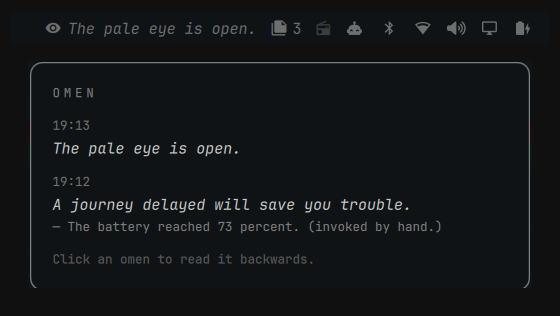
OMEN is a plugin for the Omarchy shell. It provides a bar widget, a background service, and an overlay panel. The service monitors local system conditions. When a condition satisfies a rule, the bar widget displays one short line of text. This line is called an omen.
The mapping from system event to text is deterministic. Each rule produces one fixed text. The same event produces the same text on every machine and on every occurrence. The plugin does not use a language model and does not use a random number generator.
The plugin does not access the network. All inputs are local files and local sockets. The bar widget does not display the cause of an omen. The cause of each omen is recorded and can be displayed in the overlay panel on request.
Terminology
| Term | Definition |
|---|---|
| The eye | The bar widget. Its color indicates state: dimmed when no unread omen exists, full brightness when an unread omen exists. |
| Omen | One line of text, at most 60 characters. It is displayed in the bar next to the widget glyph and is removed automatically. |
| The reading | The overlay panel. It lists the most recent omens, up to seven. |
| Trigger | The system event that caused an omen. Each list entry in the overlay can be expanded to show its trigger. |
| Linger interval | The period an omen remains visible in the bar: 20 minutes. |
| Quiet period | The minimum interval between two omens: 90 minutes. |
Rule engine
- The rule set contains 24 rules. Each rule maps one event condition to one fixed text.
- Each rule has an individual cooldown interval. Most cooldown intervals are approximately one day.
- A global quiet period of 90 minutes applies across all rules.
- When two or more rules fire in the same evaluation cycle, the engine emits the rule with the highest priority and discards the others. Discarded events are not queued.
- The history retains the seven most recent omens. Older entries are removed.
- The plugin has no configuration options.
The rule set is defined in omen/rules.py. This document does not
enumerate the rules; non-disclosure of the trigger conditions is a design
decision. Because the engine is deterministic, identical texts observed on
different machines indicate identical trigger events.
Requirements
| Item | Function |
|---|---|
Omarchy 4 (Quattro), with omarchy-shell |
Hosts the plugin. |
| Python 3 | Executes the rule engine. Supplied by Omarchy. |
| Hyprland | Supplies window events. Optional. |
Absent data sources do not cause errors. A rule with no available data source does not fire. The plugin has no further dependencies.
Installation
-
Add the plugin and enable it:
omarchy plugin add https://github.com/asfarsadewa/omarchy-omen.git --enableTo review the code before execution, omit
--enable. The plugin then remains disabled after installation. Enable it with:omarchy plugin enable asfarsadewa.omen right -
No further steps are required. The widget operates without user input.
Removal
Remove the plugin with:
omarchy plugin remove asfarsadewa.omen
Removal does not delete the state file. To delete the stored omens and the cooldown timestamps, also remove the state directory:
rm -r ~/.local/state/omen
Operation
- The bar widget displays an omen when a rule fires. The text is removed after the linger interval.
- A click on the bar widget opens the overlay panel. Opening the panel marks all omens as seen.
- A click on a list entry in the panel shows the trigger of that entry.
- The Escape key, the
qkey, or a click outside the panel closes it.
Shell IPC interface
omarchy-shell omen reading   # toggle the overlay panel
omarchy-shell omen show      # open the overlay panel
omarchy-shell omen hide      # close the overlay panel
omarchy-shell omen status    # print the current frame as JSON
Command-line interface
The backend is a single executable, bin/omen. The shell service runs
omen watch as a long-lived process. The remaining commands are one-shot:
bin/omen status          # print one frame as JSON
bin/omen history         # print the stored omens as JSON
bin/omen seen            # mark all stored omens as seen
bin/omen rules           # list the rule identifiers
bin/omen invoke <rule>   # fire one rule immediately, for testing
An omen produced by invoke carries the marker (invoked by hand.) in its
recorded trigger. A forced omen is therefore distinguishable from an omen
produced by a system event.
State
All persistent data is stored in one local file:
~/.local/state/omen/state.json
The file contains the omen history and the cooldown timestamps. Deletion of the file resets the plugin to its initial state.
Tests
The rule conditions, the rate-limiting gates, and the system readers are covered by unit tests. The tests require no display server and no running shell:
python3 -m unittest discover -s tests
License
MIT. See LICENSE.