
omarchy-linecast
An Omarchy bar-widget plugin built on linecast — weather, the sun, the moon, the tides, radar, and maps, drawn for the terminal. The bar gets a pill for each of the first four; every pill opens a panel that matches the stock ones and re-inks itself when you switch themes. linecast itself comes bundled, so there is nothing else to install.
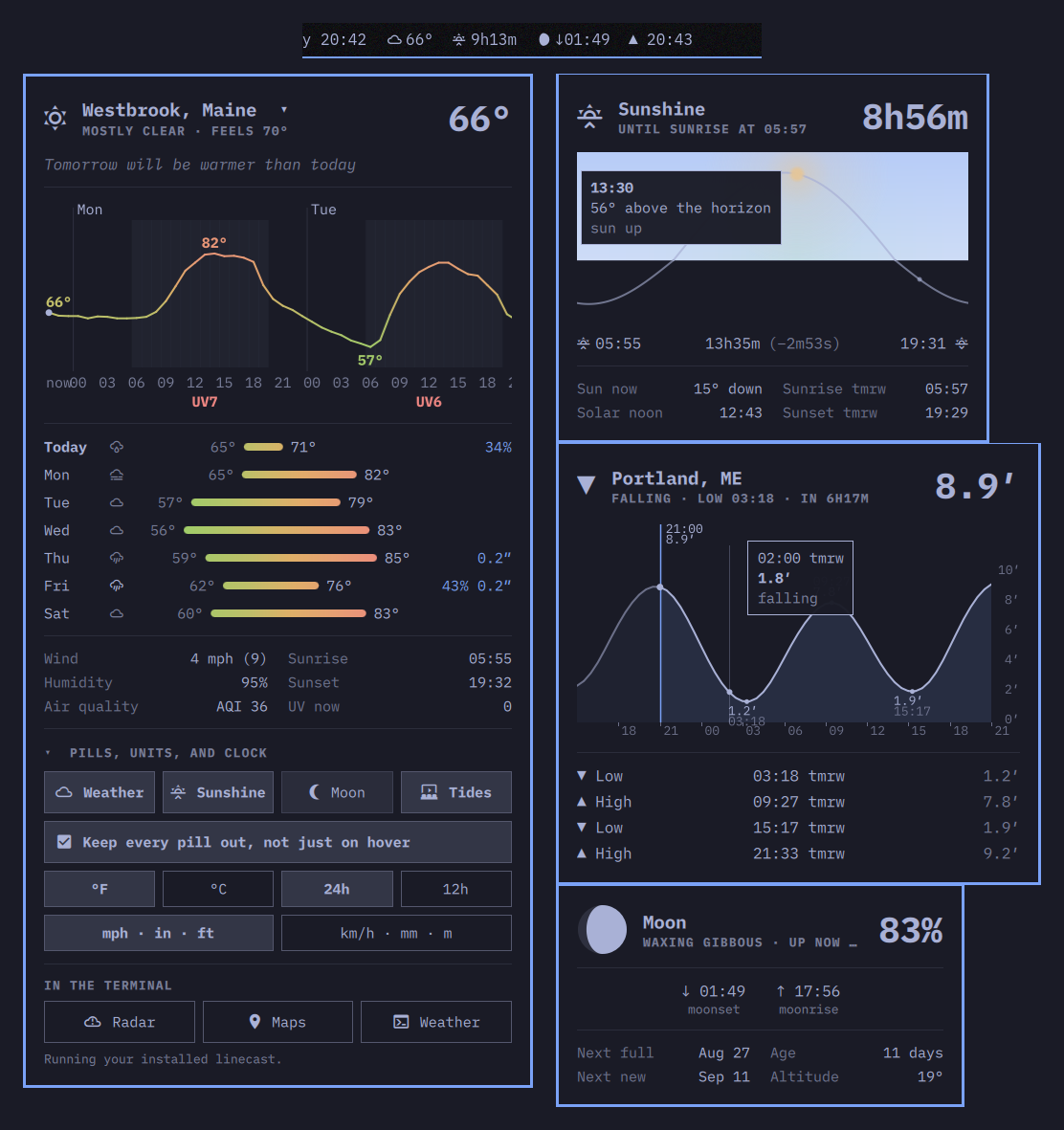
What you get
- Weather pill, always visible: icon and temperature, the full oneline summary as a tooltip. Sunshine, moon, and tide pills tuck away and slide out on hover, the same gesture as the stock indicators widget — or stay out, or stay hidden; your choice, from inside the panel.
- Left click on any pill opens its panel, anchored to that pill.
Right click opens the matching linecast view in a floating terminal.
rrefetches,Escapecloses,Tabmoves to the neighboring bar panels. - Weather panel: current conditions with a plain-English comparison to yesterday, weather alerts, a scrollable hourly temperature line and a week of range bars in linecast's temperature colors, and wind, humidity, sun times, and air quality at a glance. Click the place name to change location.
- Sunshine panel: the day's solar arc under a sky that follows the hour, the sun at its current position, with sunrise, sunset, day length and its day-to-day drift.
- Moon panel: a drawn phase disc (correct terminator, hemisphere aware), phase and illumination, moonrise and moonset, the next full and new moons.
- Tides panel: the tide curve for the day with the water marked at now, the turns labeled, the next high or low, and the station name.
- Radar and Maps, one click from the weather panel: linecast's live precipitation radar and its terrain, street, and globe maps open in a floating terminal.
Everything is colored from the current Omarchy theme, and so is linecast itself, so the bar, the panels, and the terminal views all change together when you switch themes.
Requirements
Nothing beyond a stock Omarchy. The plugin carries its own copy of
linecast (vendor/linecast, v1.15.1, MIT, same author) and runs it with
the system Python — linecast has no dependencies outside the standard
library. If you have linecast installed already, from the AUR
(yay -S linecast) or with uv tool install linecast, the plugin uses
yours instead, so the bar and your terminal always agree. jq and a Nerd
Font in the bar are part of Omarchy.
Install
omarchy plugin add https://github.com/ashuttl/omarchy-linecast.git --enable
Then add the widget to the bar if it wasn't added automatically:
omarchy bar move ashuttl.linecast --section center
Remove
omarchy plugin remove ashuttl.linecast
That takes the widget off the bar and deletes the plugin, bundled
linecast included. A few small files are left for you to delete by hand
if you like: the pill caches at ~/.cache/omarchy-bar-*-oneline, the
plugin's compiled Python at ~/.cache/omarchy-linecast/, the location
recents at ~/.local/state/omarchy/linecast-recent-locations.json, and
linecast's own settings and caches at ~/.config/linecast/ and
~/.cache/linecast/. A linecast you installed yourself stays put.
Settings
Which pills show is set from the weather panel (the Pills row at the
bottom), or inline in the widget's shell.json entry, which hot-reloads
on save:
-
pills(default all four:["weather", "sunshine", "moon", "tides"]) — which pills show, in order. The first is the always-visible pill and hosts the panel; the rest slide out on hover. Weather and tides only, for instance:{ "id": "ashuttl.linecast", "pills": ["weather", "tides"] } -
alwaysShow(defaultfalse) — keep every pill out instead of sliding the extras in on hover. -
clock(default24h) —24hor12htimes in the pills and panels. -
temperature(default: follow linecast) —fahrenheitorcelsius, independent of linecast's metric/imperial setting, so °C with mph is a choice. Wind, rain, and tide-height units come fromlinecast units metric|imperial, which the panel's buttons set.
Location follows linecast location; change it from the weather panel or
with linecast location set <place> and every pill and panel follows.
Scripting
Panels can be driven from keybindings or scripts:
omarchy-shell ashuttl.linecast openSection tides   # weather|sunshine|moon|tides
omarchy-shell shell toggle ashuttl.linecast        # last-used face
Notes
Everything runs through bin/linecast, a small wrapper that picks an
installed linecast when one is on PATH and the bundled tree otherwise
(bin/linecast --source tells you which). The pills shell out to
scripts/linecast-*.sh, which cache linecast's --oneline output under
~/.cache/; each panel runs its linecast <command> --json on first open
and refetches when stale. Nothing here talks to the network directly —
linecast does, to Open-Meteo, NOAA, and the other sources it documents.
scripts/vendor.sh v1.15.1 refreshes the bundled copy from a linecast
tag.
License
MIT.