
Astro Keybind Editor
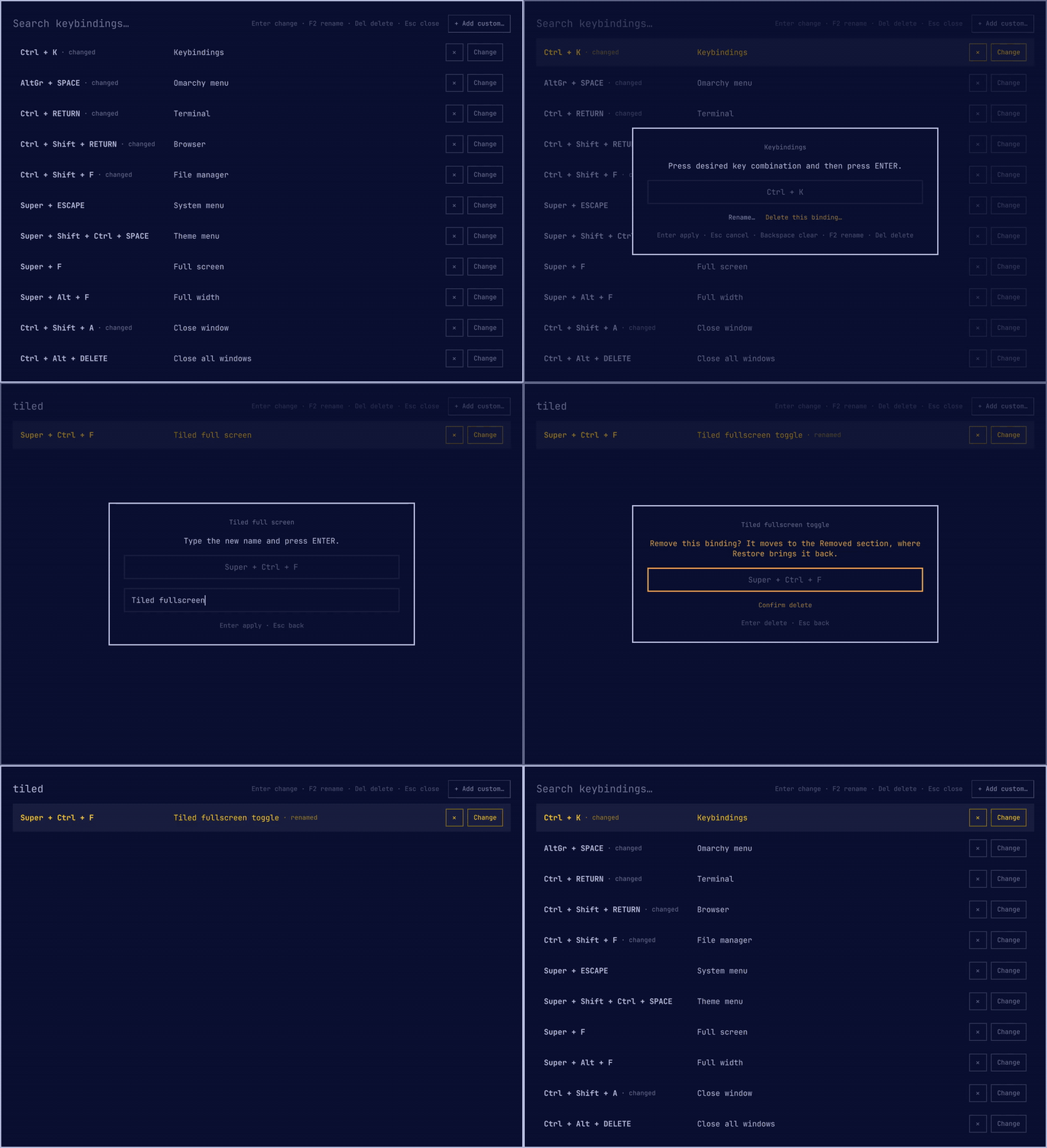
A shell plugin for Omarchy Quattro that turns the keybindings viewer into an editor. It lists every effective Hyprland binding with a Change button. Press the new combination in a capture dialog and the rebind applies immediately. No config editing, no reload.
Features
- Rebinds any binding, including the Omarchy defaults.
- Conflicts show in orange. If you apply anyway, the combo is removed from the other action.
- Reset a changed binding to its default: hover its marker and click "reset".
- Add custom keybindings: press a combo, type a description and a command.
- Delete a binding: the small × button on its row, or Del, then
Enter to confirm. A custom binding loses its
o.bindline; anything else moves to a Removed section at the bottom of the list, where Restore brings it back. - Rename any binding, defaults included: F2 or "Rename…" in the capture dialog. Renamed defaults show a marker; hover it and click "reset name".
- All rebinds live in one file:
~/.config/hypr/keybind-remaps.lua, all renames in~/.config/hypr/keybind-renames.lua. Review them, version them, or copy them to another machine. Akeybind-remaphook fires on every change, for backups or auto-commits (see Backup). - The stock read-only menu stays available:
omarchy menu keybindings.
Install
omarchy plugin add https://github.com/astrofoundry/omarchy-keybind-editor.git --enable
bash ~/.config/omarchy/plugins/astrofoundry.keybind-editor/install.sh
The second command installs the config-side hook (see How it works). It is safe to run again. Also on the Omarchy plugin marketplace.
Then bind a key to the editor in ~/.config/hypr/bindings.lua:
hl.unbind("SUPER + K") -- Previously: the read-only keybindings menu.
o.bind("SUPER + K", "Keybindings", "omarchy-shell shell toggle astrofoundry.keybind-editor")
Update
omarchy plugin update astrofoundry.keybind-editor --yes
# Optional: only needed when the release notes say the config-side hook
# changed. Safe to run every time, so run it when in doubt.
bash ~/.config/omarchy/plugins/astrofoundry.keybind-editor/install.sh
Without --yes the first command shows the incoming changes in a pager
(q to close) and asks for confirmation. The second one refreshes the hook
in ~/.config/hypr/; it is idempotent and leaves your remaps and renames
untouched.
Screenshots
<table> <tr> <td align="center"> <a href="screenshots/list.png"><img src="screenshots/list.png" width="230" alt="Keybindings list: every binding gets a delete button and a Change button; rebound entries are marked changed"></a> <br><sub>List</sub> </td> <td align="center"> <a href="screenshots/capture.png"><img src="screenshots/capture.png" width="230" alt="Capture dialog: press the new combination, Enter applies; Rename and Delete links below"></a> <br><sub>Capture</sub> </td> <td align="center"> <a href="screenshots/conflict.png"><img src="screenshots/conflict.png" width="230" alt="Conflict: the combo is taken; Enter overrides and unbinds it from the other action"></a> <br><sub>Conflict</sub> </td> <td align="center"> <a href="screenshots/reset.png"><img src="screenshots/reset.png" width="230" alt="Reset: hovering a changed marker turns it into reset; clicking asks for confirmation"></a> <br><sub>Reset</sub> </td> <td align="center"> <a href="screenshots/add.png"><img src="screenshots/add.png" width="230" alt="Add custom keybinding: combo, description, and command in one dialog"></a> <br><sub>Add custom</sub> </td> </tr> <tr> <td align="center"> <a href="screenshots/rename.png"><img src="screenshots/rename.png" width="230" alt="Rename: F2 or the Rename link turns the capture dialog into a name field, prefilled with the current name"></a> <br><sub>Rename</sub> </td> <td align="center"> <a href="screenshots/removed.png"><img src="screenshots/removed.png" width="230" alt="Removed section: deleted defaults are listed struck through with a Restore button; Enter asks for confirmation"></a> <br><sub>Removed and restore</sub> </td> </tr> </table>Usage
- Type to search. Arrows to navigate.
- Enter or the Change button opens the capture dialog for a row. Del or the × button opens it straight at the delete confirmation, F2 straight at the rename field.
- In the dialog: press the new combination, then Enter to apply. Backspace clears. Esc cancels. Del deletes the binding after an Enter confirmation, F2 renames it (bare Del and F2 are therefore not capturable as combos; modified combos like Super+Del still are).
- Capturing a binding's original combination also restores its default. Typing a default's stock name back removes its rename.
- Removed bindings are listed in a Removed section at the bottom of the list (they match the search like any row). Enter or Restore brings one back; the dialog warns when another binding now holds that combo.
- Custom bindings land as
o.bind(...)lines in~/.config/hypr/bindings.lua. Changing, renaming, or deleting one edits that line in place, so custom rows never show the changed or renamed marker. A failed reload rolls the file back. - Renamed defaults keep their stock position in the list, so the order stays familiar.
Backup
All rebinds live in ~/.config/hypr/keybind-remaps.lua and all renames of
default bindings in ~/.config/hypr/keybind-renames.lua. Three options,
from manual to automatic:
Copy the files. Copy them anywhere to back up. Copy them back and run
hyprctl reload to restore.
Version them in a dotfiles repo. Move the files into your repo and leave symlinks. The editor writes through the symlinks:
mv ~/.config/hypr/keybind-remaps.lua ~/dotfiles/keybind-remaps.lua
ln -s ~/dotfiles/keybind-remaps.lua ~/.config/hypr/keybind-remaps.lua
mv ~/.config/hypr/keybind-renames.lua ~/dotfiles/keybind-renames.lua
ln -s ~/dotfiles/keybind-renames.lua ~/.config/hypr/keybind-renames.lua
Run a script on every change. After each change the editor fires the
keybind-remap hook with the applied operations as arguments
(set <original> <replacement>, delete <original>, disable <original>,
rename <original> <description>, unrename <original>,
add <combo> <description> <command>,
remove <combo> <description> <command>,
update <old-combo> <new-combo>,
rename <combo> <description> for a custom binding).
Install a script:
omarchy hook install keybind-remap my-script.sh
Combined with the symlink above, this script commits every rebind:
#!/bin/bash
git -C ~/dotfiles add keybind-remaps.lua keybind-renames.lua
git -C ~/dotfiles commit -m "keybind remap: $*" --quiet
How it works
Hyprland reports Lua-registered binds without a recoverable action, so
editing binds by rewriting actions is a dead end. Instead the plugin uses
the fact that every binding, default or personal, passes through hl.bind
when the config loads. install.sh adds a small hook, loaded before the
Omarchy defaults, that wraps hl.bind/hl.unbind and rewrites combos
according to ~/.config/hypr/keybind-remaps.lua. A remap moves a binding
without touching its action. An empty remap removes it. The same hook
swaps descriptions according to ~/.config/hypr/keybind-renames.lua, so a
renamed default shows its new name everywhere, hyprctl binds included.
The overlay lists binds by re-executing the Hyprland Lua config with a stubbed API, the same technique the stock menu uses. The list always matches what Hyprland registered, remaps included. During that replay the hook also reports the binds it dropped (the Removed section) and each renamed bind's stock description (used for ordering).
Files
| File | Role |
|---|---|
KeybindEditor.qml |
Overlay UI and capture dialog |
KeybindModel.js |
Parsing, normalization, ordering, conflict logic |
extract-binds.lua |
Lists effective binds from the Lua config |
apply-remap.sh |
Rewrites the remap and rename tables, reloads Hyprland, fires the keybind-remap hook |
add-bind.sh |
Appends a custom o.bind to bindings.lua, validates, rolls back on error |
remove-bind.sh |
Deletes an editor-added o.bind line from bindings.lua, validates, rolls back on error |
update-bind.sh |
Rewrites the combo or description of an editor-added o.bind line in place, validates, rolls back on error |
xkb-symbols.sh |
Keycode/name maps for display and comparison |
hypr/keybind-remap-hook.lua |
The remap layer, installed by install.sh |
Uninstall
omarchy plugin remove astrofoundry.keybind-editor
Then remove the require("hypr.keybind-remap-hook") line from
~/.config/hypr/hyprland.lua and delete
~/.config/hypr/keybind-remap-hook.lua. Keep or delete
~/.config/hypr/keybind-remaps.lua and ~/.config/hypr/keybind-renames.lua;
without the hook they have no effect.
Requirements
Stock Omarchy (Hyprland Lua config, omarchy-shell, lua, jq, gawk,
xkbcli).