
Visualizer
The sound, in the Omarchy bar. Five shapes, six palettes, and the same colours mirrored onto your WLED lights.
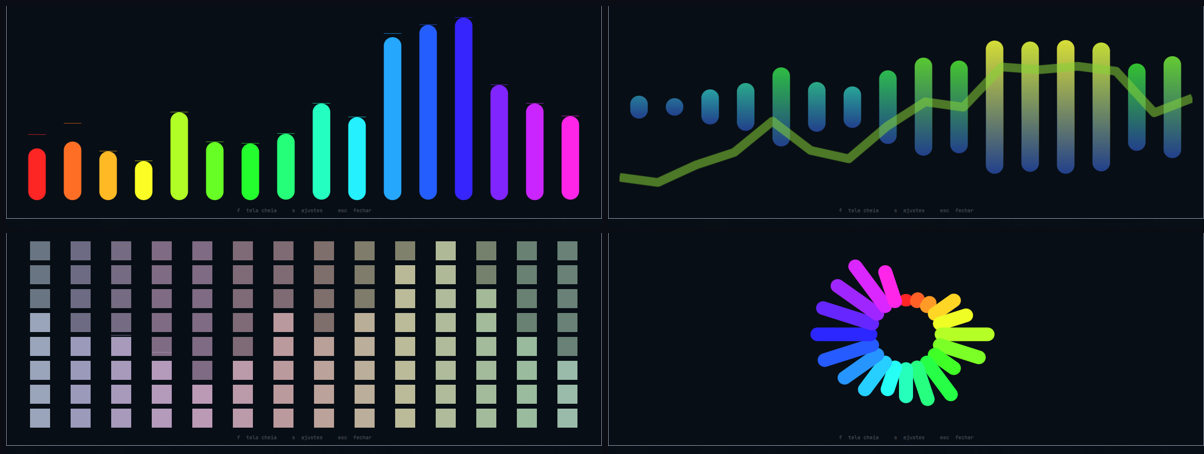
Four combinations of the same four axes.
It does not resolve a problem. It is an ornament, and the design assumes that: every decision below chooses between prettier and does not burn the battery, and the second one wins whenever it can.
Install
omarchy plugin add \
  https://github.com/chameleonbr/omarchy_visualizer.git \
  --enable \
  --yes
Needs cava, which the plugin does not install for you:
omarchy pkg add cava
Without it the widget shows a crossed box and says so on hover, rather than disappearing — a widget that shows nothing is indistinguishable from one that failed to load.
Styles
Four axes rather than a list of finished styles. They combine, so the shapes people recognise from a reference sheet are arrangements of these rather than fifteen separate things to maintain.
| Axis | Values |
|---|---|
| base | bottom · top · mirror · radial |
| cap | flat · round · segments |
| fill | solid · barGradient · screenGradient |
solid is one flat colour per bar. barGradient ramps every bar through the
whole palette range, normalised to its own length. screenGradient anchors
one ramp to the drawing area instead, so a quiet bar only ever reaches the low
end of it and a loud one covers the lot.
A palette that reads position rather than height — rainbow, spectrum, a
picked solid — has the same colour at both ends of a bar, so brightness
stands in for the height it has no opinion about. Every fill does something
visible in every palette.
| extras | peak markers · a wave underneath |
radial is a base like any other, so a full ring and an open fan are the same
geometry with a different spread.
The peak marker rises instantly and sinks slowly: the bars say what is happening now, the markers say what just happened, and that is what makes a meter readable at a glance.
Palettes
| Palette | What it does |
|---|---|
accent · foreground |
the theme's colours, solid |
intensity |
foreground → accent as a band gets louder |
spectrum |
hue swept across the bands, saturation from the theme |
rainbow |
the same sweep at full saturation, ignoring the theme |
heat |
cold at rest, hot at the peaks |
gradient |
between two colours you pick |
solid |
one colour you pick |
urgent |
accent, turning urgent above the threshold |
Two families on purpose: intensity, heat and urgent move with the sound;
spectrum, rainbow and gradient are fixed to position. One gives colour
motion, the other keeps the bar visually still.
spectrum takes its saturation from the theme, so a muted theme gets a muted
sweep. rainbow is the loud version, and having both is the point.
The stage
Click the widget and the spectrum gets a window of its own.
| Key | What it does |
|---|---|
b c f p i e w a l r g |
cycle one setting, while the pane is open |
shift + any of those |
cycle it backwards |
1 2 3 |
open the colour picker for the row of that number |
s |
settings, beside the spectrum |
esc |
steps back one layer — out of the settings, then closed |
The stage is an ordinary window titled Visualizer. Whether it tiles, floats,
where it opens and how big — that is your compositor's job, and you already
have rules and keybinds for it. Under Hyprland:
windowrule = float, title:^(Visualizer)$
windowrule = size 900 400, title:^(Visualizer)$
windowrule = center, title:^(Visualizer)$
Fullscreen is your compositor's too — Omarchy binds it to super + F — so
the plugin claims no key for it and every letter is free for the settings.
omarchy-shell avila.visualizer fullscreen is there if you would rather bind
your own.
The settings open beside the spectrum, not over it — every control in them is previewed by the visualiser next to it, so covering it would defeat the point. On a narrow screen they go underneath instead.
Every row cycles on click, left forward and right back. There is no apply button.
Windowed, the stage is a floating card the size of its own content: the rest of
the screen carries on working, and you can click other windows while it is up.
It takes the keyboard only for a moment when it opens, so f and s work right
away; after clicking elsewhere, click the card again to use them.
Colours: the palettes that read a colour — solid and gradient — get a
picker in the settings, with a saturation square, a hue strip and an editable
hex. The hex commits on Enter rather than on every keystroke, because #ff is
a valid prefix of a colour someone is still typing.
It can be bound too:
omarchy-shell avila.visualizer toggle
omarchy-shell avila.visualizer fullscreen
omarchy-shell avila.visualizer settings
Where it listens
input |
What it hears |
|---|---|
system |
what the machine is playing |
mic |
the microphone |
both |
the two summed together |
both is not a cava setting: cava reads one device, and a device that hears
both does not exist. The plugin builds one — a null sink fed by two loopbacks —
while the setting is on, and removes it when you change it or the shell exits. A
stray sink left in someone's audio graph outlives the widget.
Settings live in their own file
~/.config/omarchy/visualizer.json. The bar host has no way for a widget to
write its own shell.json entry, and a plugin editing that file races the shell
whenever the bar is dragged. The shell.json entry seeds the defaults; the
file wins.
What it costs you## What it costs you
This runs on a laptop, so the guards are most of the design.
The process is killed, not paused. A paused cava still holds the audio capture open, which is most of what it costs. It stops when nothing is playing, when you are on battery, and when no copy of the widget is on screen. Each of those is a setting, and each is on by default.
30 frames a second, not 60. At the size of a bar the difference is invisible; in the power draw it is not.
The width never changes. A visualiser whose width followed the sound would shove every widget to its right across the bar on every frame.
At rest the shape is still drawn, flat and dimmed. The widget keeps its place rather than collapsing and reflowing everything beside it.
WLED
Turn on wled in the settings pane and the lights configured for the
WLED plugin show the colour the
bar is showing. That file is read, never written — it belongs to that plugin.
The pane grows rows when that file names a light: whether the bridge is on,
which mode, which light to drive, how fast, how far a knob may swing, and
whether to put it back when the music stops. devices cycles through the
names from that file — the ones their owner gave them, untranslated — and
all means every light it lists.
Modes
A strip is not a lamp, a panel is not a strip, and an effect is not a canvas. Each mode is the most that one of those can do.
| Mode | What the light shows |
|---|---|
spectrum |
the bands laid along the strip, low at one end, each lit by how loud it is |
mirror |
the same, folded so the low bands meet in the middle and travel out to both ends |
solid |
one colour for the whole strip, brightness following the mean — what a bulb wants |
params |
the light keeps its own effect, and the spectrum moves that effect's sliders |
bars |
a matrix only: one column per band, standing on the floor, as tall as the band is loud |
On a matrix, spectrum and mirror run the bands along the WIDTH — one
column per band, filling the height, brightness following the band. They used
to send run-length indices over every pixel, which on a panel is a line that
snakes across the rows: the bands lined up with neither the columns nor the
height. On a strip they are the same picture one row tall, and bars becomes
spectrum there — one row has nowhere to put a height.
All three painting modes go out over DNRGB on UDP, strips included. That
is what removed the freeze. The old strip path wrote run-length indices under
a frozen segment, and a freeze has to be lifted afterwards or the strip keeps
the last frame of the music for as long as it stays on — which is what a
session that died without running its teardown left behind more than once.
There is no such state now: the packets stop and the light goes back to its
own effect on the realtime timeout. It also lifts the rate: over HTTP a light
answered a POST in about 150ms, and a strip of fifty LEDs is one packet, so it
gets fifty frames a second inside the packet budget instead of wledRateHz.
wledRateHz still caps solid, which is not painting — it writes fx, pal
and col, and a realtime packet cannot carry those.
params leaves the effect running. Every other mode takes the strip away
and paints it; this one asks the light which sliders its current effect has —
WLED publishes that in /json/fxdata — and swings them around the values you
already tuned. PS Fire declares Speed, Intensity, Flame Height, Wind and
Spread; the bass moves the first, the treble the last.
Not every slider takes modulation, and the ones that do not repeat across the 220 effects rather than being particular to any of them: Blur and Fade rate jitter into flicker, Speed fights the effect's own clock, Select bin and Sensitivity are an audio-reactive effect's own listening controls. Those are left alone. About a third of the effects declare nothing else, and there the mode falls back to brightness rather than driving them anyway.
An effect with no sliders at all — Solid is one — leaves params with nothing
to move, and it behaves exactly like solid does. That is not a fault: set an
effect on the light first, and the mode has something to work with. The knob
row is the tell; it does not appear when the current effect declares none.
The knob row names one slider to drive instead — by the light's own word for
it, which is what the WLED app shows too. A single named knob hears the whole
spectrum rather than one band of it. swing is how far from your own setting
a knob may travel, as a percentage of its range; silence gives back exactly
what you tuned.
bars needs a matrix. WLED reports one in /json/info as leds.matrix,
and on a panel the segment's stop - start is the WIDTH, not the pixel count.
Painted over DNRGB on UDP rather than the JSON API: the same frame as JSON is
around 4KB that a 32×24 panel answers in 150ms, which caps it at six frames a
second. The realtime packet carries a timeout, so when the music stops the
light goes back to its own effect without being told — there is nothing to
restore. On a strip, and on a panel whose segment does not start at the
origin, bars falls back to spectrum.
bin/omarchy-visualizer-stream is what speaks DNRGB, and it needs python3
— the only thing in the plugin that does. Without it the painting modes fall
back to brightness alone; solid and params are unaffected.
The segment is frozen while the bridge is running. WLED's effect engine owns
the segment and repaints every LED on its next tick, so individual LEDs
written underneath it last a few milliseconds — freezing is what makes them
stay. Setting the effect to Solid is not the same thing: Solid is an effect
like any other and fills the segment with the primary colour, and it would
quietly replace whichever effect the strip was set to. The freeze is lifted on
the way out, both when the music stops and when the mode falls back to
solid; leave it on and the strip keeps the last frame forever.
The strip is asked how long it is once, when the bridge starts, and painted in
runs rather than one colour per LED: fourteen [start, stop, colour] triplets
is a payload a device with a few hundred kilobytes of RAM can read ten times a
second; three hundred hex strings is one it drops. Until it answers, and for a
single bulb, every mode falls back to solid — the bridge works from the
first frame and sharpens once the strip has spoken.
A band at rest is dim, never black. A dark stretch of strip reads as a fault rather than as quiet.
Three things this gets right, and they are all about the hardware:
Brightness follows the mean, not the peak. Tracking the peak makes the lamp follow the kick drum alone, which reads as strobing rather than as music.
Frames above wledRateHz are dropped, never queued. WLED over HTTP stops
answering long before a frame rate, and the symptom looks like a broken lamp
rather than a busy one. A queue would only move the backlog to the end of the
song. bars is not paced by that setting — it is paced by a packet budget,
because DNRGB carries 489 pixels and a 768-pixel panel is two packets per
frame. Measured on one panel, the board is flat to fifty packets a second and
falls off a cliff past it, and what it drops is what arrived last: the second
half of every frame, which on a bar chart is the half the bars stand on.
The lights are put back when the music stops. Leaving a lamp frozen on some colour after you close the player is the worst thing this bridge can do.
A light that does not answer never holds up a frame: the sends are detached, and a failure there never touches what the bar draws.
Settings
Everything is in the widget's settings screen. The ones worth knowing:
| Setting | Default | Why you might change it |
|---|---|---|
base · cap · fill · palette |
bottom · flat · solid · accent |
taste |
barCount |
14 | more bands, finer detail, more to draw |
smoothing |
60 | how gently a bar falls; the rise is always immediate |
floor |
3 | below this a band reads as zero, so room noise lets it rest |
framerate |
30 | the cost knob |
pauseWhenSilent · pauseOnBattery |
on | the two guards |
wledEnabled |
off | mirror onto the lights |
wledRateHz |
10 | how fast the lamp is asked to follow over HTTP |
wledDevices |
all | narrow the bridge to one light |
wledStyle |
spectrum |
how the light is driven |
wledSpan |
40 | params: how far a knob may swing from your own setting, in percent |
wledKnob |
auto | params: name one slider to drive, instead of letting it choose |
Development
node test_visualizer.js
35 checks, no framework, no audio, no cava, no network. See CLAUDE.md for how
the pieces fit and SPEC.md for why they are shaped this way.
License
MIT
Language
Everything the plugin says is translated, and English is the default. auto
follows LANG and falls back to English for anything not translated rather
than guessing at a near neighbour; en and pt force one. The setting is in
the pane, so switching it is one click and takes effect immediately.
Adding a language is one entry in I18n.js. The checks fail if it is missing
a key English has, or has one English does not, or leaves any setting value
without a word.
The keyboard
Open the pane with s and every row has a letter, painted in the accent
colour inside its own label:
| Key | Row | Key | Row |
|---|---|---|---|
b |
base | r |
fps |
c |
cap | g |
language |
f |
fill | d |
wled |
p |
palette | v |
devices |
i |
input | m |
wled mode |
e |
peak | t |
wled rate |
w |
wave | o |
restore on stop |
l |
fall | a |
bars |
x |
knob swing | ||
k |
driven knob |
The last five are only there when the WLED plugin's config names a light, and
so are their letters: on a machine with no lights d does nothing rather than
flipping a setting nobody can see.
Hold shift to walk an axis backwards, which is what makes a nine-value
palette usable from the keyboard. 1, 2 and 3 open the colour picker for
the colour rows in the order they appear — the palette decides how many there
are, so 1 is always the first one on screen.
The letters do not move when you change language. Muscle memory outlives a
translation table, so fps shows fps (r) in English and Portuguese alike
where the label has no r of its own to paint.
Where it writes
Two files, both yours:
~/.config/omarchy/visualizer.json— your settings.$XDG_RUNTIME_DIR/omarchy-visualizer/cava.conf— the config cava is started with, in a directory created0700, falling back to~/.cacheand to not running at all rather than to a shared directory like/tmp.
It never touches ~/.config/cava. That file belongs to whoever runs cava in a
terminal, and a bar widget has no business rewriting it.
It reads one more, ~/.config/omarchy/wled.json, which the WLED plugin owns.
Both of the files it reads go through SizedFile, which reads through a
ceiling rather than measuring against one: at most 64 KiB plus the byte that
proves the file was bigger, so what arrives is bounded whatever the file does
while it is being read. Over that, the last good settings stand. The shell
outlives every window in it, so anything it reads it keeps — and the device
list in wled.json is scanned to a fixed depth for the same reason. Trim the
file and it loads again on the spot; no restart.