
Mullvad for Omarchy
A status-bar plugin for Omarchy Quattro that puts Mullvad VPN on the desktop instead of in a terminal.
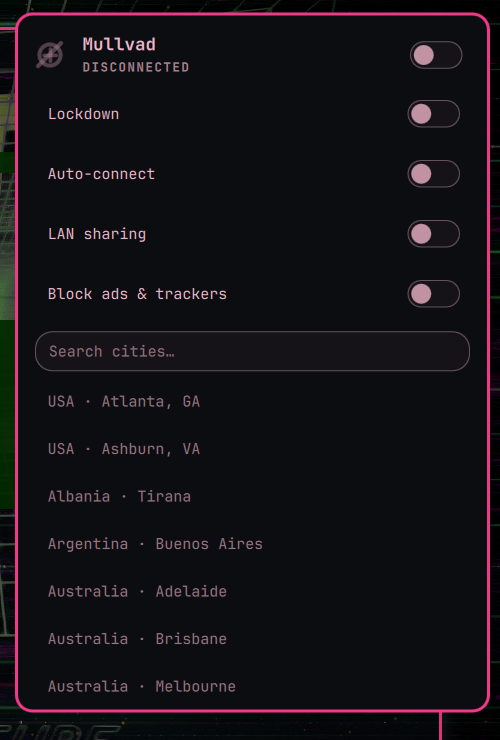
Click the themed mark to see whether you are connected, pick a city, turn the tunnel on or off, log in with your account number, and flip the daily-driver switches: lockdown, auto-connect, LAN sharing, and Mullvad's DNS ad & tracker blocking. Right-click the icon to connect or disconnect without opening the panel. It talks to the official mullvad CLI, so the daemon you already trust is still what is running.
Install
omarchy plugin add https://github.com/Aweiward/omarchy-mullvad.git --enable
If mullvad is missing, open the widget and click Install Mullvad. That runs omarchy pkg add mullvad-vpn-daemon (Arch extra, via Omarchy’s usual privilege prompt) and starts mullvad-daemon.service. It will not remove the official Mullvad app if you already have it.
Remove
omarchy plugin remove aweiward.mullvad
That disables the widget and deletes the plugin checkout. It does not uninstall mullvad-vpn-daemon, stop the Mullvad daemon, log you out of Mullvad, or change other Omarchy config.
Use
- Left click: panel
- Right click: connect / disconnect (opens the panel if you are logged out)
- Middle click: refresh
- Panel: account number login, city search, log out, and toggles for lockdown, auto-connect, LAN sharing, and DNS ad & tracker blocking
Keys inside the panel: j/k move (through the toggles, then the city list), Enter selects, / search, t tunnel, l lockdown, Esc closes.
The ads & trackers switch drives Mullvad's DNS content blocking and re-sends your other block categories (malware, gambling, …) unchanged. If you have a custom DNS server configured, the switch disables itself instead of overwriting it.
Staying informed
You get a desktop notification when an established tunnel drops without you asking it to — critical if your traffic is exposed, quieter if lockdown is already blocking everything — and when the Mullvad daemon stops. Nothing fires when you disconnect on purpose.
When your account is within 7 days of expiring, the panel shows an urgent line with a Top up link to mullvad.net/account, the bar icon shows its warning badge, and you get one notification per session. Set expiryWarnDays in the widget's bar entry to change the threshold.
Account handling
Your account number is a credential, so the plugin never puts it on a command line where any local process could read it out of /proc. It runs mullvad account login with no argument and writes the number to that process's stdin. The plugin does not store the number itself — the daemon keeps the session — and it strips 16-digit sequences out of any CLI error it shows you.
Requirements
- Omarchy 4 (Quattro) /
omarchy-shell mullvad2026.3+ (installed for you from the panel if missing)
Dev
node --test tests/*.test.js
tests/cli-contract.sh
cli-contract.sh does not change your Mullvad state. It never connects, disconnects, or logs out. It does run mullvad account login once with an all-zero number to check that the CLI still prompts for the number on stdin; that number cannot log anyone in.