
Okomart
"Okonomi" roughly translates to "as you like," and refers to the single items you may order after your omakase meal.
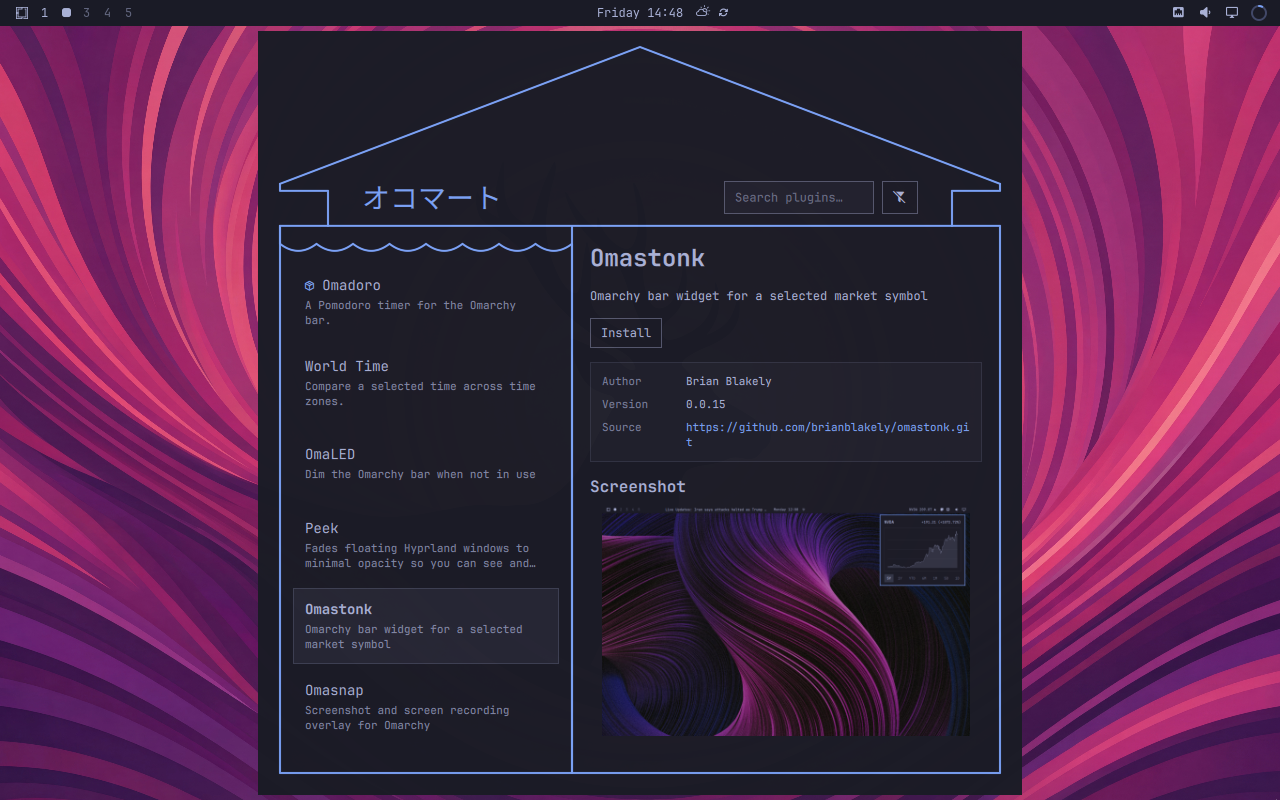
Okomart (オコマート) is a storefront and manager for
Omarchy plugins. It lets you search, preview, install,
enable, disable, update, and remove plugins without the terminal.
Install
omarchy plugin add https://github.com/brianblakely/omarchy-plugins.git --enable --yes
Launch Okomart like any other application via SUPER + SPACE, or from the
terminal:
omarchy-shell shell summon b.okomart
Using Okomart
Okomart allows you to browse plugins published in its catalog, as well as your
local third-party plugins already installed under ~/.config/omarchy/plugins/.
- Search matches plugin names, descriptions, and authors.
- The "Installed" filter limits the list to local plugins.
- Plugin details show metadata, installation and enabled state, actions, and screenshots.
- Installed plugins can be enabled or disabled without removing their checkout. Full bar plugins are replaced by enabling another bar and cannot be disabled directly.
- The "Updates" button lists all plugin updates and asks you for confirmation to install them.
Keyboard controls
Tab/Shift+Tab: move between controlsUp/Down,Page Up/Page Down,Home/End: navigate plugins while the plugin list is focusedPage Up/Page Down,Home/End: scroll plugin details or a confirmation/results list while that pane is focusedEnter/Space: activate the focused control/orCtrl+F: focus searchCtrl+R: refresh the catalogLeft/Right: move through screenshots while the carousel is focusedEsc: close a dialog, return from narrow details, clear search, or close Okomart, in that order
Notice
Installed plugins are arbitrary, unsandboxed code. Before approving an install or update, review its source URL and changes. Okomart's confirmations do not turn third-party plugins into sandboxed applications.
Uninstall
Remove Okomart and disable its shell entry:
omarchy plugin remove b.okomart
Plugin Catalog
If you would like your plugin to be included, simply add it by filing a PR against plugins.txt.
<!-- BEGIN GENERATED PLUGIN CATALOG --> <!-- Generated by scripts/generate-plugin-catalog.mjs from plugins.txt; sorted alphabetically by plugin name. -->| Plugin | Author | Description |
|---|---|---|
| Blink | Brian Blakely | Blink briefly flashes a border over the active Hyprland window. It runs automatically when the active window changes and can also be triggered on demand. |
| Bluetooth codec | mihai | Shift Bluetooth audio fidelity: pick the A2DP codec or headset profile for each connected Bluetooth audio device. |
| Codex Notifications | Brian Blakely | Clickable lifecycle notifications that return to the originating Codex context. |
| Exposé | Kristoffer Risanger (@kristofferR) | macOS-style Exposé for Omarchy: one key or a hot corner shows every open window as a live preview. Type to search, press Space to Quick Look, press Enter to launch. |
| Flight Radar | yuters | Live aircraft overhead with short-horizon flyby forecasts, an overhead badge, and notifications. Works without an account. |
| Hive Status | Ivan Kuznetsov | Monitor Hive instances and active tasks from the Omarchy bar. |
| Keysmith | Ahmed-Sinkeat | Add, change, and remove Omarchy shortcuts without editing config files |
| Omacal | Brian Blakely | Omarchy-native day/time label with a mini calendar popup |
| Omadoro | Brian Blakely | A Pomodoro timer for the Omarchy bar. |
| OmaHUD | Brian Blakely | Flashes a discreet Hyprland workspace indicator when you switch workspaces. It's designed for people who hide their Omarchy bar most of the time, and would like help navigating their workspaces. |
| OmaLED | Brian Blakely | Dim the Omarchy bar when not in use |
| Omaloom | Cause of a Kind | Local-first screen recording controls for Omarchy Quattro. |
| OmaNetWatch | Keith | Monitor HTTP and TCP endpoints from the Omarchy bar |
| Omanews | Brian Blakely | Omarchy-native headline ticker for the bar |
| Omanote | Brian Blakely | Omarchy-native secure scratch note for the bar |
| Omashot | Brian Blakely | Screenshot and screen-recording overlay for Omarchy |
| Omastonk | Brian Blakely | Omarchy bar widget for a selected market symbol |
| Omaudit Status | Dhiraj Das | Summarizes Omaudit plugin risk and capability drift. |
| Peek | Brian Blakely | Fades floating Hyprland windows to minimal opacity so you can see and interact with the content underneath |
| World Time | Mwikala Kangwa | Compare a selected time across time zones. |