
Keybindings Lookup
An Omarchy shell bar-widget that puts a searchable, favoritable reference of your Hyprland keybindings one click away, so the ones you use most aren't a search away every time.
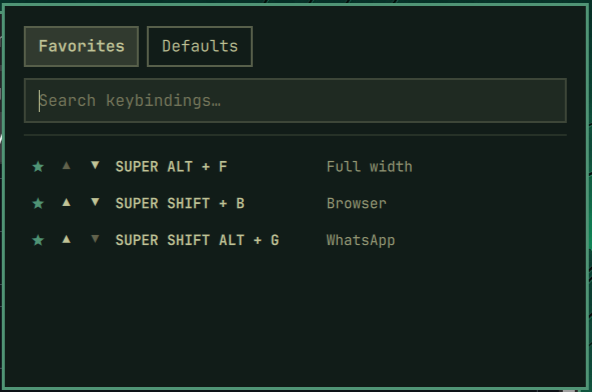
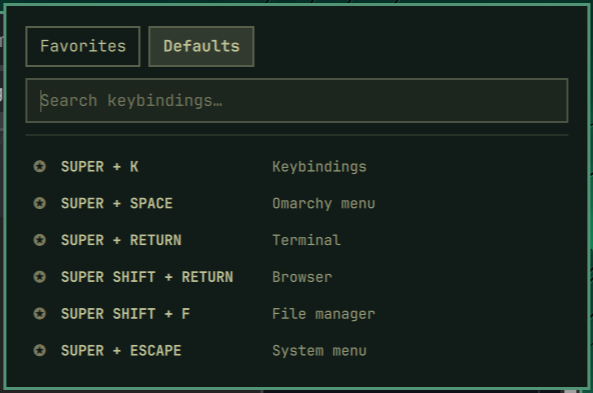
Features
- Two tabs: Favorites (your own curated shortlist) and Defaults
(every keybinding Hyprland currently has registered, same source as
omarchy menu keybindings) - Live search — type any words and it filters to bindings that match all of them, in any order, across both the key combo and the action name
- Star to favorite — tap the star on any row in Defaults to pin it to Favorites; tap again to unpin
- Reorder favorites — up/down arrows on each row in the Favorites tab let you arrange them however you like; the order is saved
- 6 rows visible, scrolls for more — the popup stays compact instead of growing into a wall of text
- Tab to switch tabs — while the popup is open,
Tab/Shift+Tabflips between Favorites and Defaults without touching the mouse - Read-only: clicking a row never executes the binding, it's a reference only
Requirements
- Omarchy with the Quickshell-based bar (default install)
- Nothing else — no extra dependencies. It shells out to the
omarchyCLI that already ships with every Omarchy install.
Installation
omarchy plugin add https://github.com/Bagareal/omarchy-keybindings-lookup.git --enable
Or install first and enable later:
omarchy plugin add https://github.com/Bagareal/omarchy-keybindings-lookup.git
omarchy plugin enable bagareal.keybindings
To place it at a specific spot on the bar:
omarchy plugin enable bagareal.keybindings --before omarchy.agents
Removal
To temporarily hide it from the bar but keep it installed:
omarchy plugin disable bagareal.keybindings
To remove it completely:
omarchy plugin remove bagareal.keybindings
This does not delete your saved favorites
(~/.local/state/omarchy/settings/bagareal-keybindings-favorites.json) or
the keybinding you may have added to ~/.config/hypr/bindings.lua — remove
those by hand if you want a full cleanup.
Suggested keybinding
The plugin doesn't bind a hotkey for you — add one yourself in
~/.config/hypr/bindings.lua:
o.bind("SUPER + CTRL + ALT + K", "Keybindings Lookup", "omarchy-shell shell toggle bagareal.keybindings")
Pick whatever combo is free on your system; check with omarchy menu keybindings --print first.
What it reads and writes
For transparency, since Omarchy plugins run unsandboxed:
- Reads: runs
omarchy menu keybindings --printto list your current Hyprland keybindings. Nothing else on your system is touched. - Writes: your favorited keybindings and their order, as a plain JSON
array, to
~/.local/state/omarchy/settings/bagareal-keybindings-favorites.json. That's the only file this plugin ever writes.
License
MIT — see LICENSE.