
Bar Glow
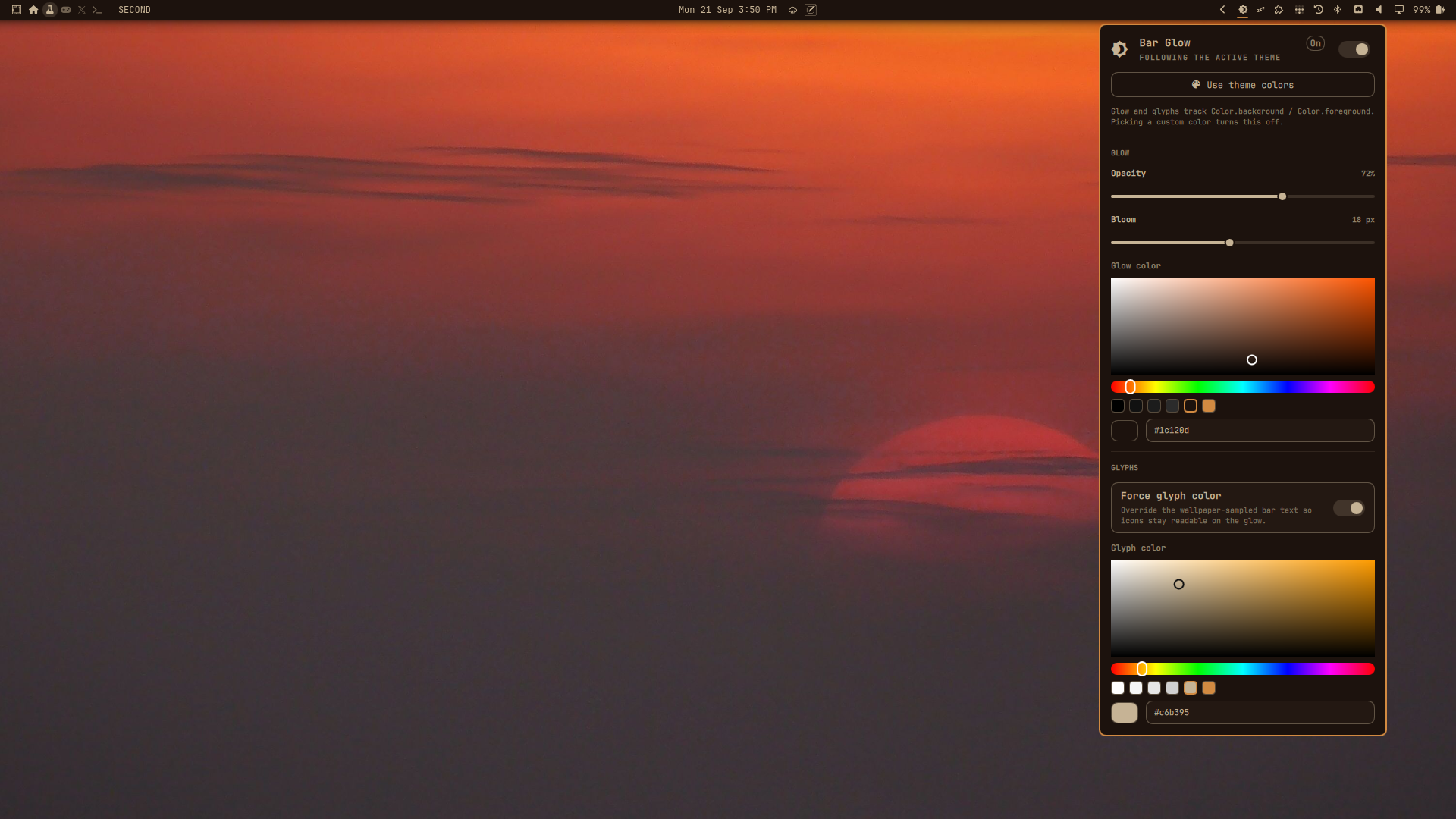
Full-width glow behind the stock Omarchy 4 (Quattro) bar, so icons and labels stay readable on any wallpaper. A settings panel tunes opacity, bloom, glow color, and glyph color. The bar icon that opens it is optional.
It does not replace omarchy.bar. Third-party full-bar clones currently
fail to load because Bar.qml required properties are not injected at
construction
(#6915,
#8007,
#8202).
Install
omarchy plugin add https://github.com/07dcolem/bar-glow.git --enable
Omarchy will ask which bar section to use (default: right). That chip opens the panel. The icon is optional; Settings panel explains how to remove it and still open the panel.
If the folder is already at ~/.config/omarchy/plugins/bar-glow/:
omarchy plugin validate ~/.config/omarchy/plugins/bar-glow
omarchy-shell shell rescanPlugins
omarchy plugin enable bar-glow --section right
omarchy restart shell
Confirm:
hyprctl layers | grep -E 'omarchy-bar$|omarchy-bar-glow'
omarchy-shell bar-glow status
omarchy-shell bar-glow toggle
With a top bar you should see a bottom-layer wash covering the whole bar strip, plus a short bloom on the inner edge:
Layer level 1 (bottom):
  ... xywh: 0 0 1920 44, namespace: omarchy-bar-glow
Layer level 2 (top):
  ... xywh: 0 0 1920 26, namespace: omarchy-bar
The glow uses ExclusionMode.Ignore (exclusive zone -1) so it does not
steal reserved space. It sits on WlrLayer.Bottom, so it shows through the
transparent bar and never covers widgets or popouts.
Remove
omarchy plugin remove bar-glow
That deletes ~/.config/omarchy/plugins/bar-glow/ and removes the
plugin from shell.json. Glyph color returns to the theme. Nothing is
written under $OMARCHY_PATH or ~/.local/share/omarchy.
Settings panel
Left-click the bar chip (). The panel anchors to that icon.
The icon is optional. The plugin stays enabled as long as bar-glow is
either on the bar or in plugins[]. To drop the icon and keep the glow:
- Copy the
bar-glowobject frombar.layoutinto top-levelplugins[], settings included. - Delete it from the layout section.
- Save
~/.config/omarchy/shell.json. The shell reloads it.
Leave it in only one of those places. omarchy plugin remove deletes the
first match, and the bar layout wins, so a second plugins[] copy would
survive removal. Deleting the layout entry without adding plugins[]
disables the plugin and the glow stops.
With the chip hidden, open the same panel with either command:
omarchy-shell shell toggle bar-glow
omarchy-shell bar-glow toggle
Those commands open the overlay. It has no icon to attach to, so the panel
uses the existing top-left fallback. Clicking the chip, when it is on the
bar, still anchors the panel to the icon. Forced glyph color still applies
with the chip hidden, and theme-follow still tracks Color.foreground on
omarchy theme set.
The panel is a stock Omarchy KeyboardPanel:
| Control | What it does |
|---|---|
| On/off switch | Show or hide the glow |
| Use theme colors | Glow = theme background, glyphs = theme foreground, and both follow omarchy theme set |
| Opacity | Peak alpha of the wash (20–100%) |
| Bloom | Soft falloff past the inner edge (0–40 px) |
| Glow color | Saturation/value field, hue bar, presets, and hex. Picking a color turns off theme-follow |
| Force glyph color | Override the wallpaper-sampled bar text |
| Glyph color | Same color field as the glow (disabled when Force is off) |
Changes apply live and persist to ~/.config/omarchy/shell.json. Esc closes
the panel.
shell.json keys
Settings live on the bar-widget entry while the chip is on the bar. With
the chip hidden they live on the plugins[] entry. When the chip is present
only the bar entry is written, so omarchy plugin remove does not leave a
second copy behind:
{
  "id": "bar-glow",
  "enabled": true,
  "size": 18,
  "opacity": 0.72,
  "color": "#000000",
  "forceWhite": true,
  "contentColor": "#ffffff",
  "followTheme": false
}
| Key | Type | Default | Meaning |
|---|---|---|---|
enabled |
boolean | true |
Draw the glow |
size |
integer | 18 |
Bloom in px (0–48). 0 is wash only |
opacity |
number | 0.72 |
Peak alpha. Values > 1 are treated as percent |
color |
string | #000000 |
Glow hex, or theme for Color.background |
followTheme |
boolean | false |
Live-bind glow and glyphs to the active theme |
forceWhite |
boolean | true |
Force glyph color (name is historical; the color is contentColor) |
contentColor |
string | #ffffff |
Forced glyph hex, or theme for Color.foreground |
Theme-follow is also what the Use theme colors button writes. A custom
color picker value clears followTheme.
Behavior
- Follows bar position (top / bottom / left / right), including live drag.
- Hides with the bar (
shell.bar.barHidden, including Super+Shift+Space). - Multi-monitor: one glow surface per output.
- A click applies immediately through the service (
applyLive), thenupdateEntryInlinewritesshell.json. While the chip is on the bar that write goes to the layout entry. With the chip hidden it goes toplugins[]. The service reads that file, so either location reaches the glow. - Forced glyph color is owned by the service. It copies the theme shell
values and sets
bar.text. It does not assignColor.bar.text, so the bar's own color binding stays intact. The previousbar.textcomes back when the glow is off, force-glyphs is off, or the plugin is removed or disabled. Theme-follow tracksColor.foreground, includingomarchy theme set.
What this plugin does not do
- It does not become the active bar.
- It does not intercept pointer events (
mask: Region {}). - It does not change window gaps, rounding, or
decoration.shadow. - Colorful tray app icons keep their own pixels; glyphs and labels follow the forced color when that toggle is on.
Development
omarchy plugin validate .
omarchy-shell shell rescanPlugins
omarchy restart shell
omarchy-shell bar-glow status
Kinds: service (Service.qml, the glow and the glyph-color override),
bar-widget (GlowChip.qml, optional bar icon), and overlay
(GlowPanel.qml). Not bar. Hide the chip, leave the plugin enabled, and
open settings with omarchy-shell shell toggle bar-glow or
omarchy-shell bar-glow toggle. Forced glyph color still applies with the
chip hidden. Files are not named BarWidget.qml / Panel.qml so they do
not collide with qs.Ui.
Author
07dcolem — https://github.com/07dcolem/bar-glow
Disclaimer
This plugin is provided as-is, with no warranty of any kind. Omarchy plugins run unsandboxed inside your shell process, with the same access as your user account. Review the code before you enable it. The author is not liable for data loss, desktop breakage, theme changes, or any other damage from installing, using, or removing this plugin. A marketplace listing, if any, is not a security review.
License
MIT. Copyright (c) 2026 Dylan Coleman. See LICENSE.