
Binary Clock for Omarchy
A minimal Binary-Coded Decimal (BCD) clock for the Omarchy top bar.
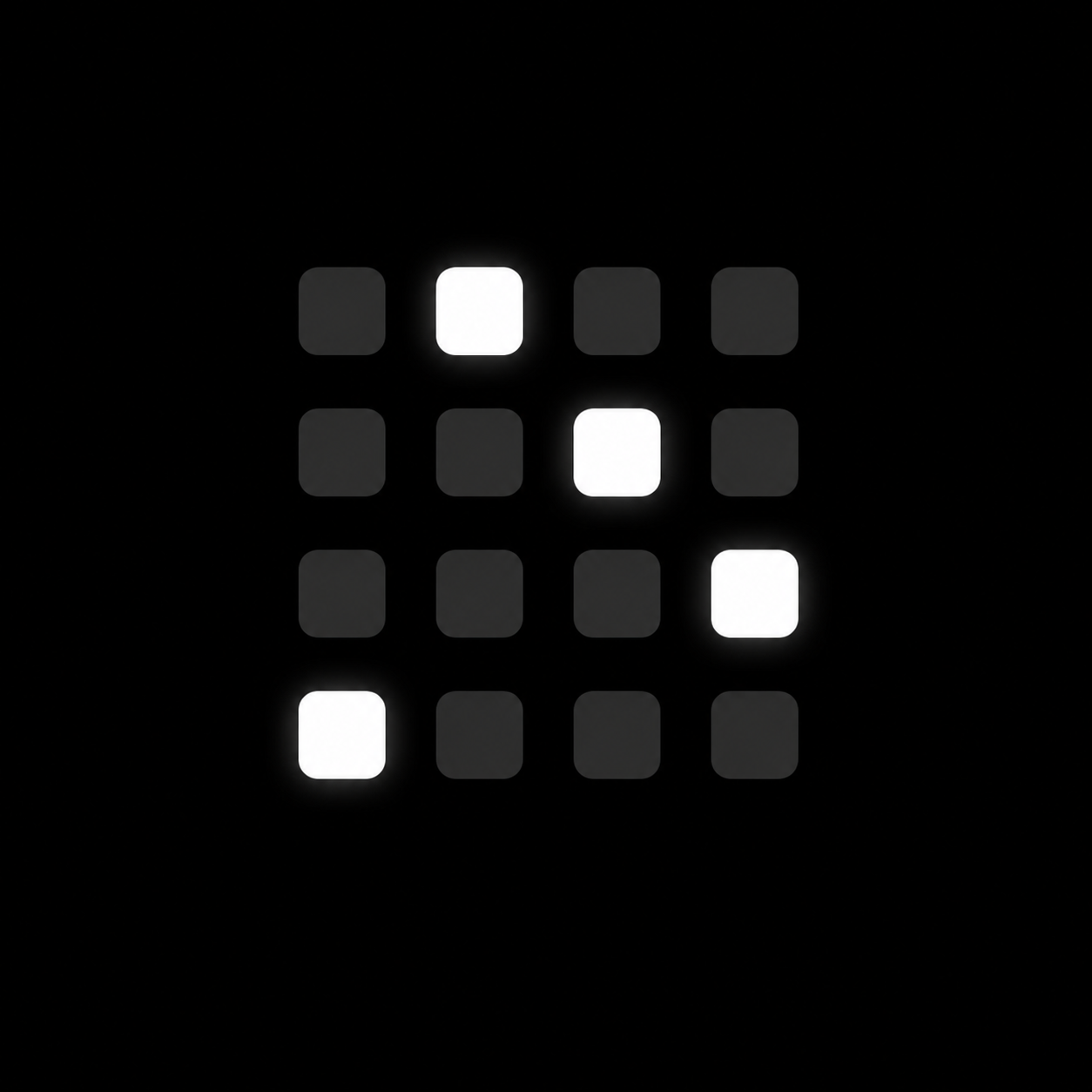
Binary Clock replaces the traditional digital clock with a compact 4 × 4 binary display showing the current time in hours and minutes.
Features
- 4 × 4 BCD binary clock
- Displays hours and minutes
- Uses the system clock directly
- Native Omarchy
bar-widget - No external scripts
- No background processes
- Calendar popup on click
- Uses Omarchy's standard calendar panel
- No seconds
- No configuration required
- Designed as a replacement for Omarchy's standard clock
How It Looks
The four columns represent the four digits of a 24-hour clock:
H H M M
For example:
21:36
is split into:
2 1 3 6
Each digit is then displayed separately in binary:
    2   1   3   6

8   ○   ○   ○   ○
4   ○   ○   ○   ●
2   ●   ○   ●   ●
1   ○   ●   ●   ○
●= active bit○= inactive bit
How to Read the Clock
Binary Clock uses Binary-Coded Decimal (BCD).
Instead of converting the complete hour or minute into binary, each decimal digit is converted individually.
The columns are:
| Column | Represents |
|---|---|
| 1 | Tens of hours |
| 2 | Hours |
| 3 | Tens of minutes |
| 4 | Minutes |
The rows represent these values:
| Row | Value |
|---|---|
| Top | 8 |
| Second | 4 |
| Third | 2 |
| Bottom | 1 |
Add the values of the active dots in each column to determine the digit.
Example
For the digit 6:
8   ○
4   ●
2   ●
1   ○
The active values are:
4 + 2 = 6
For 21:36, the four columns therefore represent:
2 | 1 | 3 | 6
Installation
Binary Clock is installed using Omarchy's plugin system.
omarchy plugin add https://github.com/WarmTies/omarchy-binary-clock.git --enable
The plugin ID is:
binaryclock.clock
Replacing the Default Omarchy Clock
Binary Clock is intended to replace Omarchy's built-in clock.
Disable the default clock:
omarchy plugin disable omarchy.clock
Enable Binary Clock in the center section:
omarchy plugin enable binaryclock.clock --section center
If Binary Clock was installed using --enable, it may already be enabled.
Centering
Omarchy can use a specific bar widget as the center anchor.
If required, change the centerAnchor in:
~/.config/omarchy/shell.json
to:
"centerAnchor": "binaryclock.clock"
This keeps Binary Clock visually centered even when the left and right sides of the bar have different widths.
Configuration
Binary Clock is intentionally minimal and currently has no configuration options.
It displays:
- 24-hour time
- hours
- minutes
- four decimal digits
- four binary rows with the values
8,4,2, and1
Seconds and timezone controls are intentionally not included.
Clicking the Binary Clock opens Omarchy's standard calendar popup.
Plugin Structure
The plugin consists primarily of:
binaryclock.clock/
├── manifest.json
├── BarWidget.qml
├── Panel.qml
├── Model.js
├── preview.png
├── README.md
└── LICENSE
The plugin is registered as:
binaryclock.clock
and uses the Omarchy:
bar-widget
plugin type.
Development
To work on the plugin locally, place it in:
~/.config/omarchy/plugins/binaryclock.clock
Validate the plugin with:
cd ~/.config/omarchy/plugins/binaryclock.clock
omarchy plugin validate .
Changes to the QML widget can then be tested directly inside Omarchy.
How It Works
The clock reads the current system time and separates it into four decimal digits:
HH:MM
For example:
21:36
becomes:
2 1 3 6
Each digit is checked against the binary values:
8
4
2
1
The corresponding dots are then shown as active or inactive.
Because the clock uses the system clock directly through QML/Quickshell, it does not need to run shell commands such as date or maintain a separate background process.
Design Philosophy
Binary Clock is intentionally focused on one task:
show the current time in binary.
It does not attempt to reproduce the additional functionality of Omarchy's standard clock.
There is:
- a calendar popup on click
- no timezone selector
- no seconds counter
- no external dependencies
- no background daemon
The goal is a small, clean binary clock that fits naturally into the Omarchy bar.
Updating
Updates can be installed using Omarchy's normal plugin update workflow.
When developing locally, validate the plugin after making structural or manifest changes:
omarchy plugin validate .
Uninstall
Remove Binary Clock with:
omarchy plugin remove binaryclock.clock
To restore the standard Omarchy clock:
omarchy plugin enable omarchy.clock --section center
If you changed the center anchor, change it back to:
"centerAnchor": "omarchy.clock"
Credits
Binary Clock was created from Omarchy's built-in omarchy.clock plugin and modified into a minimal Binary-Coded Decimal clock.
The original Omarchy clock and plugin infrastructure are developed by the Omarchy contributors.
License
Licensed under the MIT License.
See LICENSE for details.
Original Omarchy copyright and license notices should be retained where required by the MIT License.
Issues and Contributions
Bug reports, feature suggestions and pull requests are welcome.
Please use GitHub Issues for bugs and feature requests.