
Bird's Eye
Bird's Eye is a native Omarchy Shell overview for every open Hyprland window. It uses Quickshell's foreign-toplevel and screencopy integrations for live, clickable previews without launching a separate UI process.
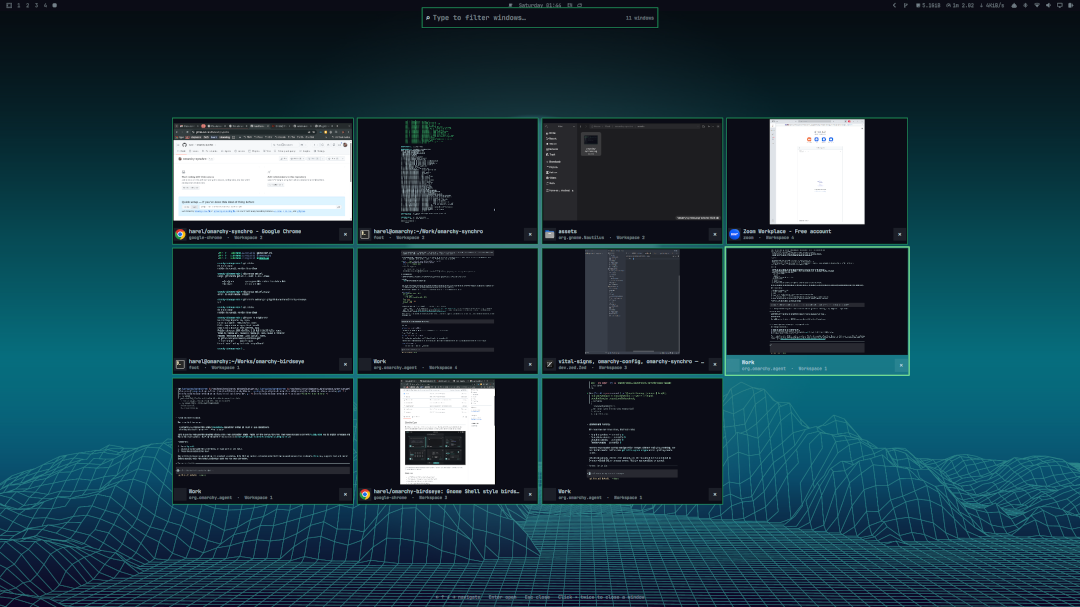
The marketplace image uses generic mock windows. Replace it with a real, privacy-reviewed screenshot before publication if desired.
Features
- Live thumbnails for windows across all workspaces
- Responsive full-screen grid on every connected monitor
- Application icons, titles, and workspace names
- Focus and keyboard-selection highlighting
- Type-to-filter by application ID or title
- Arrow-key navigation and Enter activation
- Two-click, auto-expiring close confirmation on every card
- Live updates as windows open, close, move, or change title
- Native Omarchy colors, spacing, typography, and rounded corners
- Theme-aware fallback when a screencopy frame is unavailable
birdseye toggleshell IPC endpoint
Requirements
- Omarchy 4.0 or newer with the native shell plugin system
- Quickshell with
ToplevelManagerandScreencopyView - Hyprland with
wlr-foreign-toplevel-managementand toplevel-export screencopy support hyprctl(included with Hyprland)
Install
From a published Git repository:
omarchy plugin add https://github.com/harel/omarchy-birdseye --enable
For local development, clone/copy this repository to a Git URL, then use omarchy plugin add <git-url> --enable. Omarchy intentionally installs plugins from Git after validating their manifests.
Add a Hyprland binding to ~/.config/hypr/bindings.lua:
o.bind("SUPER + A", "Bird's Eye", "omarchy-shell birdseye toggle")
Choose any unused chord if SUPER + A is already bound. Call hl.unbind(...) only when intentionally replacing an existing binding, and document what it replaced. Run hyprctl reload afterward.
Remove
Remove the Bird's Eye lines from ~/.config/hypr/bindings.lua, then run:
omarchy plugin disable birdseye.window-overview
omarchy plugin remove birdseye.window-overview
hyprctl reload
Keyboard controls
| Key | Action |
|---|---|
| Arrow keys | Move selection |
| Enter | Activate the selected window |
| Escape | Close the overview |
| Any printable text | Filter by title or application |
| Backspace | Remove a filter character |
| Ctrl+Backspace | Remove a filter word |
| Ctrl+U | Clear the filter |
Mouse users can click a card to activate it. Closing a window requires two clicks on its close control within 1.6 seconds.
Configuration
Bird's Eye reads optional settings from:
~/.config/omarchy/birdseye.json
Create it from the example bundled with the installed plugin:
cp ~/.config/omarchy/plugins/birdseye.window-overview/config.example.json \
  ~/.config/omarchy/birdseye.json
Alternatively, click the configuration button (⚙) in the top-right corner of the Bird's Eye overlay. It creates the file with the defaults when needed and opens it in the editor selected by omarchy default editor.
The default configuration is:
{
  "backgroundMode": "workspace",
  "blurStrength": 0
}
backgroundModecontrols what appears behind the tiles. Use"workspace"to show a frozen snapshot of the current workspace when blur is enabled (or the live workspace when blur is0). Use"desktop"to show Omarchy's current wallpaper without the workspace windows.blurStrengthcontrols background blur from0(off) through128(maximum). It applies to either background mode.
The file is watched while Omarchy Shell is running. Saving it updates the configuration automatically; close and reopen Bird's Eye to refresh the captured workspace or wallpaper with the new settings. If plugin code itself is updated, run omarchy restart shell to avoid stale QML component caching.
Bird's Eye has no separate color settings: it reads Omarchy's current Color and Style tokens. Grid dimensions adapt automatically to screen size and window count. The Hyprland shortcut is user configuration and can be changed to any unused combination.
External tools can toggle, open, or close the overview:
omarchy-shell birdseye toggle
omarchy-shell birdseye open
omarchy-shell birdseye close
Troubleshooting
- No thumbnails: verify that Hyprland exposes toplevel-export support and that no screen-capture policy blocks Quickshell. Cards remain usable with fallback labels.
- Workspace says “—”: Bird's Eye matches foreign-toplevel objects to
hyprctl clients -j. Very short-lived windows or multiple identical title/class pairs can briefly be ambiguous. - Plugin is not listed: run
omarchy plugin validate ., thenomarchy-shell shell rescanPlugins. - Shortcut does nothing: run
hyprctl reload, inspecthyprctl configerrors, and testomarchy-shell birdseye toggledirectly. - Standalone Super: Hyprland modifier-only bindings are not reliably distinguishable from the start of normal Super shortcuts in current configurations. A chord such as Super+Tab avoids delayed or accidental activation.
License
MIT