
Another Boring Piece — for Omarchy
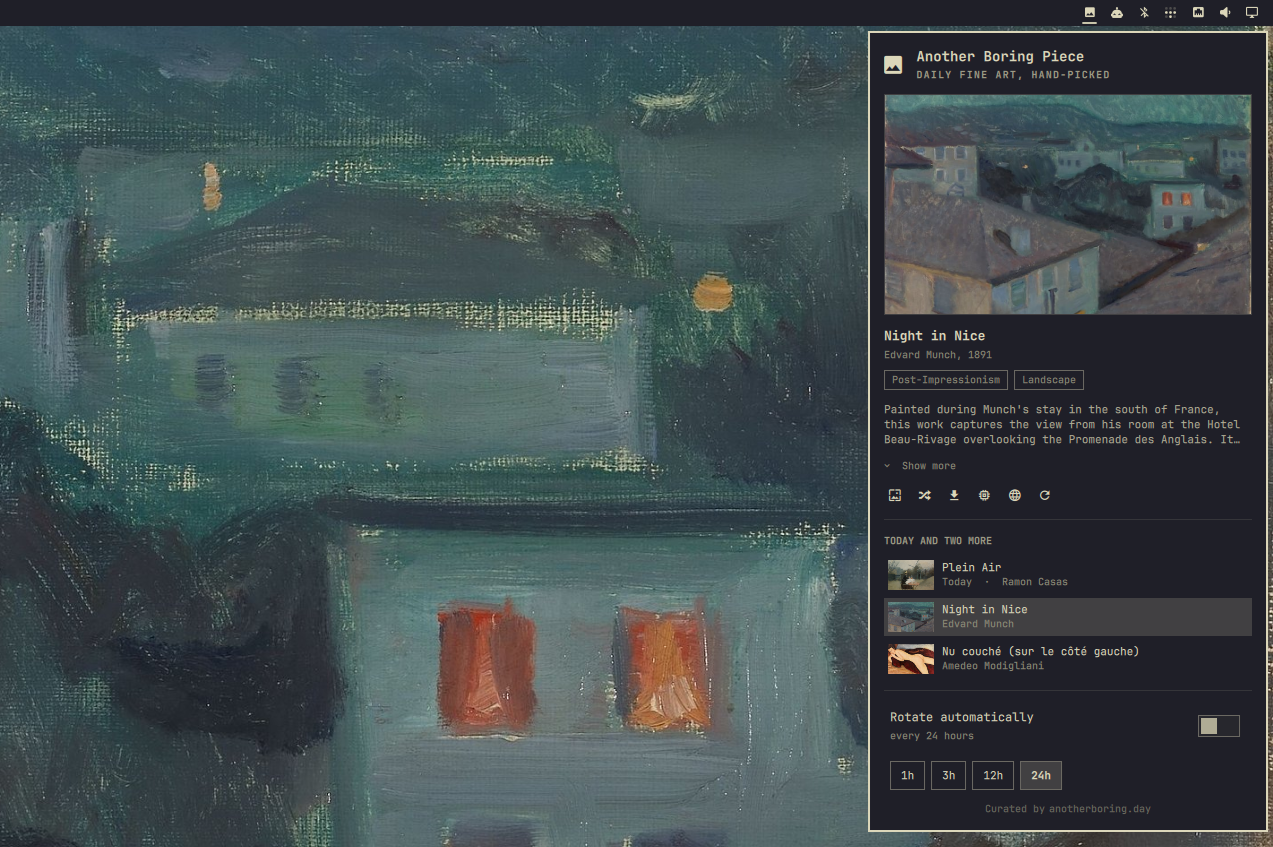
Hand-picked fine art from anotherboring.day as your Omarchy background. A pill in the bar opens today's piece plus two more, one click sets any of them, and an optional schedule keeps the wall moving.
The Omarchy port of the Raycast extension of the same name: same public endpoints, no account, no API key.
Requires Omarchy 4 (the Quickshell-based omarchy-shell).
Install
omarchy plugin add https://github.com/jopesh/omarchy-boringday.git --enable
Or from a checkout — the directory must be named for the plugin id, since that is where the shell looks:
git clone https://github.com/jopesh/omarchy-boringday.git \
  ~/.config/omarchy/plugins/boringday.wallpapers
omarchy-shell shell rescanPlugins
omarchy plugin enable boringday.wallpapers right
Using it
Click the pill to open the panel; right-click shuffles a random piece without opening anything, middle-click refetches today's set. The pill takes the accent color while rotation is on.
The three rows are a selector: browsing previews a piece, and the wall only changes when you set it.
| Key | Action |
|---|---|
↑ / ↓ |
Move the cursor — browsing a piece previews it |
Enter |
Set the previewed piece as the background |
s |
Shuffle — set a random piece |
t |
Add the previewed piece to the current theme |
d |
Save a copy to your pictures folder |
e |
Expand or collapse a truncated description |
o |
Open the piece's page on anotherboring.day |
r |
Fetch today's set again |
a |
Toggle automatic rotation |
← / → |
Pick the rotation period when the cursor is on it |
i |
Cycle the rotation period |
Esc |
Close |
Keeping a piece
Setting a piece moves Omarchy's current-background symlink, and that symlink
belongs to the theme — switch themes, or cycle with omarchy theme bg next,
and the piece is gone.
t makes it permanent: the image is copied into
~/.config/omarchy/backgrounds/<theme>/, the folder that rotation reads from,
so the piece becomes one of the theme's own backgrounds. Adding the same piece
twice does nothing, and if it is the piece on screen the symlink moves onto the
permanent copy.
From the command line
The service registers a boringday IPC target, so everything works with no bar
widget on screen — from a keybinding, a script, or over ssh into the session.
omarchy-shell boringday random          # set a random piece now
omarchy-shell boringday today           # set today's piece
omarchy-shell boringday install         # add the piece on the wall to this theme
omarchy-shell boringday auto toggle     # on | off | toggle
omarchy-shell boringday interval 1800   # seconds
omarchy-shell boringday current         # what's on the wall
omarchy-shell boringday status          # JSON: interval, next change, errors
omarchy-shell boringday refresh         # refetch today's set
A Hyprland binding, in ~/.config/hypr/bindings.conf:
bindd = SUPER SHIFT, W, Another boring piece, exec, omarchy-shell boringday random
Settings
Settings live inline on the plugin's entry in ~/.config/omarchy/shell.json,
the same place every other bar widget keeps its settings — so the panel's
toggle and the boringday auto call are the same switch.
{ "id": "boringday.wallpapers",
  "autoRotate": true,        // rotate on a schedule
  "intervalSeconds": 3600,   // 1h / 3h / 12h / 24h from the panel
  "notify": true }           // notification naming each piece as it changes
The interval is wall-clock, not uptime: the last change is persisted, so
restarting the shell resumes the schedule rather than granting a fresh hour.
Rotation only advances while omarchy-shell is running.
Where things land
| Path | What |
|---|---|
~/.cache/omarchy/boringday/wallpapers/ |
Full-size images, newest 20 kept |
~/.cache/omarchy/boringday/thumbs/ |
Panel previews, newest 60 kept |
~/.local/state/omarchy/boringday/state.json |
Last change, current piece, recently-seen ids |
~/.config/omarchy/backgrounds/<theme>/ |
Pieces added with t, kept until you delete them |
$(xdg-user-dir PICTURES) |
Copies saved with d, never overwritten |
The list of pieces is not persisted — it is rebuilt on every start. The piece on your wall is, whole record and all, so the panel opens describing what is on screen without asking the server for anything.
How it fits together
Service.qml is headless and loaded once per session: it owns every fetch, the
caches, the rotation schedule, and the boringday IPC target. Panel.qml is
the bar pill and its popup, and pure view — a bar surface exists per monitor,
so it owns no state. Model.js holds the parts worth reading alone: the CDN
thumbnail transforms, response parsing, and state serialization.
Images are fetched to disk with curl and rendered from local files, so a
dropped network degrades to a stale preview rather than a broken one. Nothing
off the network is taken on trust: responses have a size curl refuses to
exceed mid-download, records are cut to a bounded shape, and every image is
checked against its own header — type and decoded dimensions — before it is
previewed or set. The ceilings are the MAX_ constants at the top of
Model.js.
License
MIT. The artwork belongs to anotherboring.day and the respective museums and estates; this plugin only points your desktop at it.