
CVE Watcher
An Omarchy bar plugin that watches for new CVEs in the stack you actually run — and only bugs you about the versions you actually use.
A shield icon sits in your bar. When new advisories land for a service you subscribe to, it badges up with the unread count (red when something is critical or actively exploited). Click it for a scrollable timeline of the latest CVEs across your stack; opening the panel marks everything as read.
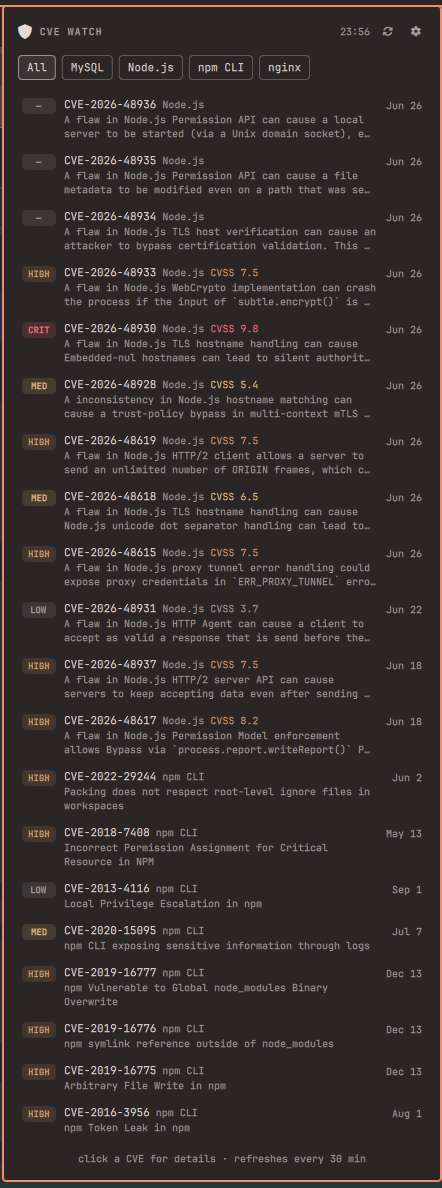
What it shows
- Timeline — newest CVEs first, across all subscribed services, with severity (CVSS), a summary, and age. Click any row to open the full advisory.
- KEV badge — CVEs listed in CISA KEV
(confirmed exploited in the wild) get a red
KEVchip. That's the signal worth interrupting your day for. - EOL card — filter to one service and see its release line's latest patch version and end-of-life date, via endoflife.date.
- Unread markers — rows published since you last opened the panel get a dot; the bar icon badge counts them.
Where the data comes from
Each service maps to the layer where its CVEs actually live:
| Layer | Source | Services |
|---|---|---|
| Frameworks & libraries | OSV.dev | Laravel, Rails, Django, Symfony, Express, Next.js, npm CLI |
| Runtimes & products | NVD API 2.0 | PHP/PHP-FPM, Node.js, Python, Go, Rust, Java, Ruby, WordPress, MySQL, MariaDB, PostgreSQL, MongoDB, Redis, nginx, Apache, Docker, Kubernetes |
| Exploited-in-the-wild | CISA KEV | all (cross-reference) |
| EOL / latest patch | endoflife.date | all with a product page |
All feeds are free and keyless. NVD limits anonymous clients to 5 requests / 30 s, so NVD fetches self-stagger a few seconds apart to stay under it.
Settings (⚙ in the panel)
- Services — toggle which of the 24 services you subscribe to. Nothing is watched out of the box; pick your stack. (PHP-FPM CVEs are filed under PHP itself, so the PHP entry covers both.)
- Minimum severity — All / Medium+ / High+ / Critical. KEV (exploited in the wild) and unrated entries always show regardless of the floor.
- Min version — per service, hide advisories that only affect versions older than what you run ("I don't care about Laravel 10, I'm on 13"). Type a version or click a release line to set it — lines are listed with their latest patch and EOL date.
Tweakables via CLI:
omarchy bar set bottelet.cve-watcher refreshMinutes 60
omarchy bar set bottelet.cve-watcher highColor "#e5941b"
Install
omarchy plugin add https://github.com/Bottelet/omarchy-cve-watcher.git --enable
omarchy bar put bottelet.cve-watcher --after omarchy.clock
Usage
- Click the shield: open/close the timeline (marks all as read).
- Middle-click the shield: refresh all feeds now.
- Click a service pill: filter the timeline + show that service's EOL info.
- Click a CVE row: open the advisory (osv.dev / nvd.nist.gov).
Remove
omarchy plugin remove bottelet.cve-watcher
Settings (subscriptions, min versions, read state) live in this plugin's
own entry in ~/.config/omarchy/shell.json; removing the plugin drops the widget
from the bar, and the entry can be deleted from that file if you want a clean slate.
Dependencies
curl and jq — both ship with Omarchy.