
Focus Modes
One toggle, whole context. Work mode blocks the noise; Off mode gives it back. Like Focus on your phone — but for your actual computer.
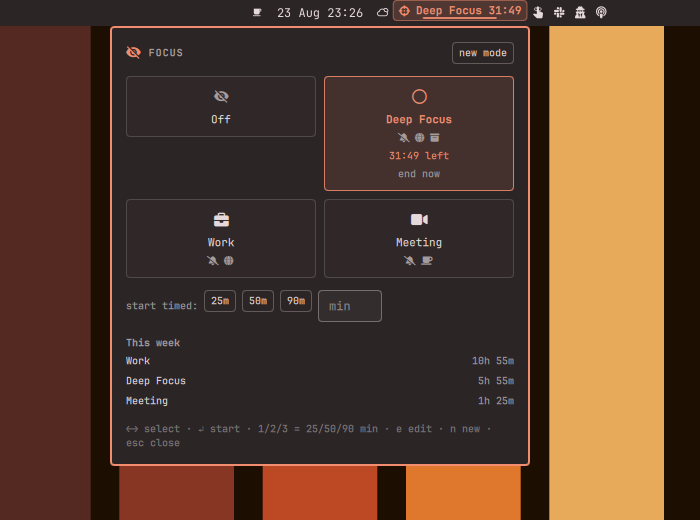
A mode is a named profile (Deep Focus, Work, Meeting, your own) that applies a set of actions atomically when it starts and reverts exactly what it applied when it ends — by click, by timer, or after a crash:
- 🔕 Silence notifications — the shell's own do-not-disturb
- 🌐 Block distracting sites system-wide (
/etc/hosts, no browser extension) - 📦 Quarantine distracting apps — Discord & friends slide to a hidden workspace and come back to the exact workspace they were on; apps opened mid-mode get caught too
- 🎨 Switch theme — visual context for "I'm working now"
- ☕ Keep the screen awake (Meeting mode's best friend)
- 🔇 Mute audio
- ⚙️ Run your own hooks on enter/exit — Slack status, smart lights, anything
A timer (25/50/90 min or custom) shows a countdown in the bar; when it expires everything is restored and you get a notification with the session length. A small "this week" view totals your focus time per mode.
Fully local. No network access, no accounts, no telemetry — your focus habits never leave the machine.
Install
omarchy plugin add https://github.com/Bottelet/omarchy-focus-modes --enable
The bar chip shows an outline icon when off, and the mode's icon + name +
remaining time while a mode runs. Click it for the mode cards; keyboard-first
(←→ select, ↵ start, 1/2/3 = 25/50/90 min timer, e edit, n new
mode, Esc close).
Site blocking and authorization (one-time setup)
Blocking sites edits /etc/hosts, which needs root. The plugin does that
through a tiny audited helper which must be installed once to a root-owned
path — pkexec is never pointed at anything inside the (user-writable)
plugin directory, because a script you can rewrite is a script any process
running as you can rewrite between the prompt and the execution:
# review it first — ~150 lines of bash
less ~/.config/omarchy/plugins/bottelet.focus-modes/helpers/focus-modes-hosts

sudo install -o root -g root -m 755 \
  ~/.config/omarchy/plugins/bottelet.focus-modes/helpers/focus-modes-hosts \
  /usr/local/bin/focus-modes-hosts
The plugin only ever invokes /usr/local/bin/focus-modes-hosts, and the
helper itself refuses to do privileged work from any path that is not
root-owned and non-user-writable, so a copy that never went through
sudo install is inert. Without the setup, modes still work; site blocking
reports "needs one-time setup" and is skipped. Each block/unblock shows a
polkit authorization prompt; cancel it and the mode still applies its other
actions.
Plugin updates never touch the installed helper. If a future release changes
helpers/focus-modes-hosts, re-run the sudo install line (the README
changelog will say so).
localhost, *.local, *.localhost and this machine's own hostname can
never be blocked — local development keeps working no matter what is on the
block list. Already-open tabs keep their existing connections; new lookups
die. See SECURITY.md for the full threat model.
Optional: password-less toggling. If the per-toggle prompt annoys you, install the provided polkit rule (edit the username first). It authorizes only the root-owned installed helper, never the plugin checkout:
sudo install -m 644 helpers/49-focus-modes.rules.example /etc/polkit-1/rules.d/49-focus-modes.rules
sudoedit /etc/polkit-1/rules.d/49-focus-modes.rules   # set your username
Keybinding
Bind a mode to a key in your Hyprland bindings:
o.bind("SUPER + SHIFT + F", "Deep Focus",
       "omarchy-shell bottelet.focus-modes activate deep-focus")
CLI surface: activate <mode-id>, off, status, toggle.
Editing modes
Click ✎ on a card (or press e). Everything is per-mode: the action
toggles, the site list, app classes (with a "pick from open windows" row),
theme, default timer, hooks. Modes live in
~/.local/state/omarchy-focus-modes/modes.json if you prefer editing JSON.
Settings
- Show mode name — chip shows icon only when off
- Scroll cycles modes — wheel on the chip switches modes (default off)
- Notify when a timer ends (default on)
Good companions, known overlaps
Curtain / Share Cloak own screen-share hiding — a Meeting mode composes
around them, it doesn't replace them. If you run single-purpose toggles like
Caffeine or Snooze, they keep working; last writer wins on the shared
resource (idle inhibit, hosts file) and this plugin only ever touches its own
hosts marker block.
Remove
omarchy plugin remove bottelet.focus-modes
Removal checklist — everything the plugin ever touched:
- End the active mode first (click Off) so DND, theme, mute, windows and the hosts block are reverted by the engine itself.
- If you removed the plugin mid-mode, clean the hosts block manually:
sudo focus-modes-hosts --clear— or delete the block between# >>> bottelet.focus-modes >>>and# <<< bottelet.focus-modes <<<in/etc/hostsby hand. Verify withgrep focus-modes /etc/hosts(should print nothing). - Remove the installed helper:
sudo rm /usr/local/bin/focus-modes-hosts - If you installed the optional polkit rule:
sudo rm /etc/polkit-1/rules.d/49-focus-modes.rules - State (modes, session log):
rm -rf ~/.local/state/omarchy-focus-modes
Dependencies
Everything is on a stock Omarchy install: bash, pkexec (polkit),
hyprctl, wpctl (PipeWire), systemd-inhibit, notify-send,
resolvectl (optional, DNS cache flush).
License
MIT — see LICENSE.