
Omahub
← All plugins
C

Is It Down?

by Casper Bottelet

Is it me or is it down? Watches the status pages of services you depend on (GitHub, AWS, Cloudflare, npm, ...) from the bar.

Security review

Review recommended · 1 finding

Deterministic scan — not a security guarantee

Medium
Risk level
Medium
Analyzed commit
b14d186
Scanned
4 days ago
  • medium external_hosts Panel.qml:302

    Downloads or connects to an external HTTP(S) host.

    curl -fsS --max-filesize 20971520 --max-time 10 https://ip-ranges.amazonaws.com/ip-ranges.json | head -c 20971520 | jq -c '[.prefixes[].region | ascii_downcase] | unique'"]

Automated analysis only — not a security guarantee.

AI advisory review

No obvious issues detected

Language-model assessment · ~deepseek/deepseek-v4-flash-latest — advisory only

Low
AI risk level
Low
Recommendation
install
Model
~deepseek/deepseek-v4-flash-latest
Analyzed commit
b14d186
Reviewed
4 days ago

This is a straightforward status-page watcher: it fetches public JSON from known service status APIs and the AWS IP-ranges endpoint, parses it, and displays it. The deterministic scan's medium finding is the documented AWS region-discovery fetch, which is read-only and sends no credentials; shell commands are properly quoted and output-capped. No obfuscation, persistence, destructive operations, or credential access were found.

  • Fetches data from external HTTPS endpoints (status pages, AWS ip-ranges), which is expected for the widget but is a network privacy consideration.
  • Uses sh -c with curl/jq/iconv; URLs are single-quote escaped and responses are byte-capped, so injection/resource-exhaustion risk is low.
  • Custom services can point at arbitrary user-configured endpoints, but this is opt-in via the user's own shell.json.
How this check works

This review combines the deterministic scan (the rule-based results above) with an independent look at the plugin's code by a language model. The model reads a trimmed sample of the repository's files, the manifest, and the README, then gives a plain-language risk level and a recommendation: install (no notable danger), review (look closer first), or avoid (clearly dangerous).

It runs on the same analyzed commit as the deterministic scan and is strictly advisory — it is not a security guarantee and never blocks a plugin by itself. A human moderator still reviews plugins before they are listed.

AI advisory only — automated analysis, not a security guarantee.

Install
$ omarchy plugin add https://github.com/Bottelet/omarchy-is-it-down --enable
Developer Tools #bar #quickshell

Is It Down?

Is it me or is it down? Watch the status pages of services you depend on from a detective icon in the Omarchy bar.
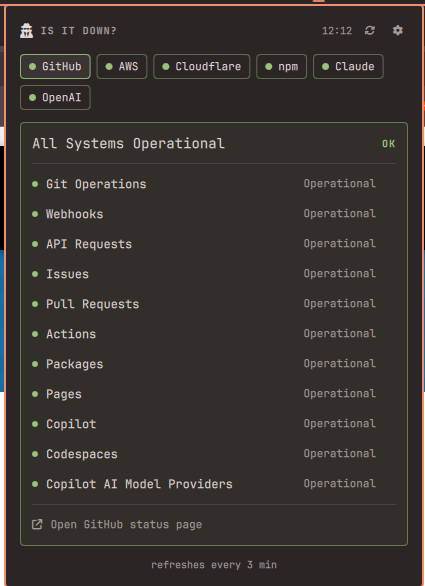
Is It Down?

Features

  • Detective icon turns yellow/red with a count badge when a watched service reports trouble.
  • Panel with one tab per service (GitHub, AWS, Cloudflare, npm, Claude, OpenAI, Vercel, PyPI, Discord, Netlify), colored green/yellow/red.
  • Per-service detail: overall status, active incidents, component health.
  • Built-in settings (⚙): toggle services on/off, then drill into a service to enable/disable its AWS regions or components — with a filter and enable/disable-all buttons.
  • Follows your Omarchy theme; red comes from the theme's urgent color.

Requirements

  • Omarchy (Quattro shell) with a bar. Uses only stock tools (curl, jq, iconv).

Install

omarchy plugin add https://github.com/Bottelet/omarchy-is-it-down.git --enable
omarchy bar put bottelet.is-it-down --after omarchy.weather

Usage

  • Left-click the detective to open the panel; middle-click to force a refresh.
  • Click a tab to see that service; the "Open … status page" link at the bottom of the card opens the real status page in your browser.
  • Hover a component row and click ✕ to mute it. Manage everything under ⚙.
  • Unreachable status pages show "maybe it's you" and don't badge the icon.

Add a service

Any Statuspage-powered site works without code changes: add a customServices entry to the plugin's settings in ~/.config/omarchy/shell.json:

{ "id": "bottelet.is-it-down",
  "customServices": [
    { "key": "tailscale", "name": "Tailscale",
      "api": "https://status.tailscale.com/api/v2/summary.json" }
  ] }

It appears in ⚙ like any built-in. Components and AWS regions are discovered live from the services themselves, so new ones show up automatically.

Remove

omarchy plugin remove bottelet.is-it-down

Settings live in this plugin's own entry in ~/.config/omarchy/shell.json; nothing else is touched.

License

MIT