
Omatidy
Your folders, on autopilot. Point rules at a folder and stop living in a landfill: invoices file themselves by date, downloads unzip themselves, week-old installers walk to the trash — all in the background while you work.
Features
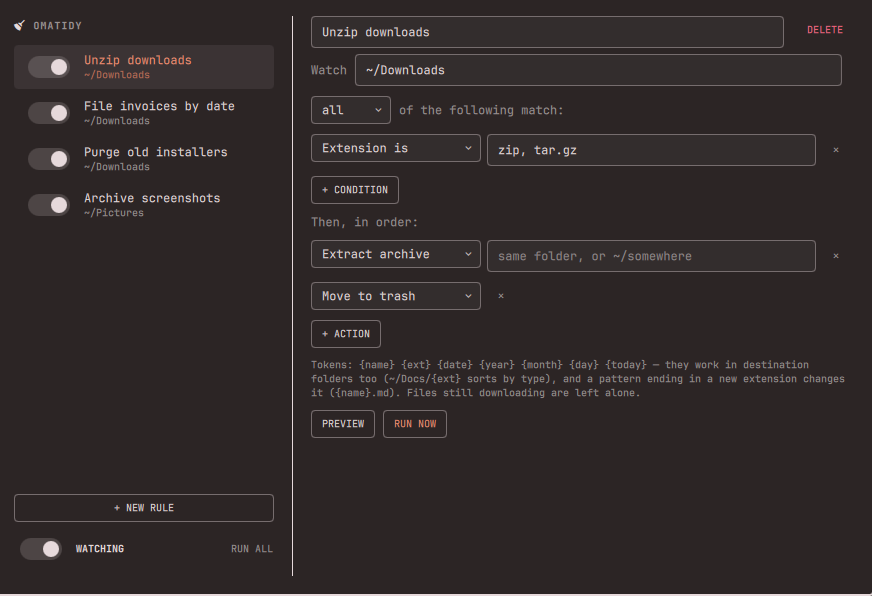
- Hotkey-summoned rules pane — no bar icon; one key opens a two-pane editor (rules left, conditions & actions right), Esc closes it. Arrow keys step through rules.
- Rules that read like sentences — conditions (name contains, glob, extension, content contains — including inside PDFs, older than N days, size over/under) matched with all or any, then actions applied in order: move, copy, rename, extract, trash, delete. Rules run top to bottom; the first match wins per file.
- A real background watcher — flip Watching on and an inotify loop
reacts to folder changes within seconds, waits for downloads to settle
(
.part/.crdownloadand friends are never touched), and sweeps every 15 minutes so age-based rules fire without folder activity. Survives shell restarts; only ever one watcher no matter how many monitors you have. - Tokens —
{name}{ext}{date}{year}{month}{day}{today}work in rename patterns and destination folders:~/Documents/{ext}sorts a whole folder by type with one rule,{date} {name}stamps files with their modified date, and a pattern ending in a new extension changes it ({name}.mdfor feeding an Obsidian vault). - Extract that thinks — archives with one top-level folder unpack in place; loose-file archives get a folder named after the archive. Never overwrites. Chain with trash for the classic "unzip it, bin the zip".
- Preview before you trust it — every rule has a dry-run Preview showing
exactly what would happen right now, and an Activity feed shows everything
the watcher has done (also logged to
~/.local/state/omatidy/omatidy.log). - Safe by construction — name collisions get
2,3, … instead of overwriting, hidden files are ignored, trash uses the real system trash (gio trash), and delete is clearly marked as bypassing it.
Install
omarchy plugin add https://github.com/Bottelet/omarchy-omatidy.git --enable
There is no bar icon — bind a key in ~/.config/hypr/bindings.lua:
o.bind("SUPER + SHIFT + T", "Omatidy", "omarchy-shell shell toggle bottelet.omatidy")
Usage
Open the pane, add a rule, point it at a folder, add conditions and actions. Preview shows what it would do; Run now applies it once; the Watching toggle keeps it running in the background from then on.
Rules live in ~/.config/omatidy/rules.json if you prefer editing JSON — the
pane and the watcher both pick up outside edits live.
Some favorites:
| Rule | Conditions | Actions |
|---|---|---|
| Unzip downloads | extension is zip, tar.gz |
extract → move to trash |
| File invoices | extension pdf + content contains invoice |
move to ~/Documents/Invoices as {date} {name} |
| Purge old installers | glob *.iso + older than 7 days |
move to trash |
| Sort by type | (no conditions — everything) | move to ~/Documents/{ext} |
| Emails → Obsidian | extension txt |
rename {name}.md, move to vault |
Tests
The rule engine ships with a 37-case test suite (pattern expansion, every condition type, first-match-wins, extract shapes, dry-run, collision handling), run on every push by CI:
tests/run.sh
Security
Omatidy makes no network requests — everything runs locally as your user.
The watcher only ever touches the folders your rules point at, and filenames
are handled strictly as data: every external command gets them as arguments
(argv arrays end to end), nothing is interpolated into a shell string, and
names shown in the pane render as plain text. Extraction relies on bsdtar's
default protections (absolute paths, .. traversal, and writes through
symlinks are refused) and never overwrites existing files. Symlinks and
hidden files in watched folders are always ignored. The test suite includes
hostile-filename and traversal-archive regression cases.
Remove
omarchy plugin remove bottelet.omatidy
Your rules (~/.config/omatidy/) and the activity log
(~/.local/state/omatidy/) stay behind; delete those folders to remove every
trace.
Dependencies
Everything ships with Omarchy: jq, bsdtar (libarchive), gio (glib2),
inotify-tools, python3. Optional: poppler (pdftotext) for content
matching inside PDFs.
python3 is used for exactly one thing: opening the rules file with
O_NOFOLLOW | O_NONBLOCK and validating it on that descriptor, which bash
cannot express. Nothing else in the engine needs it.
License
MIT