
Podcasts — an Omarchy bar plugin
New episodes land in an inbox on your bar. Triage them in five seconds. Play the queue with voice boost and per-show speed. Quit the shell, come back, and pick up where you left off.
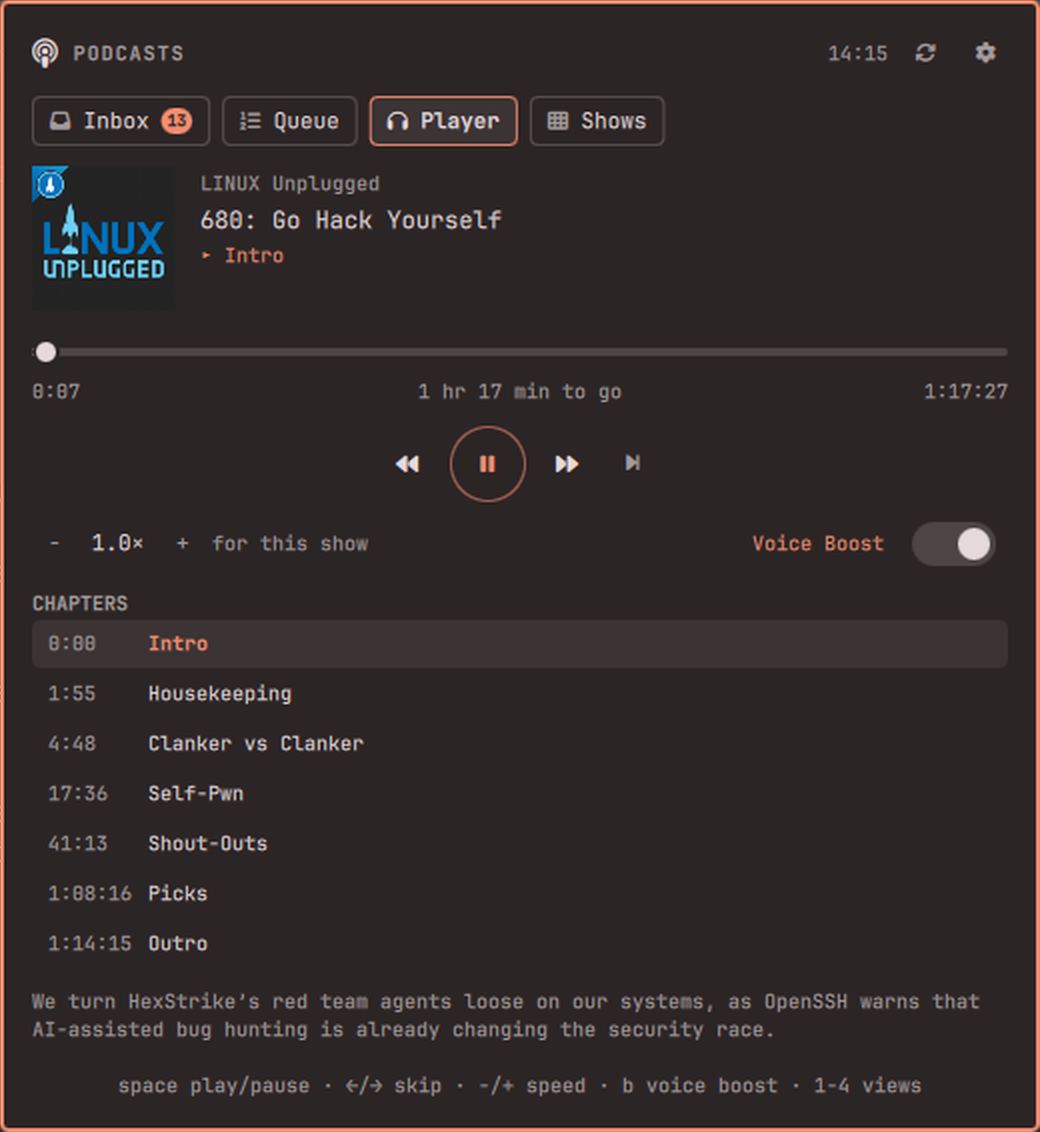
Features
- An inbox, not a firehose. Subscribing does not dump a back catalogue on
you. Only episodes that arrive after you subscribe show up for triage, and
the bar badge counts exactly those — the ones still waiting on a decision.
Enterqueues,aarchives,Aarchives the lot. Inbox zero is the point. - A queue that plays itself. Ordered, reorderable with
Shift+↑/↓, and it auto-advances when an episode ends. - Playback that survives a restart. Position is written every five seconds and on every pause; a shell restart costs you nothing.
- Voice Boost. One toggle levels quiet conversation against loud stings and
ads (mpv's
dynaudnorm) — the thing that makes podcasts listenable in a noisy room. - Per-show speed. Set 1.6× on the fast talkers and 1.0× on the ones you actually want to hear; each show remembers its own.
- Chapters. Feeds that publish Podcasting 2.0
podcast:chaptersget a clickable chapter list and a live "you are here" marker. - Three modes per show. Inbox (triage it), Auto-queue (skip triage, queue it, notify me), Ignore (subscribed but silent — browse it manually). Notifications fire only for auto-queue shows; everything else is the badge's job.
- Search as you type. The iTunes directory needs no key and works out of the box. Shows you already have sort to the top; the rest appear underneath, five at a time. Paste an RSS URL for anything the directory does not list — including private Patreon and Supercast feeds.
- OPML in and out, through the desktop file chooser.
- Polite to your machine. Feeds are polled on a jittered schedule with conditional GET, so an unchanged feed costs a couple of hundred bytes. A feed that keeps failing is marked "not updating" instead of being retried forever.
Install
omarchy plugin add https://github.com/Bottelet/omarchy-podcasts.git --enable
omarchy bar put bottelet.podcasts --after omarchy.clock
That installs to ~/.config/omarchy/plugins/bottelet.podcasts/. Click the
podcast icon in your bar to open the panel; middle-click it to play or pause
without opening anything.
Optional hotkey, in ~/.config/hypr/bindings.conf (or bindings.lua):
bind = SUPER, P, exec, omarchy-shell bottelet.podcasts toggle
Using it
Open the panel and go to Shows and start typing. Results appear as you
type: your own subscriptions narrow at the top, and shows you are not
subscribed to appear underneath, five at a time — arrow past the last one (or
click show more) for the next five. Arrow onto a result and press Enter to
subscribe.
The same box takes a feed URL. Paste one and press Enter to subscribe
directly — that path waits for Enter on purpose, so a half-pasted address
never subscribes you to whatever it happens to resolve to. It is also how you
add private Patreon and Supercast feeds, which no directory lists.
New episodes then start arriving in your Inbox.
The four views are 1–4, or click the tabs.
| Key | Inbox | Queue | Player | Shows |
|---|---|---|---|---|
↑ ↓ / j k |
move | move | — | move (past the last result loads more) |
Enter |
add to queue | play from here | — | subscribe / open show / queue episode |
Space |
play now | play now | play / pause | open show / play now |
Shift+↑/↓ |
— | reorder | — | — |
x |
archive | remove | — | unsubscribe / archive |
a / A |
archive / archive all | — | — | archive |
← → |
— | — | back 15s / forward 30s | back to the grid |
- + |
— | — | slower / faster | — |
b |
voice boost | voice boost | voice boost | voice boost |
r |
check feeds now | |||
/ |
focus search | |||
Esc |
close | close | close | close |
Right-click any episode row for the secondary action (play now in the inbox, remove from the queue).
Settings
The ⚙ button, or omarchy bar set:
| Key | Default | Meaning |
|---|---|---|
pollMinutes |
30 |
Minutes between feed checks (minimum 10) |
defaultSpeed |
1.0 |
Speed for shows with no speed of their own |
voiceBoost |
false |
Level quiet talk against loud music and ads |
podcastIndexKey |
(empty) | Optional — search Podcast Index instead of iTunes |
podcastIndexSecret |
(empty) | Paired with the key above |
omarchy bar set bottelet.podcasts pollMinutes 60
omarchy bar set bottelet.podcasts defaultSpeed 1.4
Subscriptions, the queue and your playback positions are not settings — they
live in ~/.local/share/omarchy-podcasts/.
Dependencies
Everything needed ships with a stock Omarchy install: mpv, python3
(standard library only), curl, jq, notify-send, and
omarchy-file-select. No pip packages, no Node, no bundled binaries.
If mpv-mpris is installed — it is, on stock Omarchy, at
/etc/mpv/scripts/mpris.so — playback is published on D-Bus, so your media
keys and any other now-playing widget pick it up for free. Nothing breaks
without it.
Privacy & security
- The plugin talks to the iTunes search API, the feeds you subscribe to, and nothing else. There is no server, no telemetry, and no account unless you choose to supply a Podcast Index key.
- Feed content is treated as hostile input. Enclosure URLs reach mpv as JSON over its IPC socket — never as a command line, never through a shell. Every string a feed supplies is rendered as plain text, never as rich text, so a feed cannot make the panel fetch a remote image or beacon your IP.
- The panel never points an image at a remote URL. Artwork — for your shows and for search results alike — is downloaded by the helper, size-capped and type-checked from its magic bytes, and cached to disk first. A directory API cannot make your machine reach out to a host of its choosing.
- A feed cannot point the plugin at your own machine. Loopback and link-local addresses are refused on every URL a feed controls — its own, its artwork, its chapters — so a podcast cannot use your computer to reach a service only your computer can see. Feeds on your LAN still work, because self-hosting one is a reasonable thing to do.
- Feeds must be HTTPS. A feed that declares a DTD is refused outright (the billion-laughs amplification no download cap can catch). Downloads are capped — 15 MB per feed, 5 MB per artwork — with timeouts and no retry storms.
- Everything the plugin writes is
0700/0600and lives under~/.local/share/omarchy-podcasts/. - If you supply a Podcast Index key, it never appears on a command line —
/procis world-readable, so it goes over stdin to the helper and into curl through a config file instead.
Run the offline test suite yourself:
tests/run.sh
309 checks, no network — a stub curl serves fixtures and simulates redirects, validators, and transport failures.
Remove
omarchy bar remove bottelet.podcasts
omarchy plugin remove bottelet.podcasts
That removes the widget and the plugin. Your subscriptions, queue, playback
positions and cached artwork stay behind in
~/.local/share/omarchy-podcasts/ so a reinstall picks up where you stopped.
Delete them too if you want a clean slate:
rm -rf ~/.local/share/omarchy-podcasts
FAQ
Can it play Spotify or YouTube exclusives? No, and neither can any other podcast client. Those shows are not published as RSS, so there is nothing for a podcast app to fetch. If a show has a public feed anywhere, paste that URL.
Video podcasts?
Audio only. Even when a feed's enclosure is a video file it plays with
--no-video — this is a bar widget, not a media player.
Where are my downloads? There are none yet; episodes stream. Offline downloads are planned alongside gpodder/AntennaPod sync.
Can I sync with my phone? Not yet. gpodder.net / oPodSync sync — which AntennaPod on Android speaks natively — is the next milestone.
License
MIT. See LICENSE, which also documents every external dependency and every network service the plugin contacts.