
Quickdocs
Dash for Omarchy. Press a hotkey, fuzzy-search offline API documentation for your languages, and read the page right there — no browser, no network.
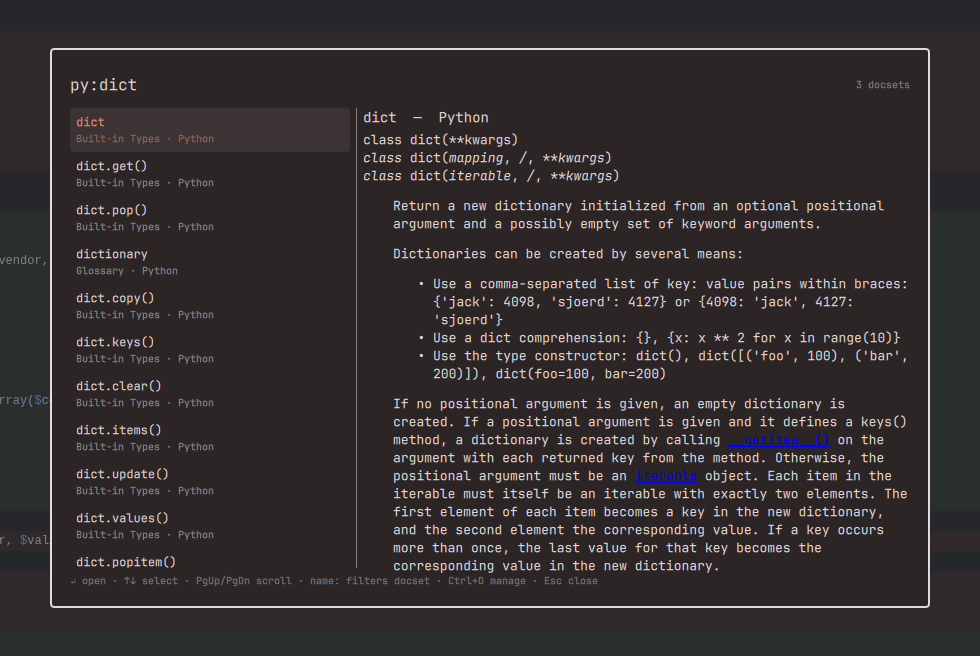
Features
- Hotkey-summoned overlay — no bar icon; one key opens the search, Esc closes it. Keyboard-first throughout.
- Fuzzy search across every installed docset, with docset scoping:
js:map,py:dict,go:append. - Instant preview — arrow through results and the page renders in the panel; PgUp/PgDn scrolls it. Relative links between pages work offline, external links open your browser.
- 800+ docsets from devdocs.io — JavaScript, Python, Go, Rust, PHP, Laravel, React, PostgreSQL, Bash, and everything else devdocs ships. Download once, use forever offline.
- Built-in docset manager — Ctrl+D lists the catalog (refreshed live from devdocs when online); Enter downloads, Del removes. Anything not in the catalog installs by typing its devdocs slug.
Install
omarchy plugin add https://github.com/Bottelet/omarchy-quickdocs.git --enable
There is no bar icon — bind a key in ~/.config/hypr/bindings.lua:
o.bind("SUPER + D", "Quickdocs", "omarchy-shell shell toggle bottelet.quickdocs")
Usage
Open the overlay and type. The docset manager opens automatically the first time (nothing is installed yet) — filter, then Enter to download.
Navigation is two-step: arrows move through the results (the page auto-previews), Enter locks the entry in for reading — the same keys then scroll the page — and Enter again drops back to the results.
| Key | Action |
|---|---|
↑ ↓ (or Ctrl+J/K) |
Move through results; scroll the page while reading |
↵ |
Read the selected entry / return to the results |
PgUp PgDn |
Page through results, or through the page while reading |
| highlight text | Selecting text in the page copies it to the clipboard |
name:query |
Scope search to one docset (js:, py:, go:…) |
Ctrl+D |
Toggle the docset manager |
Del |
Remove the selected docset (manager) |
Esc |
Step back: reading → search → close (Ctrl+C closes outright) |
Docsets
Docsets are stored under ~/.local/share/omarchy-quickdocs/<slug>/ — a search
index plus one HTML file per page, exploded from the devdocs db.json so
lookups never touch the network. Pages are sanitized at download and render
time so rendered content can never trigger a network request (images are
stripped — Qt's rich text engine would otherwise fetch them remotely). The manager downloads them in the background;
they become searchable the moment the download finishes.
Anything devdocs serves works, even if the catalog hasn't caught up: type the
slug (e.g. python~3.13) in the manager and press Enter, or use the CLI:
~/.config/omarchy/plugins/bottelet.quickdocs/scripts/docs-fetch.sh python~3.13 "Python 3.13"
Remove
omarchy plugin remove bottelet.quickdocs
Downloaded docsets stay in ~/.local/share/omarchy-quickdocs/; delete that
directory to reclaim the space. Remember to remove your keybinding from
~/.config/hypr/bindings.lua.
Dependencies
curl, jq, python3 — all present on a stock Omarchy install. Contacts
devdocs.io over HTTPS only while downloading a docset.
License
MIT — see LICENSE, which also documents the external tools and network services this plugin uses.