
Omarchy Slack
Slack in Quickshell — not Chromium.
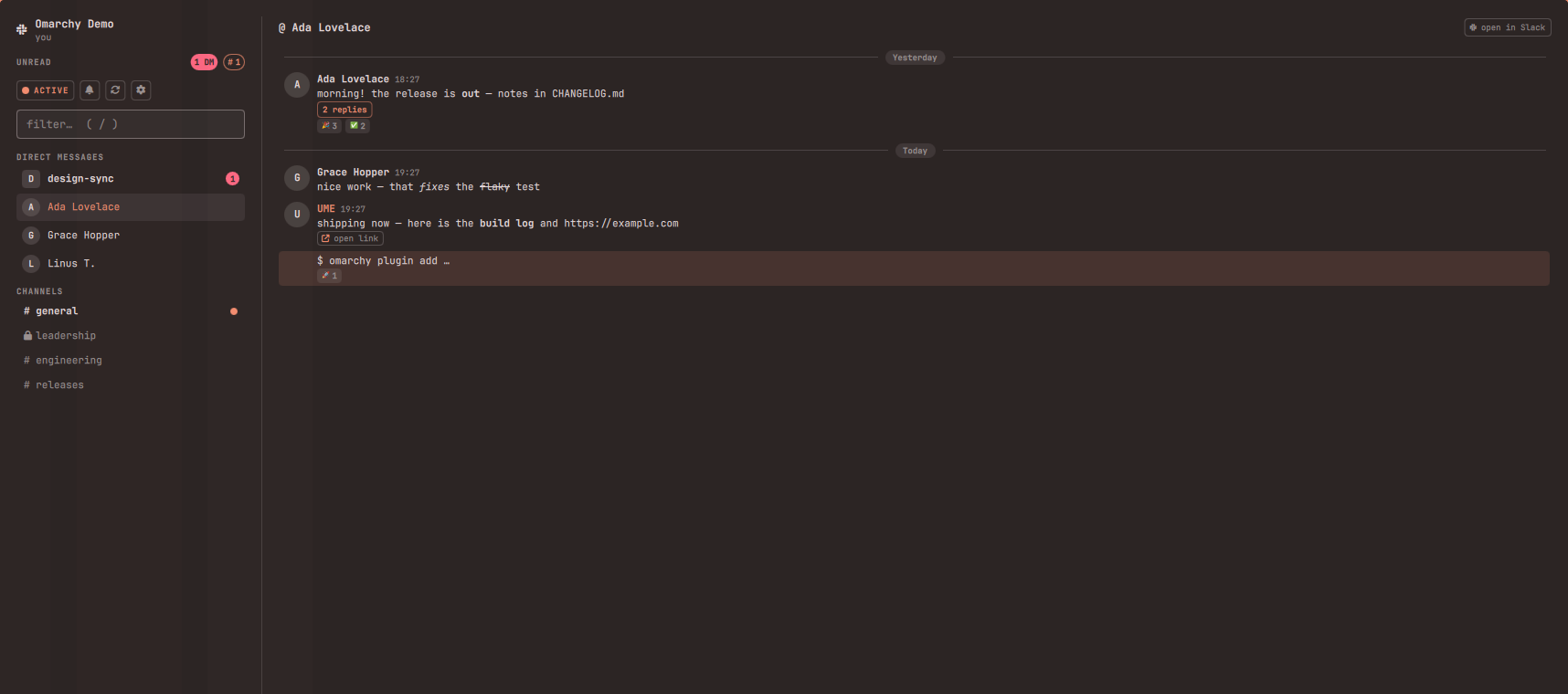
Omarchy Slack brings your workspace into a fast, themed Omarchy app: read and reply to DMs and channels, flip your presence, snooze notifications — while a mention badge keeps watch in your bar. No Electron, no half-gigabyte client.
Features
- A full app, summoned instantly. Click the bar icon (or bind a hotkey)
and Slack opens as a real, movable, resizable window (the same model as the
Spotify plugin): conversations in the sidebar, messages and a compose box on
the right.
Esccloses it. - Sign in with your browser. One click sends you to Slack's own consent page; the token comes back to the plugin and goes straight into your system keyring. No copy-pasting API keys.
- A badge that means something. The bar icon counts unread DMs and group DMs in red — every one of those is aimed at you. Channel unreads light the icon and dot the sidebar.
- Presence & Do Not Disturb. Toggle active/away and snooze notifications for an hour from the sidebar.
- Made for Omarchy. Every color comes from your active theme, light
themes included. Keyboard-first:
↑/↓move between conversations,/filters,Entersends.
Requirements
- Omarchy (Quattro shell) with a bar. Uses stock tools only:
bash,curl,jq,python3.secret-tool(libsecret) is used for keyring storage when present, with a0600file fallback. - A Slack account. Free and paid workspaces both work.
Install
omarchy plugin add https://github.com/Bottelet/omarchy-slack.git --enable
omarchy bar put bottelet.slack --after omarchy.weather
Optional hotkey (Hyprland bindings.lua):
o.bind("SUPER + SHIFT + S", "Slack", "omarchy-shell shell toggle bottelet.slack")
Then click the Slack icon and press Sign in with Slack. Your browser opens Slack's consent page; approve it and you're in.
The app opens as a normal window. Hyprland tiles new windows by default; to have it float like a typical app, add to your Hyprland config:
windowrulev2 = float, title:^(Omarchy Slack)$
windowrulev2 = size 980 720, title:^(Omarchy Slack)$
windowrulev2 = center, title:^(Omarchy Slack)$
How sign-in works
The default path is paste a token: follow docs/OWN-APP.md to create a
personal Slack app (two minutes) and paste its User OAuth Token. The token is
stored in your GNOME keyring when one is available, else in a private file.
No third party is involved at any point.
Browser sign-in exists but is deliberately not configured out of the box.
Slack, unlike Spotify, has no PKCE and requires an HTTPS redirect, so the
code → token exchange must run on a server holding the client secret — and
whoever operates that server momentarily handles your user token. That is a
trust decision only you should make, so this plugin ships no default proxy:
if you want the browser flow, deploy your own stateless Cloudflare Worker
(oauth-proxy/README.md), then point ~/.config/omarchy-slack/oauth.json at
your own app and your own proxy. The "Sign in with Slack" button appears once
that file validates, and the whole flow then runs on infrastructure you
control: loopback listener, your proxy, your keyring.
Optional: sync read state to your other Slack clients
Reading a conversation here always clears the badge locally. If you also want
it marked read on your phone and in the Slack apps, the Slack app needs the
extra write scopes (channels:write, groups:write, im:write,
mpim:write). They're heavier permissions, so they're not requested by
default; without them Slack keeps its own read state and the plugin quietly
skips the sync.
Rate limits, honestly
Slack gives personal (non-Marketplace) apps created after May 2025 one
conversations.history request per minute, 15 messages at a time. The plugin
is built around that budget: opening a conversation fetches live, refreshes
are cached for a minute, your own replies are appended locally instead of
refetched, and the open conversation re-polls once a minute. Unread counts
use different (roomier) API methods and poll every 3 minutes by default
(omarchy bar set bottelet.slack refreshMinutes N).
Privacy & security
- Your Slack password is only ever typed on Slack's own pages.
- The token lives in your system keyring (
secret-tool), or in~/.config/omarchy-slack/tokenwith0600permissions when no keyring is available — never inshell.json, never in the repo. - The token and the OAuth client secret are passed to
curlvia stdin or in-memory header files — they never appear on a command line or in/proc. - All requests go to
slack.comover HTTPS only (--proto '=https'), responses are size-capped, and every channel id is regex-validated before use. Names, errors and reactions render as plain text; message bodies render a small, safe mrkdwn subset (bold/italic/strike/code) viaText.StyledTextwhere the content is fully HTML-escaped first and only a fixed tag whitelist (<b> <i> <s> <font> <br>) is ever emitted — no<img>,<a>, orsrc, so nothing can fetch a remote resource. - Avatars are downloaded only from Slack's own image hosts (no redirects followed), size-capped, checked to be a real raster format, and converted with ImageMagick resource limits before display.
- The OAuth listener binds
127.0.0.1only, accepts a single state-validated callback, and dies after four minutes. The client secret lives only in the OAuth proxy (a Cloudflare Worker env var), never in this repo; the proxy is stateless and logs nothing. Your token reaches your machine over loopback and goes straight into the keyring. - Message caches and read markers live in
~/.cache/omarchy-slackwith0700/0600permissions — private to your user, like the token. - Like every native app with browser sign-in (GitHub CLI included), the shipped OAuth client credentials are public. They can't read anyone's Slack: a token is only ever issued to the person who completes the consent screen, and it goes only to their local keyring.
- Sign out & forget token (⚙ in the app) removes the token and the local
message cache (
~/.cache/omarchy-slack).
Remove
omarchy plugin remove bottelet.slack
Removing the plugin keeps your token and cache. To wipe those too, use Sign out & forget token first, or run:
secret-tool clear service omarchy-slack key token
rm -rf ~/.config/omarchy-slack ~/.cache/omarchy-slack
To revoke server-side, remove "Omarchy Slack" under your Slack workspace's Apps page.
Tests
tests/run.sh — an offline suite (stub curl, no token needed) covering
command routing, input validation, history caching, rate-limit fallbacks,
the OAuth listener, and that secrets never touch a process command line.
Omarchy Slack is an independent project and is not affiliated with Slack Technologies or Salesforce. Slack is a trademark of Slack Technologies, LLC.
Licensed under the MIT License.