
Omarchy Standup
A short daily standup, written for you from the git activity across all your project folders, on a schedule you set.
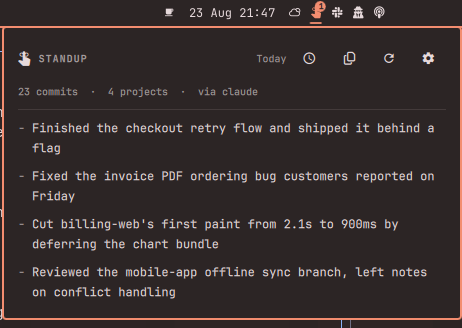
The bar icon badges when a fresh standup is waiting. Click it, read four bullets, copy them into Slack, get on with your day.
Features
- Scans every project you work in. Point it at
~/Projects,~/Work, or both — sub-folders are scanned too, so one entry covers a whole tree of repos. Linked git worktrees are recognised, so twentymyapp-wt-*folders count as one project rather than twenty. - Picks up where the last standup stopped. Monday's standup covers Friday automatically. A fixed "last N days" window is there if you prefer it.
- Filter by author. Only your commits by default — across every git identity you commit under, including per-repo work addresses. Switch to everyone for a team digest, or pick specific people from a list built out of your own repos.
- Uses your default Omarchy agent. Whatever
omarchy default agentpoints at writes the summary. You can pin a different one, or give it a custom command — anything that reads a prompt on stdin, so a local model works:ollama run llama3.2,llm -m mistral, your own script. - Runs on a schedule. Pick a time and the weekdays you want it. A standup missed while the machine was asleep is generated at the next login, once.
- Your format, your words. Pick a preset — flat bullet list, grouped by person, grouped by project, Yesterday/Today/Blockers, one paragraph — or type your own instruction. The preset just seeds the text box; whatever is in it is what the agent is told.
- Unread badge on the bar icon, plus a history of previous standups.
- Works without an agent. If none is configured or the call fails, you still get a plain per-project commit summary rather than nothing.
Install
omarchy plugin add https://github.com/Bottelet/omarchy-standup --enable
omarchy bar put bottelet.standup --after omarchy.clock
Then open the panel, press the gear, and set your project folders.
Usage
| Action | How |
|---|---|
| Open the panel | Click the bar icon |
| Generate now | The refresh icon, or middle-click the bar icon |
| Copy the standup | The copy icon |
| Previous standups | The clock icon |
| Settings | The gear icon |
From a terminal or a keybinding:
omarchy-shell bottelet.standup toggle
omarchy-shell bottelet.standup generate
omarchy-shell bottelet.standup settings
The engine is a plain script, so you can use it on its own:
~/.config/omarchy/plugins/bottelet.standup/scripts/standup.sh \
  generate --roots "~/Projects,~/Work" --window fixed --days 3
Settings
All settings live in the panel's gear page.
| Setting | Default | What it does |
|---|---|---|
| Project folders | ~/Projects |
Comma-separated roots to scan |
| Folder depth | 2 |
How deep to look for repos under each root |
| Time range | Since the last standup | Or a fixed number of days |
| Days back | 1 |
Used when the range is fixed |
| Whose commits | Only me | Everyone, or a hand-picked set of authors |
| Max bullets | 5 |
Upper bound on the generated bullets |
| Format | Bullet list | Preset shapes, or your own wording |
| Agent | Omarchy default | A specific agent, or a custom command |
| Generate automatically | on | Off means manual only |
| At | 09:00 |
Time of day to generate |
| Weekdays | Mon–Fri | Which days to generate on |
Dependencies
git, jq, python3, and wl-copy (wl-clipboard) — all present on a stock
Omarchy install. An agent CLI is optional; without one you get the plain
commit summary.
Privacy and security
Commit subjects, author names, project names and branch names from the window you configured are sent to whichever agent you selected. Nothing else leaves the machine — no diffs, no file contents. The plugin itself makes no network requests of any kind. Choosing a custom command pointed at a local model keeps everything on the box.
Commit messages are attacker-controlled text in any repository you merely
cloned, so the agent is run without tools wherever its CLI supports it
(claude --tools "", codex --sandbox read-only, gemini --approval-mode plan) and always in an empty working directory. Agents with no such switch —
opencode, copilot, pi, omp, grok — run with their own defaults; pick one of the
first three if that matters to you.
Generated standups live in ~/.local/share/omarchy-standup/, created mode
700. See SECURITY.md for the full posture.
Remove
omarchy plugin remove bottelet.standup
Generated standups stay in ~/.local/share/omarchy-standup/; delete that
folder to remove them too. Settings live in the widget's entry in
~/.config/omarchy/shell.json and go away with the widget.
Tests
tests/run.sh
86 offline checks (plus 70 in Model.js): repo discovery and worktree
de-duplication, author filtering, window handling, agent output sanitising, the
no-agent fallback, custom commands, unread bookkeeping, the schedule logic, and
the hardening guards below.