
Newgrounds Radio for Omarchy
Listen to Newgrounds Radio straight from the Omarchy bar — realtime now-playing info, album art, listener stats, and a play history, pushed the moment they change.
The official Newgrounds Radio client for Omarchy, from the team that runs the station.
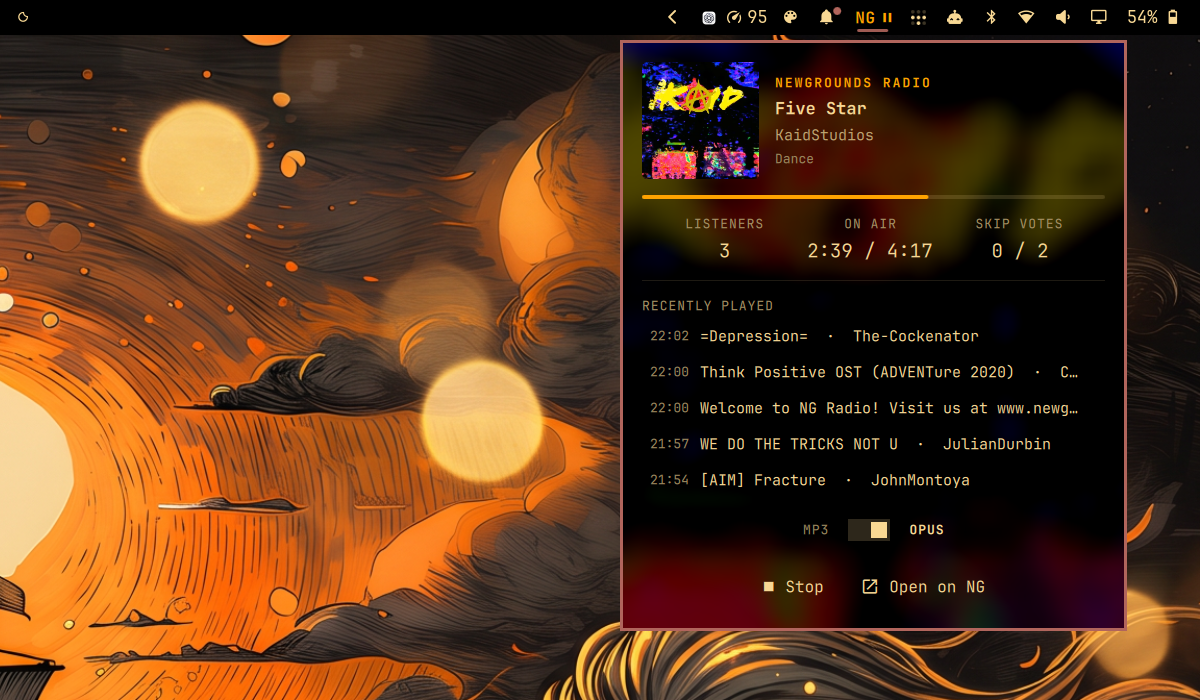
- Compact orange NG + play/pause pill in the bar
- Popup panel with album art, track / artist / genre, live listener count, on-air time, and skip votes
- Recently-played list — each track row links to the track on Newgrounds
- Album art and title link to the track page; the artist links to their Newgrounds user page (when the artist is a single username)
- Desktop notification on track change while you're listening, with cover art — click it to open the track on Newgrounds
- Opus / MP3 stream picker in the popup — switching mid-song reconnects on the spot
- Realtime updates over the station's socket.io feed (a tiny Engine.IO v4
long-polling client built on
curl), with automatic reconnect - One shared mpv stream and one feed connection, no matter how many monitors your bar spans
Install
Requires mpv and curl, both included with Omarchy:
omarchy plugin add https://github.com/brenc/omarchy-newgrounds-radio.git --enable
Then add the Newgrounds Radio widget to your bar from omarchy-shell bar
settings, or run omarchy restart shell if it does not appear.
Uninstall
omarchy plugin remove brenc.newgrounds-radio
That removes the plugin and its bar widget. Besides the current track's cover
art (one cached image in the shell's cache directory, under
newgrounds-radio/),
the plugin never writes outside its own entry in
~/.config/omarchy/shell.json; if you added an optional
trackNotifications or codec override there (see Usage), remove that entry by
hand. Versions up to 1.2.0 needed qt6-websockets; if you installed it
only for this plugin, omarchy pkg drop qt6-websockets removes it.
Usage
| Where | Click | Action |
|---|---|---|
| Bar pill | Left | Play / stop the stream |
| Bar pill | Right | Open the now-playing popup |
| Popup: album art or title | Left | Open the track on Newgrounds |
| Popup: artist | Left | Open the artist's Newgrounds page |
| Popup: NEWGROUNDS RADIO | Left | Open newgroundsradio.com |
| Popup: history row | Left | Open that track on Newgrounds |
| Popup: Opus / MP3 | Left | Switch the stream codec |
Track-change notifications only fire while the stream is playing. To turn
them off, add "trackNotifications": false to the widget's entry in
~/.config/omarchy/shell.json:
{ "id": "brenc.newgrounds-radio", "trackNotifications": false }
The stream plays as Opus by default. To start on MP3 instead, set
"codec": "mp3" in the same entry. The popup picker switches for the current
session; the setting decides what the shell starts with.
How it works
Service.qml(a singleton shell service) owns the mpv process for the station stream (radio.opusorradio.mp3on https://stream.newgroundsradio.com) and a connection to the station's socket.io endpoint, which pushes a full status — current track, listeners, skip votes, play log — on connect and on every change. The feed uses Engine.IO long-polling: each request is acurlthe server holds open until it has news, and curl caps the size of every response before the shell sees it. Playback auto-reconnects if the stream drops; the feed reconnects with a watchdog for silent connection deaths (suspend/resume, network drops).BarWidget.qmlrenders the bar pill and popup on each monitor, all reading the one shared service.
The stream is already loudness-normalized by the station, so the plugin plays it as-is.
Troubleshooting
If the widget doesn't appear in the bar at all, add it from the bar settings
or run omarchy restart shell.
If the popup never shows a track, the feed can't reach the station. Check
that this prints a line starting with 0{"sid":
curl -sS 'https://api.newgroundsradio.com/socket.io/?EIO=4&transport=polling'
Development
Git hooks live in .githooks and are committed with the repo. Git does not
enable a custom hooks path automatically, so run this once per clone:
git config core.hooksPath .githooks
pre-commit then runs ./check — qmllint plus the RadioLogic test suite —
and blocks the commit on a real finding. If the linter isn't installed the
hook skips rather than fails.
./check is also the way to run things by hand. The pure feed-handling logic
lives in RadioLogic.js so it can be tested without the shell: Quickshell's
QML modules are compiled into the quickshell binary, so qmltestrunner
cannot load anything that imports them.
License
This plugin is MIT licensed.
External dependencies
Nothing is vendored or bundled — the plugin only invokes software you install separately, and streams from Newgrounds' own servers:
| Dependency | Role | License |
|---|---|---|
mpv (ships with Omarchy) |
Plays the audio stream | GPL-2.0-or-later / LGPL-2.1-or-later |
curl (ships with Omarchy) |
Realtime feed requests and cover-art downloads | curl (MIT-style) |
| Quickshell (via Omarchy) | Shell/QML runtime hosting the widget | LGPL-3.0 |
Audio, artwork, and track metadata are served by Newgrounds Radio and remain the property of Newgrounds and the respective artists.