
Omahub
← All plugins
B

OMP Usage

by brianstarke

OMP usage stats in the Omarchy bar.

Security review

No obvious issues detected

Deterministic scan — not a security guarantee

None
Risk level
None
Analyzed commit
758458b
Scanned
1 month ago

No potentially dangerous behavior detected in the analyzed commit.

Automated analysis only — not a security guarantee.

AI advisory review

No obvious issues detected

Language-model assessment · ~deepseek/deepseek-v4-flash-latest — advisory only

None
AI risk level
None
Recommendation
install
Model
~deepseek/deepseek-v4-flash-latest
Analyzed commit
758458b
Reviewed
1 month ago

This plugin is a simple bar widget that reads OMP session logs to display token usage. The included Python script only parses JSONL files and outputs statistics; no network access, destructive commands, or obfuscation were found. The code is transparent and matches its documented purpose.

How this check works

This review combines the deterministic scan (the rule-based results above) with an independent look at the plugin's code by a language model. The model reads a trimmed sample of the repository's files, the manifest, and the README, then gives a plain-language risk level and a recommendation: install (no notable danger), review (look closer first), or avoid (clearly dangerous).

It runs on the same analyzed commit as the deterministic scan and is strictly advisory — it is not a security guarantee and never blocks a plugin by itself. A human moderator still reviews plugins before they are listed.

AI advisory only — automated analysis, not a security guarantee.

Install
$ omarchy plugin add https://github.com/brianstarke/omarchy-plugin-omp --enable
Widgets #bar #system

omp-usage

OMP token usage stats in the Omarchy bar. Displays today, weekly, and all-time token counts per model.
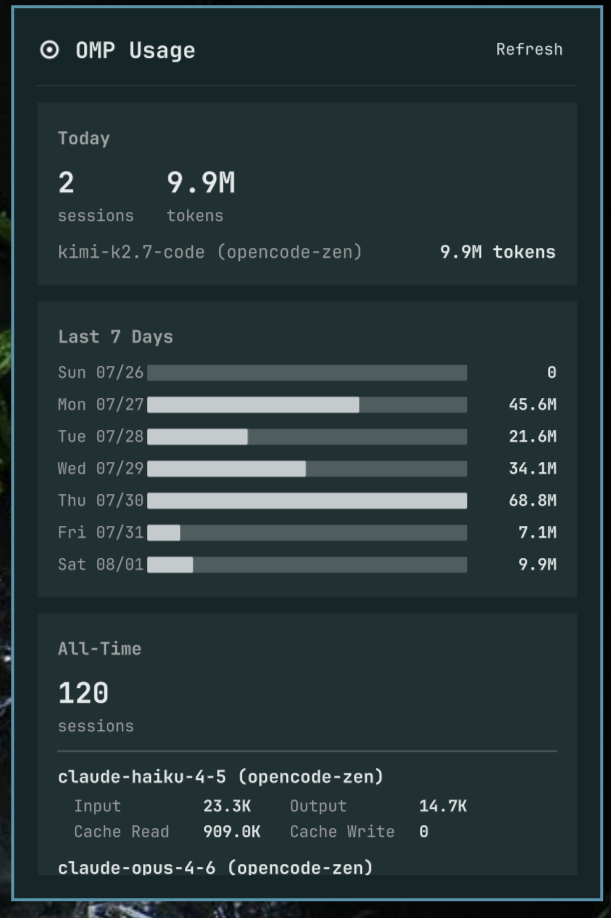
Preview

Requirements

  • Python 3
  • OMP (Oh My Pi) https://omp.sh
  • Existing OMP session data in ~/.omp/agent/sessions/

Installation

omarchy plugin add https://github.com/brianstarke/omarchy-plugin-omp.git --enable

Then place it in your bar layout with

omarchy bar plugin add omp-usage [--section <left|center|right>]

Suggested placement:

omarchy bar plugin add omp-usage --section left

You can validate the plugin at any time with:

omarchy plugin validate ~/.config/omarchy/plugins/omp-usage

Configuration

Configuration lives in ~/.config/omarchy/shell.json.

Key Type Default Description
refreshIntervalSec integer (30–3600) 300 How often to re-scan the OMP session logs (seconds)

Uninstall

omarchy plugin remove omp-usage

Credits

Heavily inspired by dizziee.opencode-model-usage.

License

MIT