
Terminal Paint
Give every terminal on the workspace its own Omarchy theme — and its own tube.
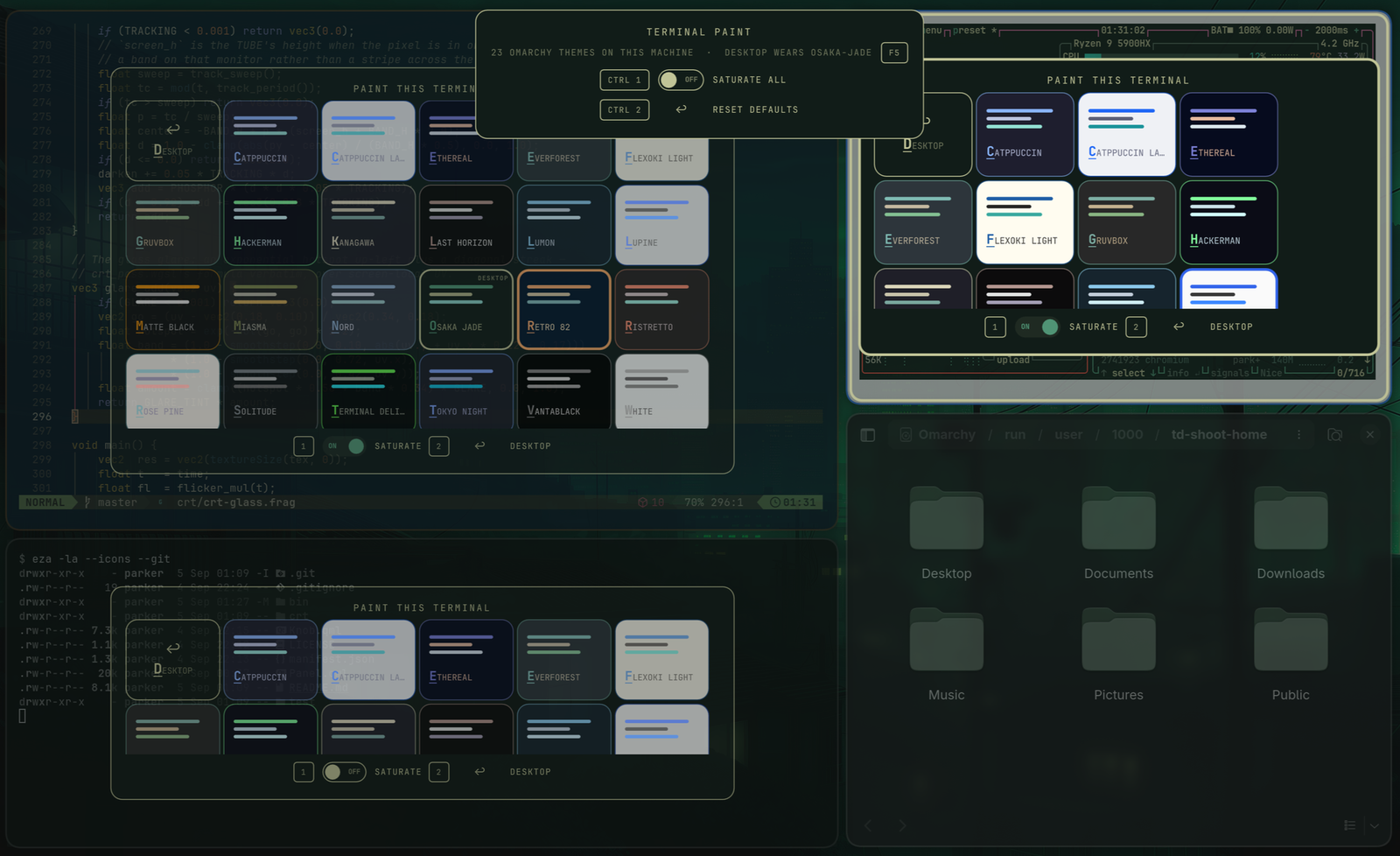
Click the palette in the bar and each terminal tile grows a picker card holding every theme installed on the box — Osaka Jade, Vantablack, Tokyo Night, whatever you have. Click one and that tile wears it. Same colours the theme grid would put on the whole desktop; the only difference is how far they reach.
Each card is its theme: filled with that theme's background, ruled with its accent and foreground, and labelled in the colour that theme writes text in. If the name is hard to read on the card, the terminal will be hard to read too, and you have learned that before clicking rather than after.
A rail across the top acts on every tile at once — SATURATE ALL and RESET DEFAULTS, one per line with its chord beside it — and tells you how many themes this machine has and which one the desktop is wearing. Each tile carries the same options across its own card.
- foot / Alacritty / kitty / Ghostty / WezTerm — the card floats over the
window; a pick runs
td-tint --window <address> --theme <name>, which writes that theme's OSC palette down the terminal's own tty and puts the matching gradient on its window border. Runtime-only, dies with the window; the ↩ DESKTOP card hands the tile back to the desktop theme. - Terminal Delight — its story is better than a window tint (per-pane and persistent), so its card is a single handoff that raises TD's own in-app pane picker over its control socket and gets out of the way.
Esc, or a click on the dimmed background, or a second click on the palette: brushes away everywhere.
Where the tube went
Earlier versions carried a CRT switch on every tile, driving the per-window warp shader through the window's rounding property. That warp could never be click-correct — it runs before the cursor is composited, so the picture and the pointer disagreed at every tile corner — and it has been superseded. The curved glass lives in its own plugin now, omarchy-crt (the Delight-O-Matic): the whole desktop, every window, any theme, click-correct, with the knobs on the bar. This widget paints.
The list is this machine's, right now
There is no bundled theme list and nothing is cached. td-tint --state globs the
theme directories at the moment you press the key, so a theme installed a minute
ago is on the grid and one uninstalled a minute ago is gone. The rail prints the
count, which is that guarantee said out loud rather than promised in a README.
F5 re-reads without closing — for when the omarchy theme install happened in
the window behind this overlay.
The theme the desktop itself is wearing is marked, not hidden. It is a perfectly good thing to paint a tile with, and knowing which card it is turns the grid from a wall of colours into a set of deviations from something.
What this plugin runs, reads, and sends
Plugins are unsandboxed, so here is the whole footprint:
- Runs, on summon: one command —
td-tint --state, the oracle that reports the installed themes, the desktop's own theme, whether the warp is installed, and where the terminal tiles are. Runs, on a card click or a switch:td-tint --window …(--theme,--clear,--saturate) orterminal-delight ctl paint …. Runs, on an empty workspace: one transientnotify-sendsaying so. Nothing resident, nothing polled. - Every one of those is an argv array. No
bash -c, no shell string, no string-formexecDetachedanywhere in the file — there is no place for a word to be re-split or re-interpreted on its way to a process. - Reads: nothing beyond those command outputs. Writes: nothing. Network: none, ever.
- While the overlay is up it holds exclusive keyboard focus (that is what makes Esc work); it releases everything on dismiss.
What it trusts, and what it checks
The theme list is not ours in any sense. The names are directory names from
~/.config/omarchy/themes and Omarchy's own share — anyone's, including a theme
cloned from a stranger's repo an hour ago — and the colours are whatever that
theme's colors.toml says. It reaches this plugin over a pipe, so --state
output is treated as third-party input and normalised by one function at one
boundary before anything downstream sees it:
| Field | Accepted | Why it matters |
|---|---|---|
key |
^[a-z0-9][a-z0-9-]{0,31}$ |
it is an argv word — so it may carry no markup, and may never begin with - |
label |
plain text, ≤ 28 chars, control characters stripped | drawn, never executed; it is also the letter the keyboard matches |
accent, partner, bg, fg |
#rgb / #rrggbb / #aarrggbb |
they land in a string→color coercion, and bg is drawn across a whole card |
desktop_theme |
the same key regex |
it decides which card gets marked, so it gets the same gate as a card |
| window address | ^0x[0-9a-f]{1,16}$ |
it is the argv word behind --window, and a filename inside td-tint's run dir |
A record that does not fit is dropped, not repaired. Card labels are built from
plain Text items with font properties — the draw path never assembles markup,
so there is nothing for a hostile name to be rendered as. The snapshot read is
gated on the collector draining rather than on a timer.
The oracle is not trusted to be small, or to finish. This widget is not a
process of its own — it runs inside the long-lived omarchy-shell — so an
oracle that never stops writing spends the shell's memory rather than its own.
The ceiling is therefore applied to the producer while it is still writing, not
only to the finished document: the collector reports its length as it fills, and
crossing the ceiling ends the process — once per run, so a producer that ignores
SIGTERM still gets SIGKILL half a second later instead of resetting its own
reprieve. A run that produces nothing at all is on a five-second deadline
against a command that normally answers in about 270 ms, and a run that produces
nothing gets nothing rather than the previous run's workspace.
Two honest limits on that ceiling. Quickshell delivers in 512 KiB reads, so the
first length the widget can ever see is already twice the 256 KiB constant: the
enforced bound is roughly 1 MiB, not 256 KiB, and the constant is the point
at which the next read is refused rather than a byte-exact cap. And it counts
UTF-16 code units, not bytes, so a document full of multibyte theme names can be
larger still in bytes. Both are bounded and both are enormous next to the ~9 KB
this actually produces. tests/check_snapshot_limits.qml exercises the ceiling,
the escalation and the empty-run case against a producer that traps SIGTERM;
bin/verify runs it where Quickshell is present, asserts the widget still
carries each line the probe assumes where it is not, and says which it did.
Requirements
td-tintonPATH, current enough to reportthemesanddesktop_themefromtd-tint --stateand to accept--theme(omarchy-terminal-delight-theme v0.3.0 or later →./install-variants.shinstalls it).
If a card is the wrong colour, that repo's ./bin/doctor says which of those
requirements is not actually met on your box, and how to fix it.
- For Terminal Delight windows: a
terminal-delightbuild with the control socket (feat/td-paint-modeor later). Terminals started from older builds can't be reached — reopen them.
Buttons
| Button | Means |
|---|---|
| Left | the picker, over every terminal tile on this workspace |
| Middle | Terminal Delight's pane picker on every workspace |
| Right | done painting, everywhere |
Keyboard
Summon it from a chord (this exact line is what we run):
-- ~/.config/hypr/bindings.lua
o.bind("SUPER + ALT + P", "Paint terminals",
  "omarchy-shell shell toggle brownfamilysports.td-palette")
Pick any free chord — omarchy menu keybindings --print lists what's taken.
While the overlay is up it plays entirely from the keyboard:
Two options, two digits, and Ctrl widens the same digit from the selected tile to the whole workspace:
| Key | This tile | With Ctrl — every tile |
|---|---|---|
| 1 | SATURATE | SATURATE ALL |
| 2 | back to the desktop theme | RESET DEFAULTS |
| Key | Means |
|---|---|
| ← → ↑ ↓ / Tab | walk the tiles in reading order |
| any letter | paint the selected tile with the first theme whose name starts with it; press it again to walk to the next match |
| F5 | re-read the theme list without closing |
| ⏎ | Terminal Delight's own pane picker |
| Esc | done — brushes away everywhere |
Letters are names, digits are verbs. Every lowercase letter belongs to a
theme, so no verb may take one: s would have stolen solitude, o would have
stolen osaka-jade, and d was safe only until someone installs dracula.
Shifted letters were the first fix and a worse one — S/C/R are three
unrelated words to remember, where 1/2/3 is one row of keys and Ctrl is the
scope. A theme whose name begins with a digit was never reachable from the
keyboard anyway; the matcher only ever looked at a-z.
There is no legend across the bottom of the overlay. Every key is drawn on the control it works, which is a hint you read once instead of one you re-read every time or never.
The three repos
| Repo | What it is |
|---|---|
| terminal-delight | the terminal itself — GPU-native, Rust, tiling panes, per-pane grading |
| omarchy-terminal-delight-theme | the desktop half — the Omarchy theme, the palette set, the compositor curve, and td-tint |
| omarchy-td-palette | Terminal Paint — this repo, the 🎨 bar widget |
This one is the thinnest: a single QML file that renders what td-tint --state
reports and shells out to td-tint to act. It authors no colours, installs no
shaders and holds no state. That is also why it validates everything it reads —
the theme list belongs to whoever installed those themes, which makes it
third-party input here.
Install
omarchy plugin add https://github.com/parker-brown-family/omarchy-td-palette.git --enable
Unlock the screen first. Not a quirk of this plugin — on Omarchy 4.0.1 with
quickshell 0.3.1, any write under ~/.config/omarchy/plugins/ while the
session is locked hot-reloads the shell, which tears down the live session lock
and aborts the shell under the lockscreen. Installing or updating anything is
such a write. The screen stays locked and the shell relaunches on its own, so you
lose the bar for a few seconds rather than your session — but
omarchy-restart-shell will then refuse to help you, because it declines to
restart a locked session.
This is upstream: omarchy#7106
and #8647, fixed by the open
#7572, with the underlying defect
at quickshell#962.
It applies to every Omarchy plugin equally. Until #7572 lands, run
omarchy plugin add against an unlocked session, and update with bin/deploy,
which checks for you.
Update
~/.config/omarchy/plugins/brownfamilysports.td-palette/bin/deploy --yes
Drop --yes to see the incoming diff and be asked. This is
omarchy plugin update brownfamilysports.td-palette with the check above in
front of it: bin/deploy asks whether the session lock is live and exits 3
rather than writing into a locked session. Nothing else differs — it hands off
to omarchy plugin update, which still shows the diff, still validates what it
pulled, and still rolls the plugin back if that validation fails.
Exit 3 is the one worth branching on. An unattended deploy can sleep on it and come back, rather than reading a locked screen as a failure.
Remove
omarchy plugin remove brownfamilysports.td-palette --yes
Runtime tints die with their windows; the plugin itself writes no state and leaves nothing behind.
Looking for the CRT? The curved glass moved to its own plugin — omarchy-crt, the Delight-O-Matic — where it covers the whole desktop, every window, on any theme, and stays click-correct. This widget paints.
Verifying it
./bin/verify
Three tiers, and it says which ones it could run. A bare machine gets the
manifest, the packaging rules, the house rules (no hardcoded colours, no second
shell process, every command an argv array) and a QML parse via qmlformat,
which needs no import resolution. An Omarchy box additionally gets the full
qmllint against the shell's own singletons and the real
omarchy plugin validate. CI runs the first tier on every push and skips the
other two out loud rather than implying they passed.
./bin/check-listing
The marketplace pins a listing to an exact commit and serves that snapshot — its preview, its description, its version — until somebody asks for a new one, and nothing tells you it has gone stale. This compares the listed commit against the latest release tag. Lagging behind unreleased commits on main is fine; lagging behind a release means the page everyone browses is not the plugin you shipped. Run it when you cut a release. Needs network for the registry read, so it is not a CI gate.
It reads that registry and fetches no git refs: everything it compares is an
object already in your clone, so git fetch --tags is yours to run, and a tag
that moved on a remote after somebody reviewed it never arrives here. The one
value that does come from off the machine — the listed commit, out of the
marketplace's registry.json — is held to a full forty-character hex SHA before
it is allowed near a git command, because a value starting with a dash would
otherwise have reached git merge-base as an option rather than as a commit.
./bin/keys-e2e
The keymap is the one thing no linter can reach, so this presses every key for
real — on a throwaway workspace it stages itself — and checks the run records
afterwards. It refuses to type unless that workspace is active and the
overlay's own layer surface is holding focus, checked before every keystroke,
because a script that synthesises key events types into whatever is in front of
it. Needs a compositor and wtype, so it is evidence about the box it ran on
rather than something CI can do.
The screenshots
./bin/check-shots
A screenshot is a build artifact with no build: nothing rebuilds it, nothing
invalidates it, and it keeps rendering fine long after it stopped being true.
This one compares the commit that last touched each image against the commit
that last touched the code it is a picture of, and fails if the code moved
later. Put [no-reshoot] in the commit message when the change cannot be seen
— a comment does not move a pixel, and a gate that cannot tell the difference
is one people route around. CI runs it.
bin/shoot builds the pictures in this README. It stages a workspace of its own
— three fresh terminals, each already wearing a different theme — raises the
overlay, captures it, and puts you back where you were. Shooting the live desktop
instead would put whatever happens to be on screen into a public README, which is
the kind of mistake you only make once.
MIT.