
exe.dev VMs — Omarchy bar plugin
An Omarchy shell (Quickshell) bar widget for exe.dev virtual machines. A server icon in the bar shows how many VMs are running; the popout lists every VM on the account with one-click actions.
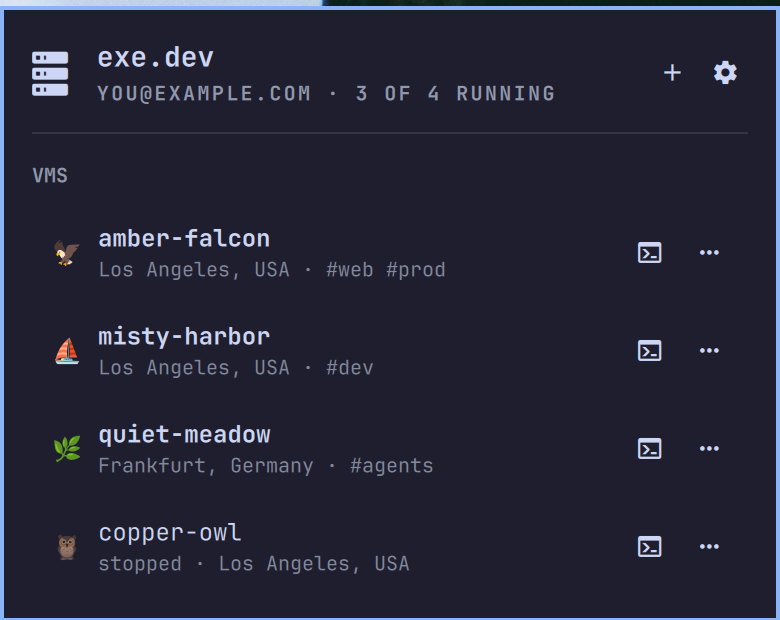
Features
- VM list — emoji, name, status, region, and tags for every VM, running
VMs first, refreshed over SSH (
ssh exe.dev "ls --json"). - SSH in a terminal — opens your default Omarchy terminal already
connected to the VM (row button, or
son the selected row). - Per-VM action menu — open the VM's
https://<vm>.exe.xyzendpoint, its web terminal, its Shelley agent, or the VM in VS Code or Zed (when a Zed CLI is installed); copy the ssh command; restart or delete the VM — both behind a confirmation dialog. - New VM — the
+button in the popout header runsssh exe.dev "new --json --no-email"and refreshes the list. - Account settings in the browser — the cog in the popout header (or
right-click on the bar icon) asks exe.dev for a one-shot magic login link
(
ssh exe.dev "browser --json") and opens it in your browser. - Full keyboard navigation, matching the first-party Omarchy panels.
Requirements
- Omarchy with the Quickshell-based shell (
omarchy-shell). - An exe.dev account with this machine's SSH key enrolled —
ssh exe.dev lsmust work non-interactively.
No other external dependencies: the plugin only shells out to ssh,
wl-copy, and standard omarchy-launch-* helpers already present on
Omarchy. The "Open in Zed" action appears only if a Zed CLI (zeditor or
zed) is installed. Licensed under the MIT License.
Install
omarchy plugin add https://github.com/bscott/exedev-oma-plugin.git --enable
Then place the widget on the bar (or add {"id": "bscott.exedev"} to the
bar layout in ~/.config/omarchy/shell.json):
omarchy bar put bscott.exedev --section right
For development, clone anywhere and symlink into
~/.config/omarchy/plugins/bscott.exedev instead; the shell hot-reloads
plugin code on save (force with omarchy-shell shell rescanPlugins).
Uninstall
omarchy plugin remove bscott.exedev
This removes the plugin and its bar entry. The plugin never modifies any other configuration.
Bar icon
- Left click — toggle the popout.
- Middle click — refresh the VM list now.
- Right click — open account settings in the browser.
The icon dims when exe.dev is unreachable; a small count shows running VMs.
Keyboard (popout open)
| Key | Action |
|---|---|
j / k / arrows |
Move the cursor (h/l switch header buttons) |
Enter |
Header: activate the focused button · VM row: open the action menu |
s |
SSH into the selected VM in a terminal |
o |
Open the selected VM's https endpoint |
c |
Copy the selected VM's ssh command |
n |
Create a new VM |
d / x |
Delete the selected VM (with confirmation) |
r |
Refresh |
a |
Open account settings |
Esc |
Close |
Settings
Configured inline in ~/.config/omarchy/shell.json on the widget entry:
| Key | Default | Meaning |
|---|---|---|
refreshIntervalSec |
120 |
Seconds between VM list refreshes (15–3600) |
host |
exe.dev |
SSH destination for the management endpoint |
IPC
omarchy-shell bscott.exedev toggle    # open/close the popout
omarchy-shell bscott.exedev refresh   # refresh the VM list
omarchy-shell bscott.exedev settings  # open account settings in the browser
omarchy-shell bscott.exedev status    # "3/8 running"
Tests
Model.js (parsing/formatting) is pure and runs under Node:
node tests/model.test.js