
Scratch Terminal
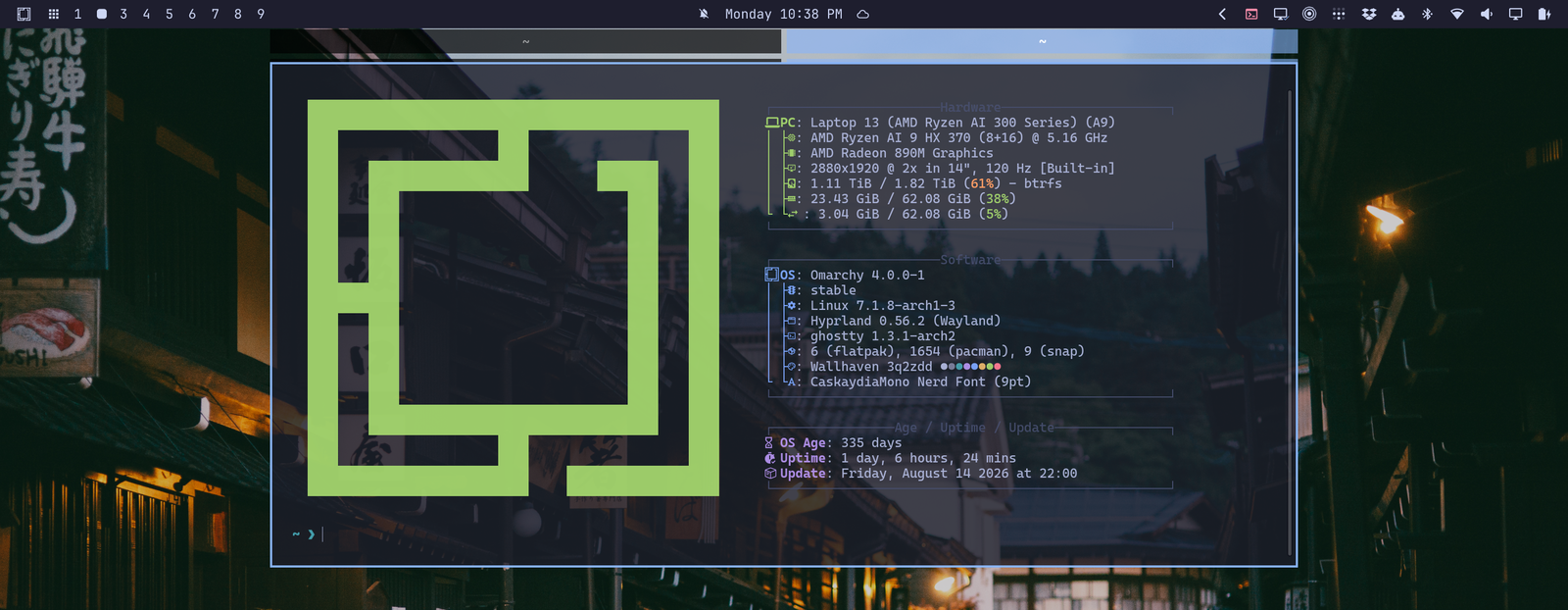
An Omarchy shell plugin: a terminal icon in the bar
that drops down a persistent scratchpad terminal — whatever terminal you have
set as the Omarchy default (omarchy default terminal) — with up to five
terminals as tabs.
The terminals are real windows parked on a Hyprland special workspace, so hiding the dropdown does not kill them: your shell sessions, running commands, or tmux survive between toggles and come back exactly where they were. Tabs are a Hyprland window group, so the dropdown gets Hyprland's native clickable tab bar along its top edge.
Install
omarchy plugin add https://github.com/bscott/terminal-oma-plugin.git --enable
Then add the Scratch Terminal widget to your bar if it doesn't appear automatically (Omarchy menu → Setup → Bar).
To remove:
omarchy plugin remove bscott.scratch-terminal
Removal leaves nothing behind: the plugin stores no state, and the runtime window rule it registers lives only in Hyprland's config session (cleared by any config reload). If a dropdown terminal is still running, middle-click the icon first (or close the terminal) before removing.
Behavior
- Left-click the bar icon: toggle the dropdown. The first click spawns the terminal; later clicks just show/hide it.
- Right-click: open another terminal as a new tab (up to
maxTabs). - Scroll on the icon: cycle through tabs while the dropdown is visible.
- Middle-click: quit all tabs (kills the sessions).
- Tabs can also be switched by clicking Hyprland's group bar on the terminal window itself.
- The icon lights up while the dropdown is visible.
- Moving the pointer away does not hide the dropdown. Use the icon or toggle keybinding to hide it without ending its sessions.
- Omarchy's universal clipboard shortcuts work normally: Super+C copies and Super+V pastes. The terminal-native alternatives are Ctrl+Shift+C and Ctrl+Shift+V.
- The terminal floats centered under the bar, sized by the settings below,
and respects your default-terminal choice via
xdg-terminal-exec. - If the Omarchy shell restarts, the widget re-adopts terminals that are already running instead of spawning duplicates.
- Note: because tabs are a focused Hyprland group, a GUI app launched from inside a dropdown terminal can open as another tab. Use Hyprland's move-out-of-group binding to release it.
Settings
Configure from the bar widget settings UI (or shell.json):
| Setting | Default | Purpose |
|---|---|---|
widthPct |
50 |
Width as % of the monitor (always centered) |
heightPct |
45 |
Height as % of the monitor |
topMarginPct |
3 |
Gap from the top of the monitor to the tab bar, to clear the bar |
maxTabs |
5 |
Maximum number of terminal tabs (1–5) |
command |
(empty) | Command to run instead of your shell (e.g. tmux, btop) |
workingDir |
(empty) | Starting directory; empty means home |
Geometry changes apply the next time the terminal is spawned (middle-click to quit, then reopen).
To interact with applications behind the terminal, Hyprland must allow focus
to pass through the unused area of a floating special workspace. Add this user override to
~/.config/hypr/input.lua if it is not already enabled:
hl.config({ input = { special_fallthrough = true } })
Styling the tabs
The tab bar is Hyprland's group bar, so its look is your global
group:groupbar:* config. Omarchy's default active/inactive tab colors are
nearly identical; to make the selected tab stand out with your theme's
accent color, add this to ~/.config/hypr/looknfeel.lua (it loads after
the theme, so it tracks theme switches):
local border = hl.get_config("general:col.active_border")
local raw = border and border.colors and border.colors[1]
local accent_hex = "89b4fa"
if type(raw) == "number" then
  accent_hex = string.format("%06x", raw % 0x1000000)
elseif raw then
  local s = tostring(raw):gsub("^0[xX]", "")
  if #s >= 6 then accent_hex = s:sub(-6) end
end

hl.config({
  group = {
    groupbar = {
      col = {
        active = "rgba(" .. accent_hex .. "99)",
        inactive = "rgba(000000b3)",
      },
      indicator_height = 3,
    },
  },
})
The widget reads the group bar's height from the live config when it places the window, so changing groupbar sizing there just works.
IPC
omarchy-shell bscott.scratch-terminal toggle   # also: show / hide
omarchy-shell bscott.scratch-terminal newTab
omarchy-shell bscott.scratch-terminal nextTab  # also: prevTab
omarchy-shell bscott.scratch-terminal quit
omarchy-shell bscott.scratch-terminal status   # e.g. "visible, 3 tabs"
Recommended keybindings
Add to ~/.config/hypr/bindings.lua (the quake-style Super+` toggle is
the classic choice for a dropdown terminal):
o.bind("SUPER + GRAVE", "Scratch terminal", "omarchy-shell bscott.scratch-terminal toggle")
o.bind("SUPER + SHIFT + GRAVE", "Scratch terminal tab", "omarchy-shell bscott.scratch-terminal newTab")
No extra bindings are needed for switching tabs: the dropdown is a regular
Hyprland window group, so Omarchy's stock group bindings already cycle it
while it has focus — Super+Alt+Tab / Super+Alt+Shift+Tab (next/previous
tab) and Super+Ctrl+Left / Super+Ctrl+Right. Scrolling on the bar icon
does the same from the mouse.
How it works
- Each terminal is launched as
setsid uwsm-app -- xdg-terminal-exec --app-id=bscott.scratch-terminal, so whichever terminal is the xdg default gets used, stamped with a dedicated window class. - Before spawning, the widget registers a Hyprland window rule (via
hyprctl evalinto the config Lua state) matching that class: float, size/position from your settings,group set,workspace special:bscott-scratchterm. Windows therefore drop into place the moment they map, and additional spawns join the existing window group as tabs. - Show/hide is
hl.dsp.workspace.toggle_special("bscott-scratchterm"); tab cycling ishl.dsp.group.next()/prev(). - The widget tracks
openwindow/closewindow/activespecialevents to know which terminals exist and whether the dropdown is on screen. The dedicated windows carry Omarchy'sterminaltag so universal copy/paste sends terminal-safe shortcuts.
Requires Omarchy's Quickshell-based shell (Hyprland with the Lua config
runtime) plus jq and xdg-terminal-exec, all of which ship with Omarchy.