
Bluetooth codec
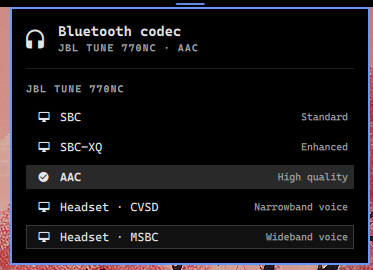
Omarchy bar widget that shifts your Bluetooth audio fidelity: pick the A2DP codec (AAC, SBC, SBC-XQ) or switch to a headset profile (CVSD, MSBC) for each connected Bluetooth audio device, straight from the bar.
Requirements
- Omarchy (Quickshell shell)
- PipeWire with PulseAudio compat (default on Omarchy) and
pactlonPATH - Bluetooth audio devices managed by PulseAudio/PipeWire
Install
Plugins are installed from git with the omarchy plugin command:
omarchy plugin add https://github.com/nightdevil00/bt.codecs.git --enable
--enable places the widget in your bar right away. To pick the bar section
interactively, omit --enable and run omarchy plugin enable bt.codecs
after installing.
If you already have the plugin installed, update it with:
omarchy plugin update bt.codecs
Usage
- Click the codec icon in the bar to open the device/codec panel.
- The icon shows the active codec of the currently active Bluetooth device (or a disconnected glyph when no Bluetooth device is active).
- The panel lists every connected Bluetooth audio device and its profiles. Click a profile to switch immediately.
- Active profile is marked with a check icon.
Supported profiles
Listed per device as reported by PipeWire:
- A2DP sink:
a2dp-sink-sbc,a2dp-sink-sbc_xq,a2dp-sink(AAC) - Headset:
headset-head-unit-cvsd,headset-head-unit(MSBC)
Development
The plugin lives in ~/.config/omarchy/plugins/bt.codecs/ after install. Edit
the QML/JS there; saved changes reload automatically.
Panel.qml— bar widget and panel UIModel.js— parsespactl list cardsand builds the device/profile modelmanifest.json— Omarchy plugin manifest
License
MIT