
LockSigil - Lockscreen Plugin
A Quickshell session lock screen for Omarchy, forked
from the built-in omarchy.lock. It keeps Omarchy's separate password and
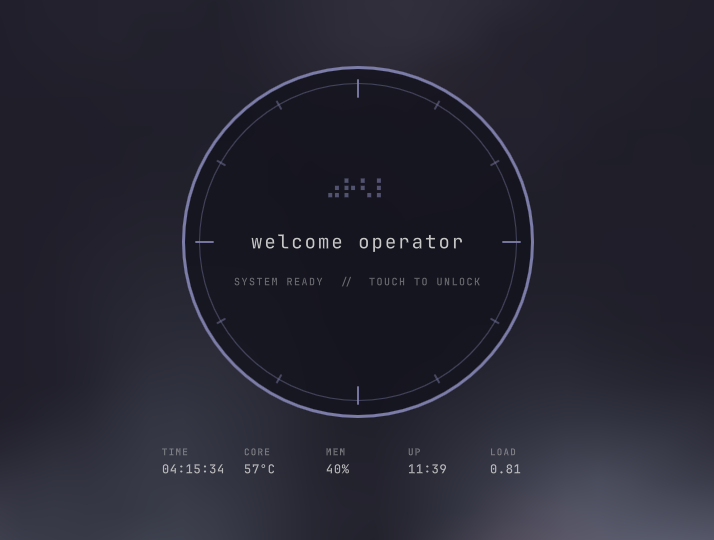
fingerprint PAM flows but replaces the interface with a circular, sci-fi
instrument-panel design.
Features
- Personalized greeting — greets you with "hello <name>" on the idle lock screen.
- Two PAM flows — password auth via
omarchy-lock-password, and fingerprint auth viaomarchy-lock-fingerprintwhen fprintd reports an enrolled finger. - Animated instrument panel — a circular control dial with concentric signal rings, slowly rotating precision dials, and a braille "noise" loader that shimmers like live static. Any key or click folds the whole dial fluidly into the password field.
- Live telemetry HUD — the idle screen keeps an eye on your machine: time, CPU core temperature, memory usage, uptime, and load average.
- Password entry — any key or click folds the circular interface into the password field without losing the first keystroke. Long passwords shrink the masked dots so they never clip.
- Fingerprint hint — an icon sits inside the field's right edge when a sensor is enrolled, matching hyprlock's placement.
- Display blanking — after 30 seconds of idle input the display is blanked
via
omarchy-brightness-*; any input wakes it. - Stranded-lock recovery — adopts an orphaned session lock left behind after a shell restart, as long as the PAM config is present.
Requirements
- Omarchy (uses
omarchy-system-wake,omarchy-brightness-*, andomarchy-hyprland-session-locked). /etc/pam.d/omarchy-lock-password— without it, the lock refuses to start.- (Optional)
/etc/pam.d/omarchy-lock-fingerprintplusfprintdfor fingerprint unlock.
Install
omarchy plugin add https://github.com/burninc0de/burninc0de.lock.git --enable
Installing switches the shell from omarchy.lock to this plugin (the manifest
declares clonedFrom: omarchy.lock, so the built-in is disabled in your
shell.json). The plugin id is burninc0de.lock and lives at
~/.config/omarchy/plugins/burninc0de.lock/.
Removal
omarchy plugin remove burninc0de.lock --yes
This disables the plugin, removes its folder under
~/.config/omarchy/plugins/, and — because the manifest declares
clonedFrom: omarchy.lock — re-enables Omarchy's built-in lock screen.
Commands
| IPC target | Function | Purpose |
|---|---|---|
lock |
lock |
Lock the session (ok / missing-pam / failed) |
lock |
isLocked |
true / false |
lock |
status |
JSON snapshot of lock state |
lock |
preview / hidePreview |
Show / hide the lock preview overlay |