
Simple Wallpaper Gallery for Omarchy
A bar widget for Omarchy that shows the wallpapers in a folder of your choice as a thumbnail grid. Click a thumbnail and it becomes your background.
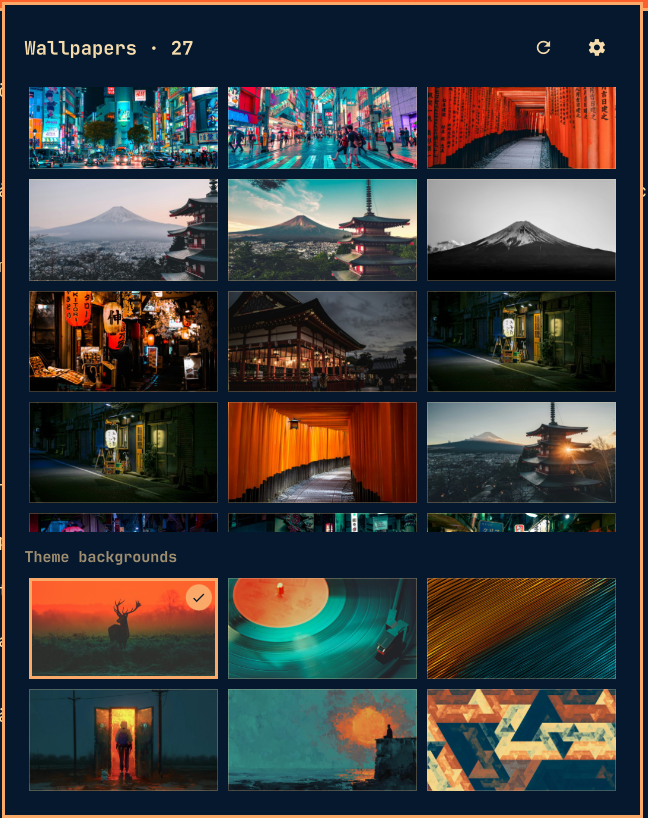
- Point it at any folder — not just your theme's backgrounds — by typing the path behind the gear.
- Optionally include subfolders, so a whole wallpaper collection shows up in one grid.
- A Theme backgrounds section below the grid keeps the current theme's own wallpapers one click away too.
- Keep wallpaper across theme switches: normally
omarchy theme setswaps in the theme's own background — this toggle keeps your pick on screen through theme changes, without so much as a flicker. - Middle-click the bar icon to jump to a random wallpaper from the folder without opening the panel.
- Thumbnails are generated once with
vipsthumbnailand cached, so listing stays in the low milliseconds even for a folder of a thousand 4K images.
Requirements
Omarchy with the Quickshell-based shell (omarchy plugin and
omarchy bar commands available). vipsthumbnail — which Omarchy already
ships for its own background switcher — is optional: without it the grid
shows the full-size originals instead of cached thumbnails.
Install
omarchy plugin add https://github.com/andreas-bylund/omarchy-simple-wallpaper-gallery.git
omarchy plugin add offers to enable the plugin straight away. Decline if
you want to read the code first — as does --yes, which adds it without
prompting and leaves it disabled — then enable it when you are ready:
omarchy plugin enable bylund.wallpaper-gallery
The widget appears in the right section of the bar; move it with
omarchy bar move bylund.wallpaper-gallery --section <left|center|right>.
Use
| Action | Effect |
|---|---|
| Left-click the bar icon | Open the gallery |
| Middle-click the bar icon | Set a random wallpaper from the folder |
| Right-click the bar icon | Open straight into the settings |
| Click a thumbnail | Set it as the background |
Arrow keys / hjkl + Enter |
Pick with the keyboard |
, |
Toggle settings |
r |
Rescan the folder |
s |
Random wallpaper |
Esc |
Leave settings, then close the panel |
The first time you open the panel it takes you straight to the settings: type
the path to the folder holding your wallpapers and press Enter or Use.
~/Pictures/wallpapers works, as does $HOME/... or a full path. The gear in
the panel header brings you back there, along with the Include subfolders
and Keep wallpaper across theme switches toggles.
Settings
Settings live inline on the widget's entry in ~/.config/omarchy/shell.json
and can also be set from a terminal:
omarchy bar set bylund.wallpaper-gallery folder '"~/Pictures/wallpapers"' --json
omarchy bar set bylund.wallpaper-gallery includeSubfolders true --json
omarchy bar set bylund.wallpaper-gallery keepAcrossThemes true --json
omarchy bar set bylund.wallpaper-gallery columns 4 --json
| Key | Type | Default | Meaning |
|---|---|---|---|
folder |
path | "" |
The wallpaper folder. ~ and $HOME are expanded |
includeSubfolders |
boolean | false |
Also list images in nested folders |
keepAcrossThemes |
boolean | false |
Restore your last gallery pick after theme switches |
columns |
integer | 3 |
Grid columns (2–5). Terminal-only; the panel has no control for it |
How keeping the wallpaper works
Your last pick is remembered in
~/.local/state/omarchy-wallpaper-gallery/last-wallpaper. With the toggle on,
two things keep it in place:
- Keep-links — every theme's user-background folder
(
~/.config/omarchy/backgrounds/<theme>/) gets a symlink named.00-wallpaper-gallery-current.*pointing at your pick, creating the folder if it does not exist. When a theme switch finds that the background in use is not among the new theme's backgrounds,omarchy-theme-setfalls back to the first background it can find — and user backgrounds sort first — so the switch "transitions" from your wallpaper to itself. No flash of the theme's own background at all. - A theme-set hook — a small self-contained script in
~/.config/omarchy/hooks/theme-set.d/wallpaper-gallery-keepacts as the fallback for themes installed after the links were seeded: it restores your pick and seeds the missing link so the next switch is seamless. It also retires itself, links and all, the first time it runs after the plugin directory is gone.
Side effect worth knowing about. The keep-link is a real image file as far
as Omarchy is concerned, so while the toggle is on your kept wallpaper also
appears as an extra tile in the stock background switcher
(omarchy theme bg-switcher) and in the omarchy theme bg next cycle, for
every theme. That is inherent to the trick: the link has to live where
omarchy-theme-set looks. Turning the toggle off removes every link and
restores the stock behavior exactly.
Uninstall
Turn the keep toggle off first, or run the cleanup directly — either removes the theme-set hook, every keep-link, the thumbnail cache and the saved state, while leaving any background folder you filled yourself untouched:
~/.config/omarchy/plugins/bylund.wallpaper-gallery/bin/wallpaper-gallery uninstall
omarchy plugin remove bylund.wallpaper-gallery
Removing the plugin without doing that is not fatal: the hook notices the plugin is gone the next time you switch themes and cleans up after itself.
Notes
- Setting a wallpaper goes through
omarchy-theme-bg-set, the same command the stock background switcher uses, so nothing else about theming changes (but see the side effect above when the keep toggle is on). - Supported formats: jpg, jpeg, png, gif, bmp, webp. Hidden folders inside the wallpaper folder are skipped, recursion is capped at four levels and does not cross filesystems, so a stray symlink cannot turn the scan loose on your whole home directory.
- A filename containing a newline cannot be carried by the row protocol and is skipped; tabs are fine.
- The thumbnail cache lives in
~/.cache/omarchy-wallpaper-gallery, keyed by path, size and mtime. Every generation pass ends by dropping the rows and thumbnails of images that have since been edited, renamed or deleted, so it does not grow without bound.bin/wallpaper-gallery prunedoes the same on demand, and deleting the folder outright is always safe.
Development
The QML is a view over bin/wallpaper-gallery, which does all the filesystem
work and is usable on its own:
bin/wallpaper-gallery list ~/Pictures/wallpapers 1
bin/wallpaper-gallery current
bin/wallpaper-gallery prune
tests/run-tests.sh
The widget answers on its own IPC target, which is handy while hacking on it:
omarchy-shell bylund.wallpaper-gallery status    # folder, image count, current
omarchy-shell bylund.wallpaper-gallery refresh
omarchy-shell bylund.wallpaper-gallery random
The tests run against a throwaway HOME, so they never touch your real
Omarchy state. CI runs them together with shellcheck on every push.
License
MIT