
Grok Usage
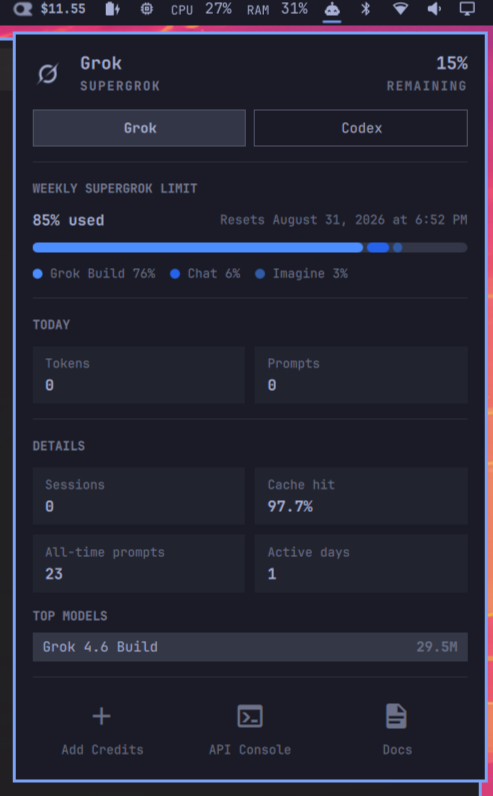
Grok on the Omarchy agents panel. Opens on your default coding agent.
ID: calmasacow.grok-usage
Author: James Barnette
License: MIT
Version: 0.3.9
Stock Omarchy already shows Claude, Codex, and Fireworks on the robot-head Agents widget. This plugin is that same panel (the bar icon stays the robot head), plus:
- the Grok mark in the Grok tab (not the star that shipped in 0.2)
- a weekly SuperGrok meter that matches grok.com: percent used, reset timestamp, and Grok Build vs Chat segments
- today's token count, remaining percent in the header, and shortcuts to Add Credits / Console / Docs at the bottom of the Grok tab
- Details always open (sessions, cache hit, top models) — the daily token chart is gone; today's usage is a token stat instead
- a Grok collector (SuperGrok weekly pool, plan name, local session stats)
- the panel opens on your default coding agent (
omarchy default agent) instead of the first id alphabetically
Enabling it replaces omarchy.agents in the bar. Removing it puts the stock
widget back.
Unofficial. Not affiliated with xAI or Omarchy.
Install
Grok Build must already be signed in (grok login).
omarchy plugin add https://github.com/calmasacow/omarchy-grok-usage.git --enable
Left-click the robot head. The Grok chip should be selected if your default
agent is grok.
Usage
| Control | Action |
|---|---|
| Left-click | Open / close the usage panel |
| Right-click | Launch the default coding agent |
| Middle-click | Next subscription |
h / l |
Switch subscription |
r or Enter |
Refresh |
| Esc | Close |
Remove
omarchy plugin remove calmasacow.grok-usage
If you previously installed the collector-only script (0.1), stop the watcher too:
systemctl --user disable --now omarchy-agent-usage-grok.service
rm -f ~/.config/systemd/user/omarchy-agent-usage-grok.service
rm -f ~/.config/omarchy/agents/omarchy-agent-usage-grok
rm -f ~/.config/omarchy/agents/omarchy-agent-usage-grok-watch
rm -f ~/.config/omarchy/hooks/post-boot.d/start-grok-usage-collector.hook
How it works
The stock panel only displays JSON in ~/.local/state/omarchy/agents/usage/.
Packaged omarchy-agent-usage-update scans $OMARCHY_PATH/bin, so Grok cannot
live there. This plugin runs scripts/omarchy-agent-usage-grok after each
refresh and writes grok.json.
The collector reads the login already in ~/.grok/auth.json and asks the same
CLI-proxy billing endpoints Grok Build uses for /usage. Authenticated
requests stay on cli-chat-proxy.grok.com and refuse cross-origin redirects
so the Grok token is not forwarded. Usage files are opened as regular files
with a size cap (O_NOFOLLOW); QML never FileView-reads them. No tokens are
stored in this repository.
Optional usage sync publishes snapshots through the Python helper. It opens each sync-directory component without following symlinks, pins the directory with a file descriptor, and atomically replaces the snapshot entry rather than following its symlink target. Snapshot input is bounded and files use mode 0600. Sync folders containing symlink components are rejected.
| File | Role |
|---|---|
Panel.qml |
Bar icon + usage dashboard |
Main.qml |
Discover records, refresh collectors, prefer default agent |
scripts/omarchy-agent-usage-grok |
Session scan + SuperGrok billing probe |
Codex five-hour and weekly limits are recovered through a bounded app-server RPC read if the stock collector loses its response. Recovery uses fresh account limits. The panel keeps the last successful Codex meters during refresh and ignores empty reads or temporary limits-probe failures until valid data arrives. Codex collection and recovery finish before a single atomic report write, so intermediate errors never replace the shared usage file. Empty or failed refreshes leave the previous report in place. Explicit unavailable/authentication errors remain visible.
Requirements
- Omarchy
- Grok Build signed in (
grok login) python3
License
MIT. Panel QML is adapted from Omarchy's first-party Agents plugin.