
Can I Work Now? for Omarchy
A monochrome Omarchy bar widget for the latest global caniworknow.com verdict.
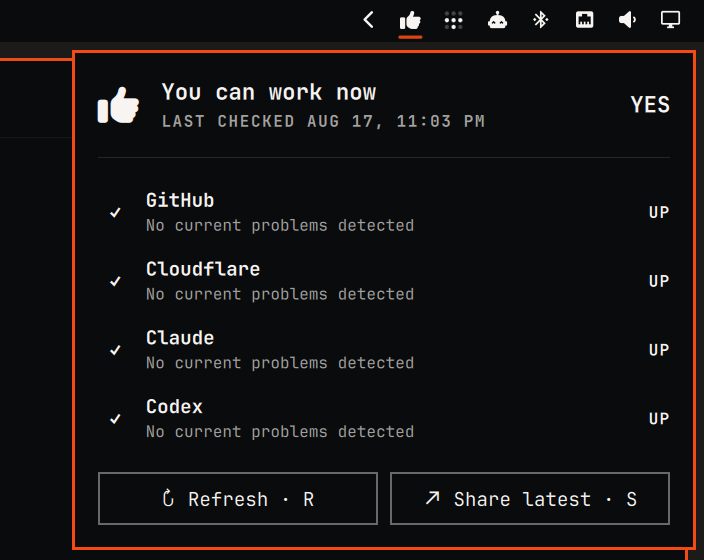
The bar icon gives a quick yes/no signal. Open the panel for GitHub, Cloudflare, Claude, and Codex details, the global check time, manual refresh, and a permalink you can copy and share.
Install
omarchy plugin add https://github.com/hemaaanth/caniworknow-omarchy-plugin --enable
The widget appears in the right section of the bar by default.
Controls
- Click the bar icon to open or close service details.
- Right-click the bar icon to copy the latest permalink and show a confirmation notification.
- Middle-click the bar icon to refresh.
- Press
Rin the open panel to refresh andSto share.
Refresh and panel-share results appear inside their buttons, without in-progress flicker or desktop notifications. Right-click sharing uses a notification because the panel is closed and has no visible button feedback. The automatic refresh interval defaults to five minutes and cannot be set below five minutes.
Settings
Open the Omarchy bar widget settings to choose:
- Refresh interval: 5–60 minutes.
- Verdict icon: monochrome thumb, check/cross, or Y/N.
Network and system access
The plugin has no install or removal scripts. At runtime it:
- uses Omarchy's system
curlat/usr/bin/curlto readhttps://caniworknow.com/api/status, with one retry for transient failures; - posts an empty JSON object to
https://caniworknow.com/api/shareonly when you share; - uses Omarchy's system
wl-copyat/usr/bin/wl-copyto place the returned permalink on your clipboard.
It does not collect credentials, write configuration, or run a background service outside Omarchy Shell.
Update or remove
omarchy plugin update caniworknow.status
omarchy plugin remove caniworknow.status
Removal deletes the plugin through Omarchy's plugin manager; no separate cleanup is required.
Troubleshooting
Omarchy normally reloads the widget after an install or update. If an existing shell instance keeps showing stale status after an update, restart the shell once:
omarchy restart shell
Development
Validate the repository from its root:
omarchy plugin validate .
/usr/lib/qt6/bin/qmlformat -n CanIWorkNow.qml