
omarchy-weather-extended
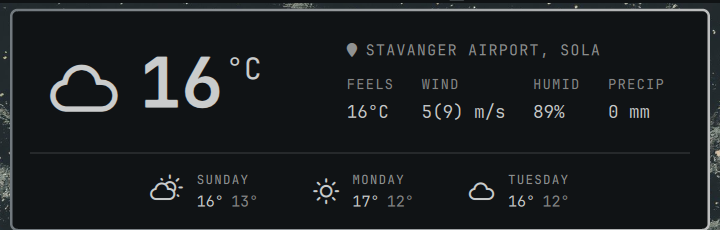
An extended version of Omarchy's built-in omarchy.weather bar widget — same pill-and-popup weather panel, with an hour-by-hour forecast, gust wind, precipitation, and a smarter regional data source built on top.
This was vibecoded on top of a clone of the stock widget (omarchy plugin clone omarchy.weather) over the course of a conversation with Claude Code. It's tuned to use what's (arguably) the best weather forecast provider for Nordic users — MET Norway / yr.no — but the fallback chain is simple enough that it'd be easy to extend with your local favorite provider for other regions too (see Data sources below).
Features
Hour-by-hour forecast
This is the feature most people will actually use. Two ways in:
- Click the current temperature or condition icon → expands an hour-by-hour breakdown for today, right under the current-conditions row.
- Click any of the three forecast days (Sunday/Monday/Tuesday, etc.) → expands the same hour-by-hour breakdown for that day instead — e.g. check exactly when rain clears up before you bike to work tomorrow.
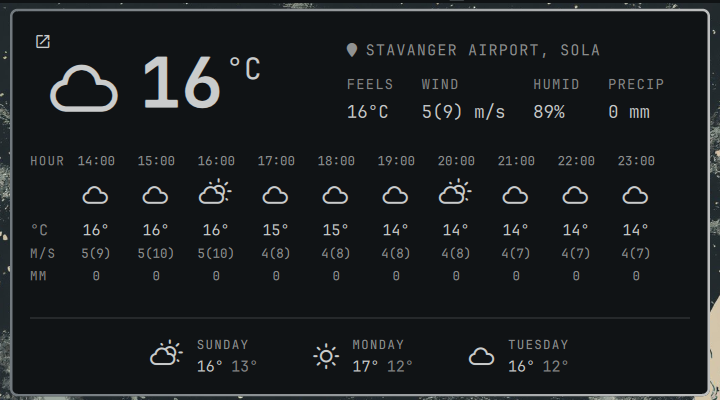
The resolution adapts to whatever the data source actually has: true hourly for the next ~2 days, thinning out to 6-hourly (or whatever the source provides) further out — labeled HOUR/6H in the corner so it's never ambiguous which you're looking at.
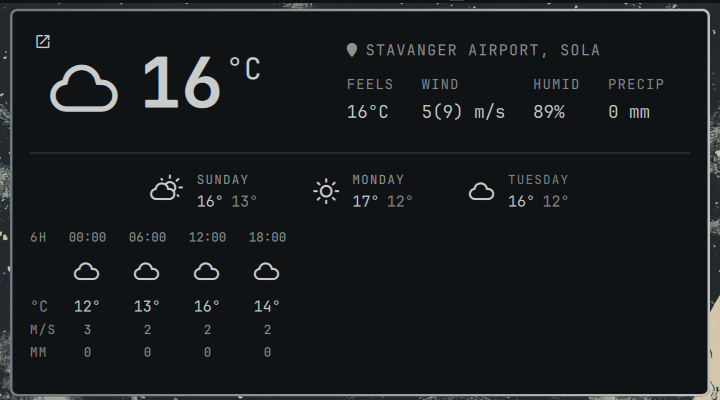
Units (°C, M/S, MM) sit once in a leading label column instead of repeating on every hour. A single link icon fades in at the top-left corner whenever a strip is open, jumping straight to the full forecast on the web for the resolved location.
Wind speed in m/s, with gust
The stock widget shows wind in km/h with no gust figure. This shows mean(gust) m/s — e.g. 5(9) m/s means a 5 m/s mean wind with gusts to 9 m/s — both in the current-conditions row and in every hour of the hourly strip.
Precipitation
A fourth stat next to FEELS/WIND/HUMID, showing expected precipitation in mm.
MET Norway (yr.no) as the preferred source in the Nordics
When the resolved location falls inside Norway, Sweden, Denmark, Finland, or Iceland, current conditions, the 3-day forecast, and the hourly breakdown all prefer MET Norway's locationforecast API (the data behind yr.no) over the stock widget's Open-Meteo/wttr.in. Outside the Nordics, nothing changes — same Open-Meteo/wttr.in fallback as the original widget.
Data sources
- MET Norway (
api.met.no,/completeproduct) — Nordic locations only, for current conditions, the 3-day forecast, and hourly data (including gust wind and precipitation). Free, keyless, but their terms require a descriptiveUser-Agent— seePanel.qml's MET Norway fetch if you fork this for your own use. - Open-Meteo (
api.open-meteo.com) — everywhere else, and as the fast path while MET Norway/wttr.in are in flight. Also free and keyless. - wttr.in — location auto-detection and a last-resort fallback, same as the stock widget.
Swapping in a different regional provider (say, a national met service for your own country) mostly means adding an isXLocation(lat, lon) bounds check next to isNordicLocation in Model.js, plus a fetch + normalizer function shaped like metNoCurrentCondition/metNoForecastDays/metNoHourlyForDate — all three exist purely to reshape a source's response into the same plain object shape the rest of the panel already consumes.
Installation
- Clone the stock widget first, so you get a
manifest.json/BarWidget.qmlscaffolded with your username (Omarchy plugin IDs are<you>.weather, not literallycarl.weather):omarchy plugin clone omarchy.weather - Copy this repo's
Panel.qmlandModel.jsover the ones in~/.config/omarchy/plugins/<you>.weather/. - Save — Omarchy hot-reloads plugin code automatically. If it doesn't pick it up, force it:
omarchy-shell shell rescanPlugins
Uninstall
This is a straight overlay on the stock widget, so removal is the same as removing any cloned plugin — it doesn't touch anything outside its own plugin directory (it shares the same ~/.local/state/omarchy/settings/weather.json location state the stock widget already uses):
rm -rf ~/.config/omarchy/plugins/<you>.weather
omarchy refresh shell
Security
Before publishing, this was reviewed for command/argument injection, SSRF, and unsafe data handling. Every external process invocation in Panel.qml builds an argv array (Process.command, Quickshell.execDetached) rather than a shell string, so even adversarial API/location data lands as inert argv tokens — nothing here is shell-interpreted. All network responses go through JSON.parse inside try/catch, never eval. No issues found.
License
MIT, matching Omarchy itself. Weather data is © the respective providers (MET Norway data is CC BY 4.0 — see their terms); this repo is just the client code.