
Cast indicator
A bar widget for Omarchy that casts your screen to an Apple TV or a Chromecast — mirror it, or extend onto an Apple TV as a second desktop — and shows what is casting.
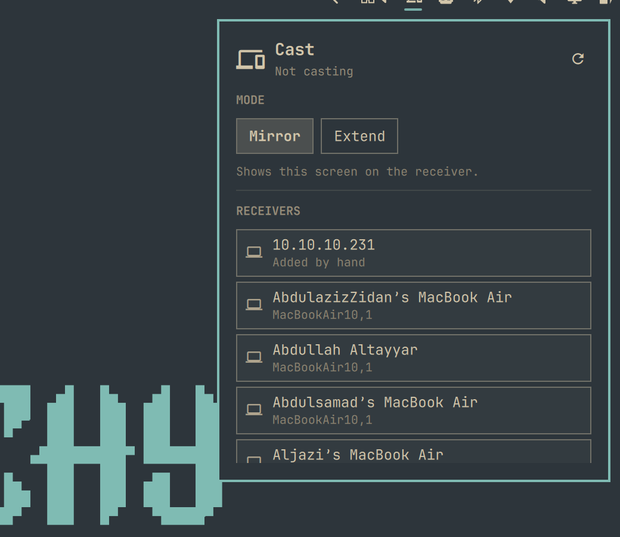
Click the icon for a panel listing the receivers on your network. Pick a mode once, click a receiver, and it casts. Televisions sort above laptops, because a colleague's MacBook answering AirPlay is noise. Right-click the icon to stop.
Extend is AirPlay only. A Chromecast row says "Mirror only" when Extend is selected, and mirrors — rather than letting a click start a cast that cannot work.
Requires castr
The widget is a front end for castr, which
does the actual work. Install it first:
yay -S castr
Without it the widget says so and tells you this command, rather than sitting there looking idle.
castr then needs whichever backend you cast with — doubletake-git for an
Apple TV, GStreamer for a Chromecast — and neither is involved in the other's
cast. castr's Installing section
has both, and castr names the missing one rather than failing obscurely.
If you run a firewall, it has to let the receiver reach your machine — neither protocol is one-way:
| port | why |
|---|---|
| UDP 5353 | mDNS, so receivers are discovered at all |
| TCP + UDP 60000-60010 | the range an Apple TV connects into to fetch the stream |
| TCP 8010 | where a Chromecast fetches the stream from |
A Chromecast also needs GStreamer, which castr's package lists as optional dependencies — the Chromecast capture is castr's own code rather than doubletake's.
Without those, discovery finds nothing or a cast starts and then stalls.
castr's README carries the exact ufw commands:
Installing.
Install
omarchy plugin add https://github.com/mrCode/castr-indicator.git --enable --yes
Remove
omarchy plugin remove castr.indicator
That takes the widget out of the bar and deletes its checkout. It leaves
castr itself alone; uninstall that separately with your package manager if
you want it gone too. The widget stores nothing of its own — everything it
shows comes from asking castr — so there is no leftover state to clean up.
What it shows
- Idle — a dim icon; the panel lists what it can cast to
- Connecting — a screen-share prompt may be waiting for you; answer it
- Streaming — the receiver and mode, with a stop button
- Failed — what went wrong, in the receiver's own words where there are any
The icon stays visible whether or not you are casting. A control you cannot see is a control you cannot find, and this one is how you stop.
Mirror and extend
Mirror sends the screen you pick at the share prompt. Your panel keeps its own resolution and refresh rate — castr does not touch it.
Extend gives you a second desktop. When the share prompt appears, pick the
output named castr, not your own screen; the portal remembers that choice.
If you pick wrong, castr reset-share extend asks again without making you
re-pair with the television.
How it talks to castr
Three commands, all of them read-only until you click something:
| command | when |
|---|---|
castr bar |
polled every 2s; never starts a daemon |
castr list --json |
only while the panel is open |
castr status --json |
only while the panel is open |
Polling castr bar cannot start or keep alive a background daemon, so an idle
machine stays idle.
Licence
MIT. Plugins run unsandboxed inside omarchy-shell; the source here is one QML
file, and it is worth the two minutes to read before you enable it.